Short answer: Topaz Gigapixel AI is one of the most capable AI image upscalers you can buy. It enlarges photos up to 16× (according to Topaz) with a model for almost every kind of image, and it works as a plugin for Photoshop and Lightroom Classic. The catch: since October 2025 it is subscription-only, from US$149 a year as of October 2026, and it runs on your own computer. If you want a free Topaz alternative, Upscayl is open source; if you want to upscale in the browser with no install, the EzImgMaker image upscaler is free to try. Let's Enhance, Adobe Photoshop, waifu2x, Pixelcut, and Picsart complete the list.
This Topaz Gigapixel AI review explains what the Topaz Labs image upscaler does, how Gigapixel compares with Topaz Photo AI, what happened to Topaz Sharpen AI, current pricing and limits, and the best alternatives, free and paid.


Topaz Gigapixel at a Glance
| Topaz Gigapixel | |
|---|---|
| What it is | Desktop AI image upscaler (sold as Gigapixel AI until its 2025 relaunch) |
| Made by | Topaz Labs |
| Upscaling | Up to 16×, according to Topaz |
| Models | Standard and Standard Max, High Fidelity, Low Res, Text & Shapes, Art & CG, Recover, Redefine, Wonder 2 and 3, Face Recovery |
| Platforms | Windows 10 and 11, macOS 12 to 15; standalone or as a Photoshop and Lightroom Classic plugin |
| Cloud | Cloud rendering included with all plans |
| Free plan | No (browser tools let you try individual upscales) |
| Price | From US$149/year or US$29/month (as of October 2026) |
| Best for | Photographers, print shops, and designers who upscale often and want maximum control |
What Is Topaz Gigapixel?
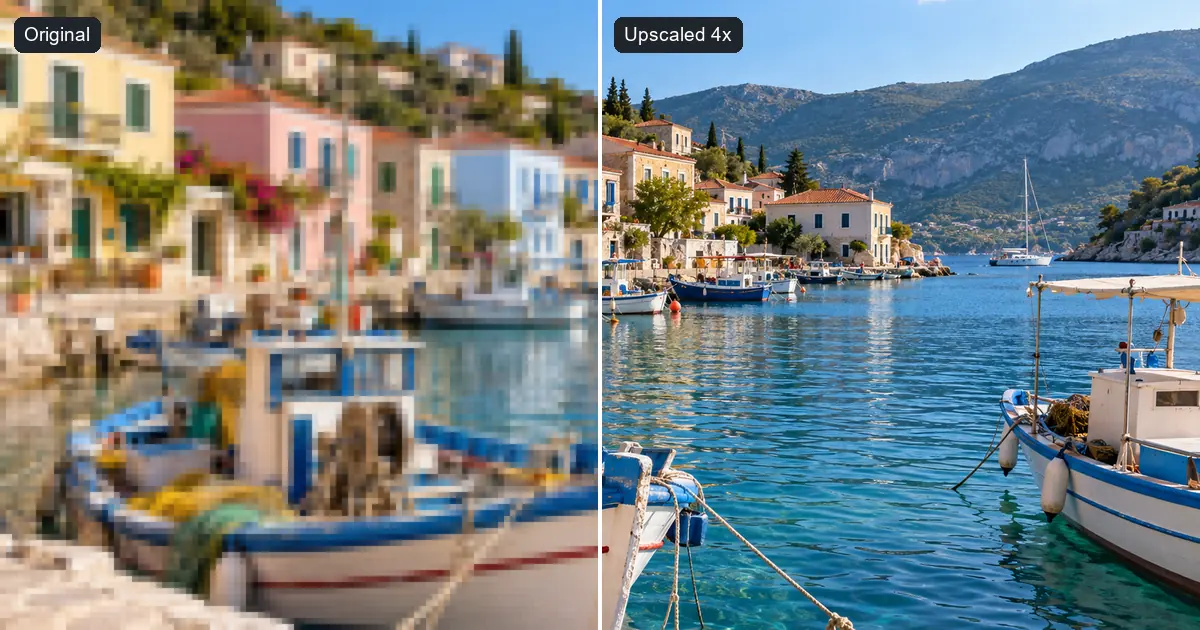
Topaz Gigapixel is the Topaz Labs image upscaler: a desktop app that enlarges an image and fills in plausible detail instead of stretching pixels. Topaz describes the original Gigapixel AI, launched in 2019, as the first commercially available AI image upscaler. Major versions followed regularly (Gigapixel 7 arrived in early 2024 and Gigapixel 8 later that year), and in September 2025 Topaz relaunched it as Topaz Gigapixel, alongside Topaz Photo and Topaz Video in its new Topaz Studio bundle.
What sets this gigapixel AI image upscaler apart is the choice of models, each tuned for a different kind of picture:
- Standard and Standard Max for general photos.
- High Fidelity for already sharp, high-quality images where you want to keep every detail.
- Low Res for small, low-quality images such as old web photos.
- Text & Shapes for logos, graphics, and screenshots.
- Art & CG for illustrations, paintings, and renders.
- Recover for heavily degraded images, and Face Recovery to rebuild faces.
- Wonder 2 and Wonder 3, Topaz's newest upscaling models.
- Redefine for generative, creative upscaling that adds new detail.
You can run it as a standalone app or open it from Photoshop and Lightroom Classic, batch-process folders, and use the included cloud rendering when your computer is slow. Whether you know it as the Topaz Gigapixel AI upscaler, a Topaz image upscaler, or a Topaz image upscale tool, or you searched for "topaz upscale image" or "upscale topaz", this is the product people mean.
Who Is Topaz Gigapixel For?
Gigapixel fits photographers who print large, wildlife and astro shooters who crop deeply, real-estate and product photographers who deliver big files, archivists restoring old scans, and designers who enlarge artwork. It is less suited to people who upscale only now and then, work mainly on a phone or Chromebook, or do not want another subscription.
Topaz Creative Upscale: Redefine and Bloom
Topaz now offers two kinds of upscaling. Faithful models (Standard, High Fidelity, Low Res, and the rest) sharpen and enlarge what is already in your photo. Creative upscaling invents new detail. In Gigapixel, that is the generative Redefine model. In Topaz's browser app, Bloom is a creative upscaler built mainly for AI-generated images; Bloom 2, released in July 2026, has five Creativity levels from Subtle to Max. Topaz itself advises faithful tools for photos where identity must be preserved, which is good advice for any creative upscaler.
Topaz Gigapixel vs Topaz Photo AI
"Topaz Gigapixel vs Topaz Photo" is one of the most common questions before buying, because both apps can upscale. Topaz Photo is the new name of Topaz Photo AI.
| Topaz Gigapixel | Topaz Photo (formerly Photo AI) | |
|---|---|---|
| Main job | Dedicated upscaling | All-in-one photo cleanup |
| Tools | Many upscaling models, face recovery, generative Redefine | Denoise, Sharpen, Upscale, Recover Faces, Adjust Lighting, Balance Color, Remove, Dust and Scratch, Super Focus, Preserve Text, Autopilot |
| Upscaling | Up to 16× with the widest model choice | Upscale tool with the Wonder and Standard Max models |
| Plugins | Photoshop, Lightroom Classic | Lightroom Classic, Photoshop, Affinity Photo, and more |
| Price (Personal, as of Oct 2026) | US$149/year or US$29/month | US$199/year or US$39/month |
| Choose it if | You mainly need bigger images | You mainly need cleaner, sharper images at the size you shot |
In short, the Topaz Photo vs Gigapixel decision is about your main problem. Topaz's own FAQ describes Gigapixel as the dedicated upscaler with more upscaling options, and Topaz Photo as the app that covers sharpening, denoising, lighting, color, and faces in one workflow. When people compare Topaz Photo AI vs Gigapixel for upscaling alone, Gigapixel is the specialist; the Topaz Gigapixel vs Photo AI question only gets close when you also need noise, sharpening, and face fixes. If you want both, the Topaz Studio bundle (US$399 a year) includes Gigapixel, Topaz Photo, Topaz Video, and Topaz's other main products. And if you are looking for an alternative to Topaz Photo AI rather than Gigapixel, the image enhancer and denoise image tools covered below do the same kind of cleanup online.
What Happened to Topaz Sharpen AI?
Topaz Labs Sharpen AI and DeNoise AI used to be separate apps. Topaz then moved development to Photo AI: a Topaz support reply shared on its community forum said that Sharpen AI 4.1.0 and DeNoise AI 3.7.2 would not get further updates, and the Topaz Photo page describes the former standalone denoising and sharpening tools as combined into one application. So if you are looking for Topaz AI sharpen or Topaz sharpening tools today, they live in Topaz Photo (its Sharpen and Super Focus tools). For a quick online fix of a soft photo, our unblur image tool does a similar job.
Topaz Gigapixel Pricing (as of October 2026)
| Plan | Price | What you get |
|---|---|---|
| Gigapixel Personal | US$149/year or US$29/month (month to month) | Local rendering plus included cloud rendering, limited commercial use (organizations under US$1M yearly revenue) |
| Gigapixel Pro | US$499/year | Additional models, seat management, full commercial use |
| Topaz Studio | US$399/year (or US$69/month) | Gigapixel, Topaz Photo, Topaz Video, Topaz for Mobile, and Topaz for Web |
| Topaz for Web – Image | From US$19/month or US$199/year (list price) | Browser-based image upscaling, no install |
These are Topaz's list prices from its official pricing page; Topaz frequently runs discounts, so check topazlabs.com/pricing before you buy. Two policy changes matter here:
- Subscription only. Since 3 October 2025, Topaz sells its software only by subscription. Earlier perpetual licenses, including Gigapixel 7 and 8, remain with the people who bought them, but you cannot buy a new one.
- No free plan. Topaz's free browser tools let you try individual upscales before subscribing, but the desktop app itself is paid.
Is Topaz Gigapixel AI Free?
No. There is no free version of the desktop app, and as of October 2026 its product page does not advertise a free desktop trial; check the official site for current trial or refund terms. If you want to try Topaz Gigapixel's results before paying, the closest free options are Topaz's browser tools for single upscales, or one of the free alternatives below.
Is There a Topaz Black Friday Sale?
Topaz Labs has discounted its software around Black Friday in past years, but it announces each year's offer itself, so check the official Topaz site in late November for the current deal and its terms. Since the move to subscriptions, a Topaz Black Friday deal usually means a lower first-year price rather than a cheaper perpetual license.
If you mainly need online upscaling, EzImgMaker runs its own Black Friday sale from November 20 to December 1, 2026: up to 30% off the first year of a yearly plan and 50% bonus credits on packs of 400 credits or more. The credits work with the image upscaler, the 4K image upscaler and every other tool on the site.
Topaz Gigapixel Pros and Limits
What Gigapixel does well
- Model choice. Separate models for photos, faces, text, art, very low-resolution, and damaged images, so you can match the model to the picture.
- Big enlargements. Up to 16× according to Topaz, useful for large prints and deep crops.
- Professional workflow. Plugins for Photoshop and Lightroom Classic, batch processing, and local rendering that keeps files on your computer.
- Faithful and creative options in one app, from High Fidelity to the generative Redefine model.
Limits to weigh
- Subscription only since October 2025, which adds up if you upscale only occasionally.
- Desktop hardware. Local rendering is fastest on a strong GPU; cloud rendering helps, with concurrency limits per plan.
- Learning curve. Many models and settings to compare before you find the best one for an image.
- Commercial use on the Personal plan is limited to organizations under US$1M yearly revenue.
Best Topaz Gigapixel Alternatives (Compared)
| Tool | Best for | Platform | Free option | Paid pricing (as of Oct 2026) |
|---|---|---|---|---|
| EzImgMaker | Upscaling online with no install; photos, 4K, HD, anime, JPEG cleanup | Web browser on any device | Free credits when you sign up | Credit packs |
| Upscayl | A free, open-source desktop upscaler | Windows, macOS, Linux | Free | Optional Upscayl Cloud (see upscayl.org) |
| Let's Enhance | Very large online upscales | Web | 10 free credits | From US$9/month billed yearly (US$12 monthly) |
| Adobe Photoshop | Photographers already using Adobe | Windows, macOS | Free trial (see adobe.com) | Included in Photoshop plans; Generative Upscale uses generative credits |
| waifu2x | Anime-style art and illustrations | Web, open source | Free | None |
| Pixelcut | Quick 2× upscales on web and mobile | Web, iOS, Android | Free 2× | 4× and enhanced upscale need Pro |
| Picsart | Upscaling inside a mobile photo editor | Web, iOS, Android | Free with lower-resolution downloads | High-resolution downloads need Picsart Plus |
Third-party details were checked on each company's official site in October 2026 and can change; confirm on the vendor's site before you buy.
1. EzImgMaker: Online Image Upscaler, 4K Upscaler and HD Image Converter
EzImgMaker gives you a set of browser-based upscaling tools instead of one desktop app, which makes it a flexible Topaz AI alternative when you do not want to install anything:
- The Image Upscaler enlarges photos, logos, product shots, and AI art 2× or 4×, or to 4K, with presets for photos, logos and text, product images, anime, and print.
- The 4K Image Upscaler is built for 4K output: a long side of at least 3840 pixels, or 4× for print and 8K-class sizes.
- The HD Image Converter turns small or blurry pictures into HD, Full HD, or 4K, sized around display standards.
- The Image Enhancer upscales 2× or 4×, or restores a blurry, noisy, or faded photo at 2K or 4K, with an optional note on what to fix.
- The Anime Upscaler keeps line art crisp, and Remove JPEG Artifacts cleans blocky, banded, or haloed images before or while upscaling.
Strengths: nothing to install, works on any device with a browser, presets choose a sensible setting, and you pay only when you need more credits. Limits: uploads are JPG, PNG, or WebP up to 10 MB, there is no Photoshop plugin or offline mode, and you get fewer model choices than Gigapixel's specialist lineup. New accounts get free credits, then you buy credit packs.


2. Upscayl (Free and Open Source)
Upscayl is a well-known free Topaz alternative for the desktop. It is a free, open-source AI image upscaler (AGPL-3.0) built on Real-ESRGAN, with built-in models such as High Fidelity, Remacri, and UltraSharp, extra community models, and batch upscaling. It runs on Windows 10 or later, macOS 12 or later, and Linux. The main requirement: a Vulkan-compatible graphics card, because many integrated GPUs do not work and CPUs are generally not supported. Its makers also offer Upscayl Cloud, a hosted version; see upscayl.org for details. Choose it if you want a free local tool and have a capable GPU.
3. Let's Enhance
Let's Enhance is a web-based AI image upscaler and enhancer, so there is nothing to install. As of October 2026 you get 10 free credits when you sign up, with size limits and a watermark until you pay, according to its pricing page. Personal plans are Starter (100 credits, US$9 a month billed yearly or US$12 monthly), Pro (300 credits, US$24 or US$32), and Max (500 credits, US$34 or US$45), and paid plans allow outputs of hundreds of megapixels. Choose it for very large online upscales without a desktop app.
4. Adobe Photoshop: Super Resolution and Generative Upscale
If you already pay for Adobe, you may not need a separate upscaler. Super Resolution in Camera Raw and Lightroom creates an image with twice the width and height (four times the pixels) and saves it as a DNG next to the original; Adobe notes it is especially useful for cropped images. Photoshop also has Generative Upscale, which offers Adobe's Firefly Upscaler plus partner models, including Topaz Gigapixel and Topaz Bloom, and uses your generative credits. That makes Photoshop a way to use Gigapixel's model without a separate Topaz subscription, within your Adobe plan and credit limits (Adobe lists some partner models for premium plans only). Choose it if Photoshop or Lightroom is already your main editor.
5. waifu2x (Anime and Illustrations)
waifu2x is a free, open-source (MIT) upscaler designed for anime-style art, with 2× upscaling and four noise reduction levels (0 to 3) to clean JPEG noise. You can use it online at waifu2x.udp.jp, or at unlimited.waifu2x.net, which runs in your browser; its developer has moved active development to a newer project, nunif. For a guided online option with 4K output and a choice of art style, try our anime upscaler.


6. Pixelcut
Pixelcut is a photo editor for web, iOS, and Android with an AI image upscaler. Its help center says 2× upscaling is free, while 4× and enhanced upscaling need a Pro membership, with a maximum output of 6000 × 6000 pixels. Choose it for quick product and social images on your phone.
7. Picsart
Picsart's AI upscaler, in its web and mobile editor, offers 2×, 4×, or a custom size. Free users get a lower-resolution download, high-resolution files need Picsart Plus, and output is capped at 4096 pixels. Choose it if you already edit in Picsart and need a modest size boost.
How to Upscale an Image Online in 3 Steps
Here is how to upscale an image online with EzImgMaker, as a quick alternative to a Topaz image upscale on your desktop:
- Upload your image. Open the Image Upscaler and add a JPG, PNG, or WebP up to 10 MB: a photo, logo, screenshot, product shot, or AI image.
- Choose the size. Pick a preset (Photo, Logo / Text, Product Image, Anime & Illustration, For Print) or set 2×, 4×, or 4K. For a big print or wallpaper, use the 4K Image Upscaler; for a simple HD version, the HD Image Converter.
- Upscale and download. Compare the result with the original, zoom in on faces and text, and download.
Clean up first if the image is damaged. Upscaling enlarges compression blocks and noise along with the detail. For a blocky or banded JPEG, run it through Remove JPEG Artifacts (it can also enlarge 2× or 4×); for grain, use denoise image; for a pixelated picture, unpixelate image. Our guide on how to fix grainy photos covers more fixes.


Tips for Better Upscales With Any Tool
- Start from the original file, not a screenshot or a re-saved copy; every save as JPEG loses detail.
- Use the smallest factor that reaches your target. For print, multiply inches by 300 to get the pixels you need (an 8 × 10 inch print at 300 DPI is 2400 × 3000 pixels). Our guide to 4K resolution has more sizes.
- Pick faithful models for real people and products, and keep creative upscaling for art and AI images.
- Check faces, text, and fine patterns at 100% zoom before you print or publish.
Is Topaz Gigapixel Worth It?
Topaz Gigapixel is still one of the strongest AI image upscalers, with more specialized models than most alternatives and a polished Photoshop and Lightroom workflow. If you upscale every week, print large, or deliver high-resolution files to clients, the Personal plan is fair value, and the Studio bundle makes sense if you also need Topaz Photo or Topaz Video. If you upscale only occasionally, the subscription is harder to justify: a free tool such as Upscayl, Photoshop's built-in upscaling if you already pay for Adobe, or a pay-as-you-go online upscaler such as the EzImgMaker image upscaler will cover most jobs. For video, see our guide to the best AI video upscalers.
Frequently Asked Questions
What is Topaz Gigapixel AI?
Topaz Gigapixel (long sold as Gigapixel AI) is a desktop AI image upscaler from Topaz Labs. It enlarges photos and graphics while adding detail, with separate models for photos, faces, text and shapes, art and CG, and very low-resolution images, plus a generative Redefine model. It runs on Windows and macOS, as a standalone app or as a plugin for Photoshop and Lightroom Classic.
Is Topaz Gigapixel free?
No. As of October 2026 Topaz Gigapixel is a paid subscription: US$149 a year or US$29 month to month for the Personal plan. Topaz’s browser tools let you try individual upscales before you subscribe. If you want a free Topaz alternative, Upscayl is free and open source, and EzImgMaker’s image upscaler is free to try with sign-up credits.
How much does Topaz Gigapixel cost?
As of October 2026, Topaz Gigapixel Personal costs US$149 a year or US$29 a month month to month, Gigapixel Pro (full commercial use) costs US$499 a year, and the Topaz Studio bundle with Gigapixel, Topaz Photo, Topaz Video and the web apps costs US$399 a year. Topaz often runs promotions, so check topazlabs.com/pricing for the current price.
Topaz Gigapixel vs Topaz Photo AI: which should I buy?
Buy Gigapixel if upscaling is your main job: it is the dedicated upscaler, with more upscaling models and enlargements of up to 16×, according to Topaz. Buy Topaz Photo (formerly Photo AI) if you mainly need to denoise, sharpen and fix faces, lighting and color in one pass, with upscaling as one of its tools. The Topaz Studio bundle includes both.
What happened to Topaz Sharpen AI?
Topaz moved development from its standalone Sharpen AI and DeNoise AI apps to Photo AI, which is now called Topaz Photo. Topaz support said on its community forum that Sharpen AI 4.1.0 would not get further updates. Today the Topaz AI sharpen and denoise tools live inside Topaz Photo, alongside upscaling, face recovery, lighting and color tools.
What is the best free Topaz alternative?
Upscayl is the best fully free Topaz alternative for a desktop: it is open source, runs on Windows, macOS and Linux, and uses Real-ESRGAN models, though it needs a Vulkan-capable graphics card. For an online option with no install, EzImgMaker’s image upscaler and 4K image upscaler are free to try with sign-up credits. For anime art, try waifu2x or an anime upscaler.
Is Topaz Gigapixel worth it?
It is worth it if you upscale images often, need very large prints, or work in Photoshop or Lightroom and want a plugin with many specialized models. It is harder to justify for occasional use, because it is now subscription-only. If you upscale a few images a month, an online upscaler or a free tool like Upscayl may cover your needs.
Can I still buy Gigapixel 7 or a perpetual license?
No new perpetual licenses are sold. Gigapixel 7 came out in early 2024 and Gigapixel 8 later that year; Topaz relaunched the app as Topaz Gigapixel in September 2025 and, from 3 October 2025, sells its software only by subscription. People who already bought a perpetual license still own it, but new buyers subscribe.
What is Topaz creative upscale?
Creative upscaling adds new, invented detail instead of only sharpening what is already in the picture. In Topaz Gigapixel that is the generative Redefine model. In Topaz’s browser app, Bloom is a creative upscaler built mainly for AI-generated images, with Creativity levels from Subtle to Max in Bloom 2. Use faithful models for real photos where faces and details must stay true.
Is there an online Topaz image upscaler?
Yes. For a Topaz online upscale, Topaz sells a browser version, Topaz for Web – Image, from US$19 a month or US$199 a year at list price as of October 2026. Photoshop’s Generative Upscale also offers Topaz Gigapixel as a partner model, using Adobe generative credits. Free-to-try online options include the EzImgMaker image upscaler, Let’s Enhance, Pixelcut and Picsart.
Related Guides
- Best AI video upscalers and enhancers: Topaz Video, Video2X, DaVinci Resolve, and online options.
- Magnific vs Higgsfield: a creative upscaler compared with an AI video studio.
- What is 4K resolution?: pixel sizes for 4K images and prints.
- How to fix grainy photos: phone, desktop, and AI fixes for noise.
- How to digitize old photos: scan, convert, and restore prints before you upscale them.
Topaz Labs, Topaz Gigapixel, Gigapixel AI, Topaz Photo, Topaz Photo AI, Sharpen AI, DeNoise AI, Topaz Video, Upscayl, Let's Enhance, Adobe, Photoshop, Lightroom, Firefly, waifu2x, Pixelcut, Picsart, and the other product names mentioned are trademarks of their respective owners. EzImgMaker is not affiliated with them. Features and prices were taken from each company's official website and documentation in October 2026 and may change; check the official sites for current information. Images in this article are EzImgMaker examples, not screenshots or output of the tools reviewed.