Short answer: Magnific vs Higgsfield is really a question of what you need to finish. Magnific made its name as the creative AI upscaler: you give it an image you already have, and it enlarges it (up to 10K) while inventing fine texture and detail you control with Creativity and Resemblance sliders. Since 2026 Magnific is also the new name of Freepik, so magnific.com is now a full platform for image, video, audio, 3D and stock assets. Higgsfield is an AI video studio: you start from a prompt or a still, pick one of dozens of named camera moves or direct a scene in Cinema Studio, and render it with models such as Seedance, Kling, Veo and Sora 2. Choose Magnific to perfect stills, Higgsfield to direct motion. If you only need an upscale or a short clip now and then, the 4K image upscaler and AI video generator on EzImgMaker are free to try with sign-up credits.
This guide compares what each platform does, which models they offer, how their pricing works as of October 2026, and who each one suits, with a workflow for using both.
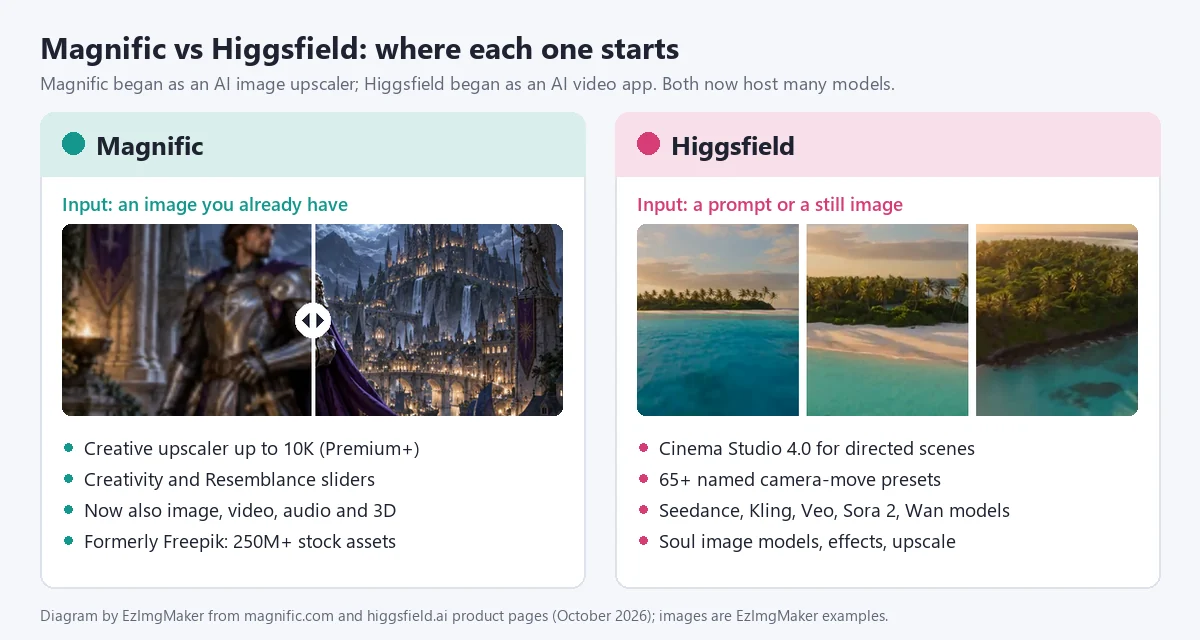
Magnific vs Higgsfield at a Glance
| Magnific | Higgsfield | |
|---|---|---|
| What it is | Creative AI upscaler, now an all-in-one AI creative platform (formerly Freepik) | AI video platform for directed, cinematic shots |
| Made by | Magnific, the company formerly called Freepik (founded in Málaga, Spain, in 2010) | Higgsfield, Inc. |
| Signature feature | Magnific Upscaler: creative upscaling up to 10K with Creativity and Resemblance sliders | Cinema Studio 4.0 and a library of 65 named motion presets |
| Image tools | Upscale, generate, edit, expand, relight, style transfer, background remover | Image generation (Soul and partner models), inpaint editing, upscale |
| Video tools | Video generator, video upscaler (up to 4K), video editor | Video generation, effects, camera presets, clip editing, lipsync |
| Extras | 250M+ stock assets, Spaces canvas, agents, plugins, desktop app, MCP and API | AI Influencer and Ads studios, Canvas, Supercomputer agent, MCP and API |
| Free plan | Yes, limited daily use (personal use, attribution required) | Yes, limited use, no monthly credits |
| Paid plans from | $14.50/month billed yearly ($20 monthly), as of October 2026 | $19/month, as of October 2026 |
| Best for | Designers, photographers and agencies finishing high-resolution stills | Filmmakers, advertisers and social creators making AI video |
What Is Magnific?
Magnific launched as magnific.ai, an AI upscaler known for inventing believable new detail while it enlarges an image; Magnific calls it a creative upscaler and says its Creative model suits stylized content, concept work and AI-driven exploration. Freepik bought Magnific in 2024, and in 2026 the company itself relaunched under the Magnific name. Magnific’s own FAQ puts it simply: Freepik is now Magnific, same team, same technology, redesigned as a full AI creative platform. The company says it has more than one million paid subscribers. (If you typed magnifici into a search bar, this is the product you were looking for: the name has no final i.)
So "Magnific" now means two things. The legacy site, magnific.ai, still runs for existing users (upscaling, style transfer, relighting, skin enhancer and Mystic generation), but it no longer accepts new sign-ups. The new platform, magnific.com, carries all of those tools plus everything Freepik built: image and video generation with 40+ AI models, audio, 3D, and a 250-million-asset stock library.
Magnific key features
- Image Upscaler with two model families. The Classic model is for fast, clean upscaling of compressed or low-resolution images. The Magnific models power the creative upscaler, which Magnific says can upscale up to 10K with every parameter adjustable; its upscaler page lists that option for Premium+ users. Magnific advertises up to 16× clarity overall.
- Creativity and Resemblance sliders. Creativity controls how much new texture and variation the model invents; Resemblance controls how close the result stays to your original. You can also pick styles such as Portrait, 3D or Digital art.
- Bulk upscaling. You can upscale up to 20 images at once (2 on the free plan), from JPG, PNG or WebP files.
- Video upscaler that raises video resolution up to Ultra HD 4K.
- Generation and editing. An image generator (Magnific’s own Magnific One model plus partner models), a video generator, an image editor, retouch, expand, background remover and a change-camera-angle tool for stills.
- Spaces, agents and integrations. A node-based canvas for team workflows, custom agents that learn your brand book, MCP and API access, a macOS desktop app, and plugins for Photoshop, Illustrator, After Effects, Premiere Pro, InDesign, Figma, Final Cut Pro, DaVinci Resolve and Microsoft Office.
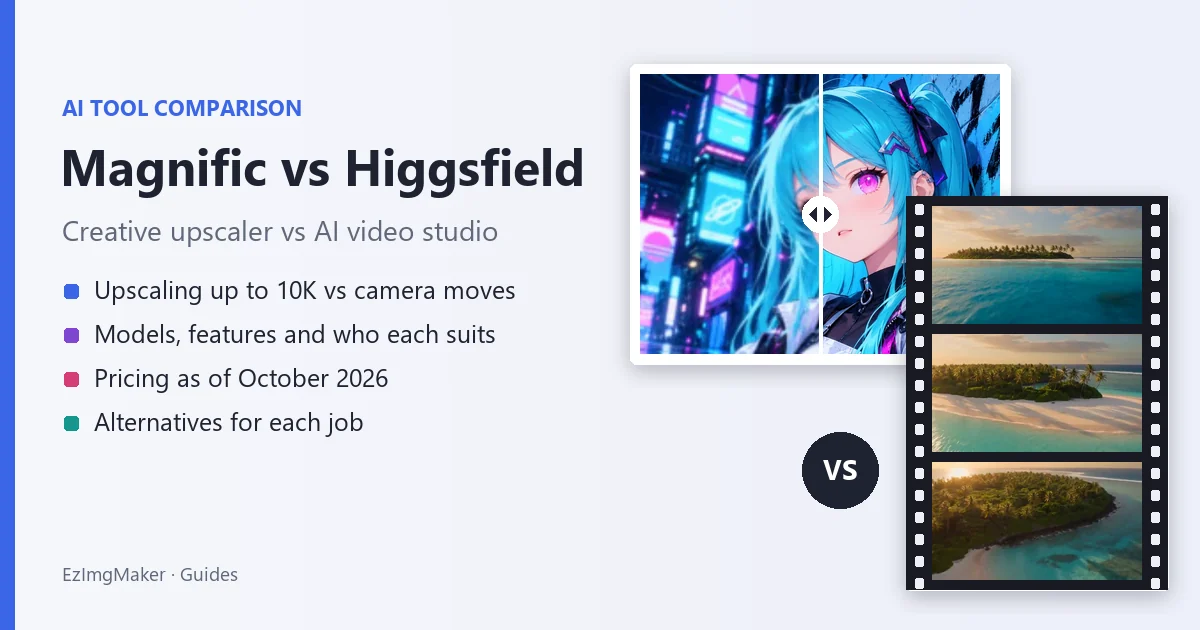
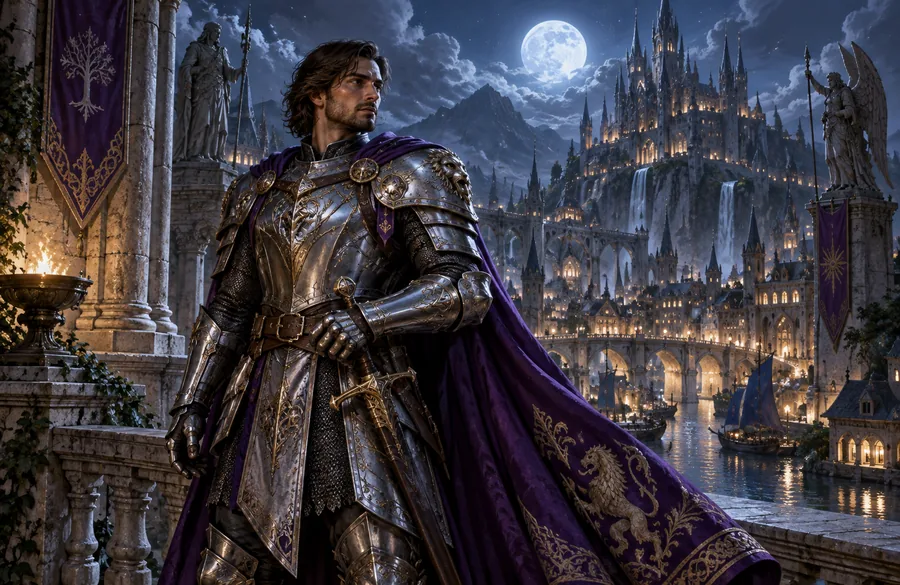
Here is what AI enhancement does to a piece of AI art: edges, armor and the city lights in the background gain crisp detail. Drag the slider to compare.
Models on Magnific
As of October 2026, magnific.com lists image models such as GPT Image 2, Nano Banana 2 and Nano Banana Pro, Seedream 5, Flux.2, Krea 2, Ideogram and Recraft; video models such as Google Veo 3.1, Seedance 2 and 2.5, Kling 3.0, Runway Gen-4.5, Wan, MiniMax Hailuo 2.3, Sora 2 and Grok Imagine; and audio from ElevenLabs and Google Lyria 3.
Magnific pricing (as of October 2026)
| Plan | Monthly | Billed yearly | AI credits | Notable extras |
|---|---|---|---|---|
| Free | $0 | $0 | Limited daily use | Up to 20 image generations a day with the in-house model, 10 stock downloads a day, personal use, attribution required |
| Premium | $20/month | $14.50/month | 240,000 a year (20,000 a month) | Image, video and audio models, Magnific image and video upscalers, premium stock, commercial AI license |
| Premium+ | $45/month | $33.75/month | 600,000 a year | Image generation on most models without spending credits, Magnific and Topaz upscalers, extra credit packs, music rights |
| Pro Starter | $110/month | $82.50/month | 1.5 million a year (a 4 million tier is also offered) | Everything in Premium+, Merchandise License, early access |
| Business | See Teams pricing | See Teams pricing | 45,000 per seat a month, shared | 2 to 100 seats, team roles, central billing |
| Enterprise | Custom | Custom | Custom | No seat limit, SSO, compliance, legal indemnification |
Yearly billing saves 25%, and yearly credits last the whole year instead of resetting monthly. Prices exclude VAT; Magnific offers a 30-day refund guarantee. Credit costs vary a lot by model: a Magnific One High 2K image is 180 credits, a 5-second Kling 3.0 Pro clip at 1080p is 450 credits, and 4 seconds of Veo 3.1 at 4K with audio is 2,080 credits. Check the official Magnific pricing page before you buy.
What Is Higgsfield?
Higgsfield is an AI video platform from Higgsfield, Inc., co-founded by Alex Mashrabov, formerly head of generative AI at Snap, and AI researcher Yerzat Dulat (as TechCrunch reported in April 2024). It has grown from an AI video startup into a studio that bundles many leading video and image models with its own directing tools. Higgsfield says its creative community has more than 25 million users.
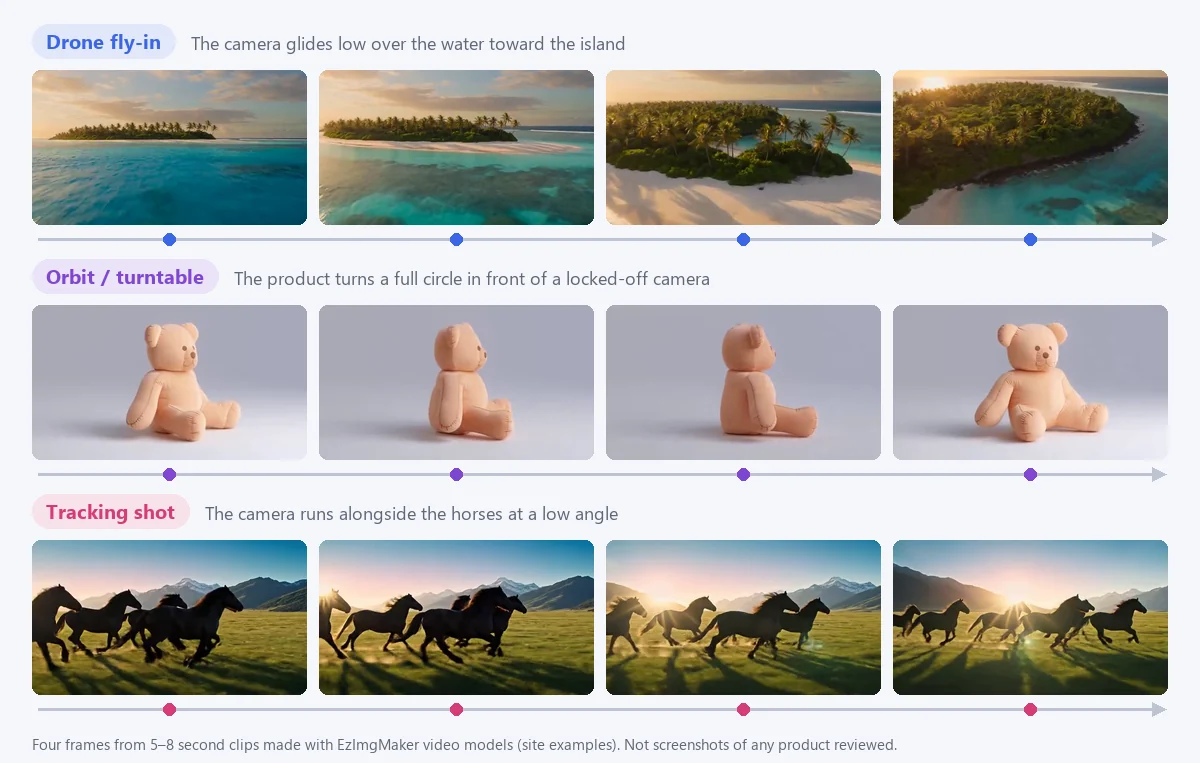
The idea that sets it apart is that you choose a camera move instead of describing one. Higgsfield’s camera-controls page lists 65 named motion presets, from Dolly In, Crane Up and 360 Orbit to Crash Zoom In, FPV Drone, Bullet Time and Whip Pan, and you can apply them to your own image or prompt.
Higgsfield key features
- Cinema Studio 4.0. Pick one of 6 genres (General, Action, Epic, Drama, Comedy, Horror), stack camera-movement tags such as static, handheld, zoom or pan, choose a film era from the 1960s to the 2020s, and add up to 50 references per generation. Higgsfield says 4.0 renders native 4K, generates up to one minute per run, and assembles cuts for you with Montage Pacing (Chaotic, Dynamic, Calm or Single Shot).
- AI Cast and shared elements. Build reusable AI actors and locations that keep their look across scenes, and share them with teammates who co-direct in real time. An assistant, Mr. Higgs, can pick the camera, light the scene or break a script into shots.
- Camera presets and visual effects. The motion library above, plus collections of visual effects and preset styles for social formats.
- Image tools. Higgsfield’s own Soul image models (Soul 2.0 costs 0.12 credits per image), partner models, inpaint editing, multi-reference images and an Upscale tool.
- More studios. AI Influencer, Ads Studio and Marketing Studio, Katana (clip edits by command), Genjutsu (new versions of one uploaded video), a lipsync studio, Canvas for moodboards, the Supercomputer agent, an API and an MCP connector for Claude and ChatGPT.
Models on Higgsfield
As of October 2026, Higgsfield’s pricing page lists video models including Seedance 2.5 and 2.0, Kling 3.0, Sora 2 (and Pro and Max versions), Google Veo 3.1, Wan 3.0, MiniMax Hailuo 2.3, Grok Video and its own Higgsfield DoP models; and image models including Nano Banana Pro, Nano Banana 2, Higgsfield Soul 2.0, GPT Image, Seedream, FLUX.2 and Reve.
Higgsfield pricing (as of October 2026)
| Plan | Monthly | Billed yearly | Credits a month | Notable extras |
|---|---|---|---|---|
| Free | $0 | $0 | 0 (limited use) | 1 job at a time, no commercial use |
| Starter | $19/month | $19/month (same price) | 270 | About 135 Nano Banana Pro images or 15 Seedance 2.0 Fast videos (Higgsfield’s estimate), commercial use |
| Plus | $59/month | $47/month | 1,200 | Access to all models and features, about 80 Seedance 2.5 videos, 7 days of free Nano Banana 2 and Kling 3.0 generations |
| Ultra | $129/month | $99/month | 3,000 (6,000 and 9,000 tiers also offered) | About 200 Seedance 2.5 videos, more parallel jobs |
| Teams | From $65 per seat | Up to 30% off | From 1,000 per seat | 2 to 15 seats, shared credits and workspace |
Higgsfield publishes a credit price for each model, which makes jobs easy to estimate: a 5-second Kling 3.0 clip is about 7 credits at 720p and 8 at 1080p, a 5-second Seedance 2.0 clip is about 22 credits at 720p, 4 seconds of Sora 2 at 720p is about 10, and a Nano Banana Pro image is 2 credits (4 at 4K). Yearly billing is advertised at 30% off, prices exclude tax, and the page often runs time-limited offers. Check the official Higgsfield pricing page for current numbers.
Magnific vs Higgsfield: Head-to-Head
| Magnific | Higgsfield | |
|---|---|---|
| Image upscaling | Core strength: Classic and creative Magnific models, up to 10K, batch of 20 | Upscale tool in its feature list (Topaz) |
| Image generation | Magnific One plus GPT Image 2, Nano Banana, Seedream, Flux.2, Krea 2 and more | Soul models plus Nano Banana, GPT Image, Seedream, FLUX.2, Reve |
| Video generation | Yes: Veo 3.1, Seedance, Kling 3.0, Sora 2, Runway, Wan, MiniMax | Core strength: Cinema Studio plus Seedance, Kling, Sora 2, Veo 3.1, Wan |
| Camera and motion presets | Change camera angle for stills | 65 named motion presets, camera tags in Cinema Studio |
| Editing | Image editor, retouch, expand, relight, style transfer, video editor | Inpaint, color grading, Katana clip edits |
| Audio | Voices, music, sound effects | Audio tools and lipsync |
| Stock assets | 250M+ photos, vectors, videos and templates | No |
| Pricing model | Credits per year or month; image generation on most models without credits from Premium+ | Credits per month with a published price per model |
| Paid plans from | $14.50/month billed yearly | $19/month |
| Free tier | Limited daily use, personal use with attribution | Limited use, no monthly credits |
| Commercial use | Included on paid plans | Included from Starter |
| Best for | Finishing and upscaling stills, brand and stock work | Directed AI video, ads and short films |
What do the credits buy?
Credits are not the same unit on the two platforms, so here is the same job priced on each entry plan. This is our own math from each pricing page in October 2026, rounded down; Magnific lists Kling 3.0 Pro while Higgsfield lists Kling 3.0, and taxes, promotions and failed generations are ignored.
| Plan (billed yearly) | Credits a month | 5-second Kling 3.0 clips at 1080p | Nano Banana Pro images |
|---|---|---|---|
| Magnific Premium, $14.50 | 20,000 | About 44 (450 credits each) | About 266 (75 credits each) |
| Magnific Premium+, $33.75 | 50,000 | About 111 | About 666 |
| Higgsfield Starter, $19 | 270 | About 33 (8 credits each) | 135 (2 credits each) |
| Higgsfield Plus, $47 | 1,200 | About 150 | 600 |
The takeaway: for the same Kling clip, costs land in a similar range on the larger plans, so pick on features, not on raw credit totals.
Pros and Cons
Magnific: strengths
- The best-known creative upscaler, with real control through Creativity and Resemblance, up to 10K.
- A fast Classic model for clean, everyday upscaling when you do not want new detail.
- One subscription now covers image, video, audio and a huge licensed stock library.
- Plugins for Adobe apps, Figma and DaVinci Resolve, plus team and enterprise features.
- Yearly credits last all year instead of expiring monthly.
Magnific: limits
- Creative upscaling adds new detail by design, so faces, text and logos can change unless you lower Creativity.
- The full Magnific creative upscaler is listed for Premium+ and up.
- The platform is big, and credit costs vary widely by model.
- Two websites (magnific.ai and magnific.com) can be confusing.
Higgsfield: strengths
- Built for directing video: camera presets, genres, film eras, pacing and an AI cast.
- Many top video models with a published credit price for each.
- Commercial use from the $19 Starter plan.
- Collaboration, an agent, an API and MCP for advanced users.
Higgsfield: limits
- Small credit pools on lower plans: Starter has 270 credits a month.
- Upscaling and still-image finishing are side features.
- Plans, models and offers change often, so costs need checking before each project.
- The free plan has no monthly credits.
Which Should You Choose?
- You have finished images that must be bigger and sharper (prints, billboards, product renders, AI art): Magnific.
- You want AI art to gain texture beyond the original: Magnific’s creative model, with Resemblance set to taste.
- You need stock photos, templates and AI under one license: Magnific.
- You make short films, music videos or trailers: Higgsfield and Cinema Studio.
- You make social clips and ads with eye-catching camera moves: Higgsfield’s presets.
- You want both in one bill: Magnific now includes video models, which may be enough unless you specifically want Higgsfield’s directing tools.
- You only upscale or animate occasionally: pay-as-you-go credits, such as the EzImgMaker tools below, may cost less than a monthly plan.
Using Magnific and Higgsfield together
- Generate or choose a still (a product shot, a character, a location).
- Upscale and refine it in Magnific, with low Creativity if the details must stay the same.
- Animate it in Higgsfield with a camera preset or in Cinema Studio.
- If the final clip needs more resolution, run it through a video upscaler.
Magnific vs Higgsfield: The Verdict
The Magnific vs Higgsfield choice comes down to your final deliverable. Magnific is the specialist for stills: nothing in Higgsfield matches its creative upscaler and stock library. Higgsfield is the specialist for directed video: its camera library and Cinema Studio give you more control over motion than Magnific’s generators. Both have become broad platforms with overlapping models, so you rarely need both subscriptions at once; start with the one that matches the work you deliver most.
Alternatives: Upscale and Animate on EzImgMaker
If you do not need a monthly plan, EzImgMaker covers the two core jobs with pay-as-you-go credits. New users get free credits to try the tools, then buy credit packs only when they need more. We do not offer Magnific’s creative sliders, a stock library, Higgsfield’s preset library or Cinema Studio’s genre and era controls; what we offer is a simple way to upscale an image or generate a clip with top models.
Upscale and enhance images
- The 4K image upscaler enlarges photos, graphics and AI art until the long side reaches at least 3840 pixels, or by 4× or 2×. It is a faithful upscale, designed to keep faces, text and colors as they are, closer to Magnific’s Classic model than its creative one.
- The image enhancer has two modes: upscale 2× or 4×, or restore and fix a blurry, noisy or faded photo at 2K or 4K, with an optional note describing what to fix.
- The anime upscaler upscales anime and illustrations to 2×, 4× or 4K with crisp lines, and the video upscaler enlarges clips 2× or 4×.


Make videos with camera moves
- The AI video generator puts Seedance 2.0 and 2.5, Veo 3.1, Kling 3.0, Grok Imagine, Hailuo 2.3 and Wan 3.0 in one place, in 16:9, 9:16 or 1:1, at 720p or 1080p, with sound on supported models.
- Image to video animates a still and has a camera motion setting (let the AI decide, static, slow push-in, orbit or pan), plus an optional end frame on Seedance, Veo 3.1, Kling 3.0 and Wan. Model pages such as Kling 3.0, Seedance 2.0 and Veo 3.1 explain each model’s strengths.
- Text to video turns a written shot description into a clip. Name the camera move in the prompt, as in the cards below.

Low-angle tracking shot
A massive battle cruiser crashes through a burning city skyline as fighter jets streak past, explosions bloom between the skyscrapers, low-angle tracking shot, cinematic sci-fi blockbuster, smoke and embers in the air.

Slow motion at water level
A giant turquoise ocean wave curls and crashes in slow motion, spray catching the sunlight, camera low at water level, crisp detail, nature documentary style.

Gentle push-in on a photo
Animate this photo: the little white cat chef in a flower-trimmed hat looks up, smiles, and stirs the bowl of flour while steam rises from the pots, warm kitchen light, gentle camera push-in.

Painting comes alive
Animate this painting: the swirling night sky slowly turns, the stars pulse with light, the cypress tree sways, and the village windows flicker, brushstroke texture preserved.
Other all-in-one platforms
If you want one subscription for images, upscaling and video, also look at Krea AI, which pairs a realtime canvas and an enhancer with many video models; our guide What Is Krea AI? covers its features and pricing. OpenArt is another option that focuses on characters and stories; see OpenArt vs Higgsfield.
Frequently Asked Questions
What is the difference between Magnific and Higgsfield?
Magnific started as an AI image upscaler that adds detail to an image you already have, and in 2026 it became the new name of Freepik’s all-in-one AI platform for image, video, audio, 3D and stock. Higgsfield is an AI video platform built around directing shots: Cinema Studio, dozens of camera-move presets and many video models. In short, Magnific vs Higgsfield is finishing stills vs making directed video.
Is Magnific better than Higgsfield?
Neither is better overall. Magnific is the stronger choice for upscaling and enhancing still images, especially with its creative upscaler and its Creativity and Resemblance sliders. Higgsfield is the stronger choice for cinematic AI video with preset camera moves. Pick by your final deliverable: a high-resolution still or a video clip.
Can Magnific make AI videos?
Yes, today it can. The original magnific.ai was an image upscaler, but the platform at magnific.com, formerly Freepik, includes a video generator with models such as Veo 3.1, Seedance, Kling 3.0, Sora 2 and Runway Gen-4.5, plus a video upscaler. Higgsfield still offers more tools for directing video, such as its camera-move library and Cinema Studio.
Does Higgsfield upscale images?
Higgsfield lists an Upscale tool (powered by Topaz, according to its feature list), and Cinema Studio 4.0 renders video in native 4K. Upscaling is a side feature there, though. If high-detail upscaling of existing photos or AI art is the main job, Magnific or a dedicated 4K image upscaler is the more direct choice.
Is Magnific the same as Freepik?
Yes. Freepik bought the Magnific AI upscaler in 2024, and in 2026 the whole company relaunched as Magnific at magnific.com. Magnific’s own FAQ says Freepik is now Magnific: same team, same technology. The old magnific.ai site still works for existing users, but new accounts are created on magnific.com.
Magnifici or Magnific: which is right?
The AI upscaler is spelled Magnific, without a final i, and lives at magnific.com (the older site is magnific.ai). Magnifici is a common misspelling; it is actually Italian for “magnificent” in the plural. If you searched for magnifici while looking for the AI upscaler, Magnific is the product you want.
How much do Magnific and Higgsfield cost?
As of October 2026, Magnific Premium is $20 a month or $14.50 a month billed yearly, Premium+ is $45 or $33.75, and Pro Starter is $110 or $82.50. Higgsfield Starter is $19 a month, Plus is $59 a month or $47 billed yearly, and Ultra is $129 or $99 billed yearly. Both prices exclude tax and change often, so check the official pricing pages.
Is there a free version of Magnific or Higgsfield?
Both have a free plan with tight limits. Magnific’s free plan gives limited daily access, including up to 20 AI image generations a day with its in-house model, for personal use with attribution. Higgsfield’s free plan is listed as limited use with no monthly credits and one job at a time. On EzImgMaker, new users get free credits to try the upscalers and video tools.
Can I use Magnific and Higgsfield together?
Yes, and many creators do. A common workflow is to generate or pick a still, upscale and refine it in Magnific, then animate it in Higgsfield with a camera preset. Watch out for paying for two overlapping subscriptions: Magnific now has video models and Higgsfield has image models, so one of them may cover most of what you need.
Related Guides
- What Is Krea AI?: another all-in-one image and video platform with an upscaler.
- OpenArt vs Higgsfield: two multi-model platforms compared.
- What is 4K resolution?: the pixel sizes behind 4K upscaling.
- Topaz Video AI settings: how to upscale and clean up video.
Magnific, Freepik, Higgsfield, Topaz, Kling, Seedance, Veo, Sora, Runway, Nano Banana and the other product names mentioned are trademarks of their respective owners. EzImgMaker is not affiliated with them. Features and prices were taken from each company’s official website in October 2026 and may change; check the official sites for current information. Illustrations in this article are made from EzImgMaker’s own examples and are not screenshots of the products compared.