Garden Kiss
Soft daylight, roses, and a slow lean-in for a first-date feel.
Video Effects
EzImgMaker’s AI kissing video generator turns photos of you and your partner into a short romantic kiss video online, free to try. Upload one photo together or one of each, pick one of 5 kiss templates such as Garden Kiss or one of 7 kiss types from Cheek Kiss to French Kiss, and generate for 27 credits per video. For consenting adults (18+) only, using photos you have permission to use.
Reference example. It is not a result generated from your upload.
Overview
An AI kiss generator turns still photos of a couple into a short romantic video. You upload one photo of the two of you, or one photo each, and the AI kissing model animates the moment: you turn toward each other, lean in, and share a kiss, with your faces, hair, and outfits carried over from the photos.
Kissing AI is popular with long-distance couples, newlyweds, and anyone planning an anniversary or Valentine surprise. Think of it as kissing artificial intelligence with good manners: it is built for consenting adult couples using their own photos, never for strangers, celebrities, or anyone who has not agreed.
Examples
Each template sets the scene and the motion. Your photos decide who is in it. All examples show fictional AI-generated adults.
Soft daylight, roses, and a slow lean-in for a first-date feel.
A close, romantic French kiss outside a city café.
White blooms and wedding chairs, made for engagement and wedding posts.
City lights, light rain, and a holiday tree: a movie-style moment.
A relaxed walk that ends in a sweet kiss, natural and unposed.
How it works
Make them kiss in three steps, using photos of two consenting adults.
Add one photo of the two of you, or one photo each. Use clear, front-facing pictures of adults who have agreed to the video. JPG, PNG, and WebP up to 10 MB.
Pick a template such as Garden Kiss or Rainy Night Kiss, a kiss type like Cheek Kiss or French Kiss, or describe your own romantic moment in Custom.
Generate your AI kiss video, watch it, and download it to share with your partner or post with an AI label.
Features
Your photos do not have to be taken together. Upload a portrait of each partner and the AI places you in one scene with matching light, then animates the kiss, which is perfect for couples who spend much of the year apart.
Choose the kind of kiss that fits your relationship: a gentle peck, a cheek or forehead kiss, a hand kiss, or a romantic AI French kiss. The AI French kiss generator keeps it tasteful and romantic, never explicit.
Templates handle the setting and camera: rain and city lights, a rose garden, a wedding flower field. The kissing AI generator keeps your faces stable while the scene moves around you.
This kiss AI generator is designed for adult couples using their own photos. Uploads are for creating your video only, and the rules are clear: no photos of strangers, celebrities, or minors, and no videos meant to embarrass or deceive.
Use cases
Popular ways couples use AI kiss videos.
A shared moment for partners who live apart, made from recent selfies of you both.
Turn a favorite photo into a short romantic clip for a card, a message, or a slideshow.
Add a kissing scene to a save-the-date post or a wedding recap, with an AI label.
Writers and artists can animate a kiss between adult characters they created themselves.
Tips
Clear photos make the AI kiss video look real and keep both faces recognizable.
Use front-facing or three-quarter photos without sunglasses, masks, or hair covering the face.
Two photos with similar light and quality blend into one scene more smoothly.
Head-and-shoulders or waist-up framing gives the AI room to animate the lean-in.
Only create and share a kiss video when both of you are happy with it.
More tools
FAQ
Answers to common questions about AI kiss videos.
It is a tool that animates a kiss from still photos. The AI kiss video generator reads both faces, places the two people in one scene, and creates a short video of them leaning in and kissing in the style you choose.
Only yourself and a partner who is an adult (18+) and has agreed to it. Do not upload photos of other people, exes, coworkers, strangers, or celebrities, and never upload photos of minors. Uploads that break these rules may be blocked.
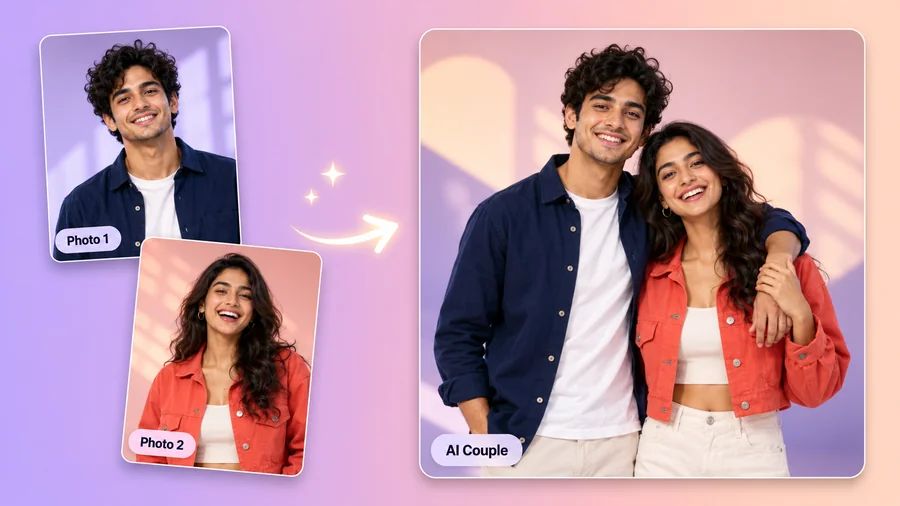
Yes. Upload one photo of each partner as Photo 1 and Photo 2, and the AI combines you into one scene before animating the kiss. If you already have a photo together, upload it as Photo 1 and leave Photo 2 empty.
Yes. Choose French Kiss under Kiss Types or the Café French Kiss template. French kissing AI videos stay romantic and non-explicit, so AI French kissing here means a tender, movie-style kiss; explicit or sexual content is not supported.
Yes. Whether you search for a.i kissing, the common typo au kissing, an a.i kiss video generator, or a kiss generator, it means the same thing: a tool that uses artificial intelligence to animate a kiss from photos.
No. Creating romantic videos of real people without their consent, including celebrities, influencers, classmates, or coworkers, is not allowed and can be illegal. Never use an AI kiss to harass, embarrass, blackmail, or deceive anyone.
New users get free credits to try it. Each kissing video uses credits, so you can test a style or two before making more.
Share it only with your partner’s agreement, and label it as AI-generated. Do not present it as real footage or use it to suggest something happened that did not.
Sharp, well-lit, front-facing photos of each person from the shoulders up or waist up. Avoid heavy filters, sunglasses, and group photos with other people in them.
Upload photos of you and your partner, choose a kiss style, and create an AI kiss video together.
For consenting adults only. Upload only photos of yourself and an adult partner who has agreed to the video. Photos of minors, celebrities, public figures, or anyone without their consent are not allowed, and the tool must not be used to harass, embarrass, impersonate, or deceive. Examples on this page show fictional AI-generated people. Generated videos are not real footage; label them as AI when you share them.