Horse River Chase
A low tracking shot at water level, then a timed hard cut to a wide shot from the bank, with hooves, spray and wind on the track.
Kling 4.0 moves through up to 10 keyframes in the order you set them, or builds a scene from up to ten reference images and a video. Clips run 3 to 30 seconds in 720p or 1080p; reference mode generates native sound or keeps a reference video’s original audio.
Low tracking shot at water level beside a rider on a grey horse galloping through a shallow mountain river at golden hour, spray catching the sun. At five seconds, hard cut to a wide shot from the bank as the rider crosses toward the low sun. Sound of hooves, splashing water and wind, no music or subtitles.
Reference example. It is not a result generated from your upload.
Kling 4.0, also called Kling 4 or Kling AI 4.0, is the latest Kling video model, built around keyframes. Instead of one start image and one end image, you can lay out a first frame, up to eight middle frames and a last frame, and the Kling 4.0 video moves through them in exactly that order. That makes it a good fit for choreography, product reveals, step-by-step processes and short stories where the middle of the clip matters as much as the ends.
Its second mode works from references: up to ten images of characters, products or places plus one reference video for motion or sound, each named in the prompt as @image_1 or @video_1. Kling 4.0 clips run anywhere from 3 to 30 seconds in 720p or 1080p, with generated sound, and you can use the Kling 4.0 model online here without an app or a local install.
Every Kling 4 video below comes with the prompt behind it: cuts, dialogue, one-takes and legible text. Unmute a clip to hear its sound, then load the prompt into the workspace.
A low tracking shot at water level, then a timed hard cut to a wide shot from the bank, with hooves, spray and wind on the track.
A slow push-in as the keeper turns and delivers a quoted line in a Scottish accent over wind and a distant foghorn.
One ultrawide drone move with no cuts: past floating icebergs, up the glacier wall, and down onto a red kayak.
Stop-motion claymation with visible fingerprints, cutting from a medium shot to a close-up of the finished loaf.
The same cook from a wide wok flare to a medium close-up, under a NOODLE KING sign spelled as written.
A half orbit around an amber bottle standing in a thin pool of water, settling on a crisp NOCTURNE label.
The keyframe workflow in four steps. Reference mode works the same way with images and a video in place of frames.
Choose Keyframe timeline and drop your opening image into slot 01. It is required, and the clip takes its shape from it.
Fill slots 02 to 09 with up to eight middle frames, left to right. Longer clips allow more frames: 4 in total at 3 seconds, rising to all 10 from 9 seconds.
Put the closing image in slot 10, then write what happens between frames, naming them @first_frame, @keyframe_1 and @last_frame.
Pick the resolution and drag Duration anywhere from 3 to 30 seconds. The cost appears on the Generate button before you start.
Line up a first frame, as many as eight middle frames and a last frame on the numbered timeline, and Kling 4.0 moves through them in order. The frame limit grows with length: 4 frames at 3 seconds, one more for each extra second, and the full 10 from 9 seconds up.
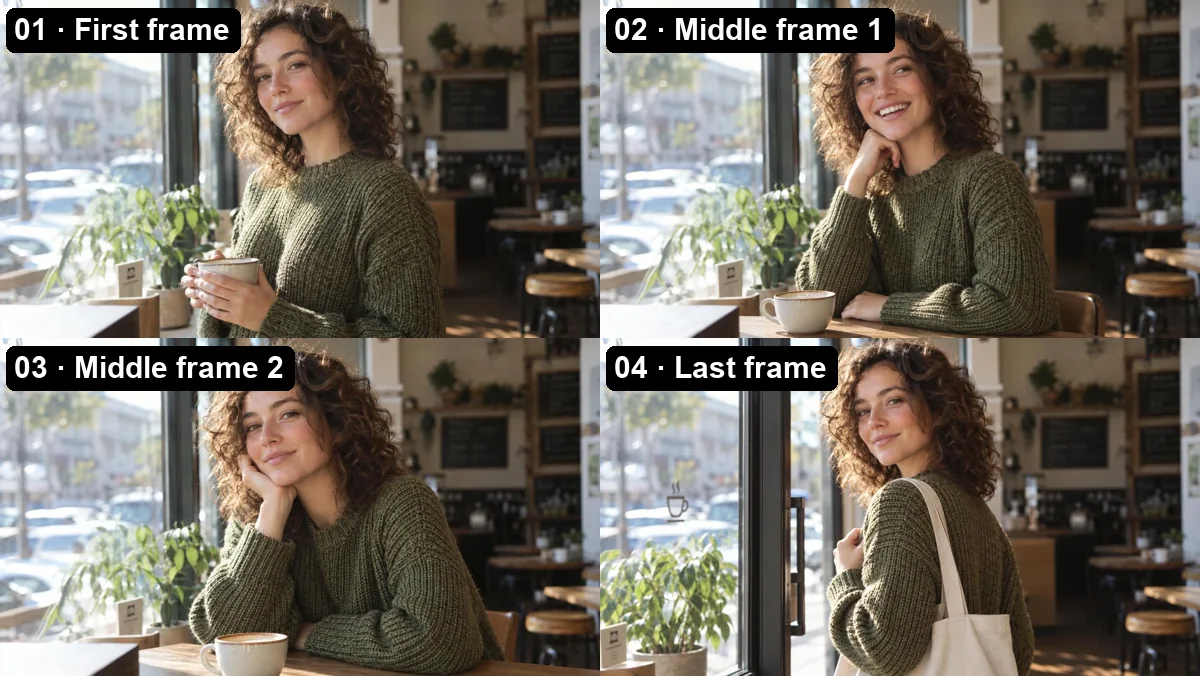
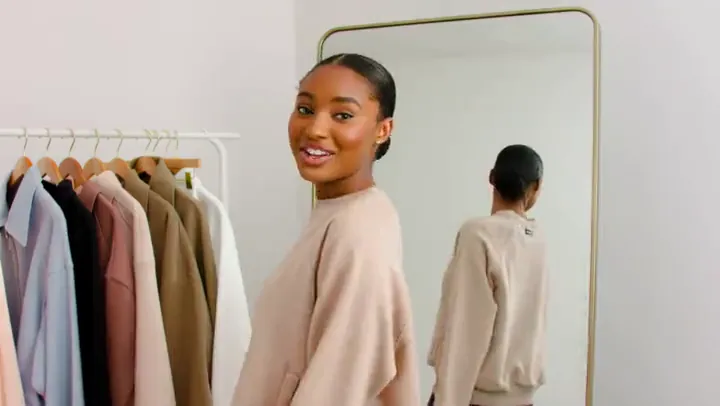
These are the inputs for the café clip above: a first frame, two middle frames and a last frame of the same woman in the same room. Small, steady changes from one frame to the next are what keep her face, sweater and the light consistent.
Reference mode takes up to ten images and one video of 2 to 30 seconds, called @image_1, @image_2 and @video_1 in the prompt. With a reference video, Keep original reference audio carries that clip’s sound into the result; without one, Kling 4.0 generates native audio.
With up to 30 seconds per clip there is room for a small story: the same clay dog astronaut grabs the cheese, tumbles through a tunnel and shares a snack with a mouse before the final wide shot of the moon.
Give Kling 4.0 the first frame of a process and the last, and it fills in the steps between them. Here a glowing iron bar becomes a finished sword between two keyframes; add middle frames when you want to pin down the stages along the way.
What you can set when you generate with Kling 4.0 here.
| Spec | Kling 4.0 |
|---|---|
| Modes | Keyframe timeline, reference |
| Keyframes | First frame required, up to 8 middle frames, optional last frame |
| Frames allowed by length | 4 at 3 s, one more per extra second, 10 from 9 s |
| Reference files | Up to 10 images and 1 video (MP4 or MOV, 2–30 s, up to 50 MB) |
| Image files | JPG, PNG, or WebP up to 20 MB; reference images at least 300 px per side, ratio 0.4–2.5 |
| Video length | 3 to 30 seconds |
| Resolution | 720p or 1080p |
| Aspect ratio | Auto, 16:9, 9:16, 1:1, or 21:9 in reference mode; keyframe clips follow your first frame |
| Sound | Reference mode: native audio, or keep the reference video’s own sound |
| Prompt | Up to 5,000 characters |
Every @ name in the prompt must match a file you uploaded: @first_frame, @keyframe_1 to @keyframe_8 and @last_frame in keyframe mode, @image_1 to @image_10 and @video_1 in reference mode.
How Kling 4.0 compares with the previous Kling and ByteDance’s Seedance 2.5 on EzImgMaker.
| Kling 4.0 | Kling 3.0 | Seedance 2.5 | |
|---|---|---|---|
| Best for | Clips steered through many keyframes | Multi-shot story clips with sound | Long takes guided by many reference files |
| Frames | First + up to 8 middle + last | Start frame, or start + end frame | Start frame, or start + end frame |
| References | Up to 10 images + 1 video here | Up to 3 elements, plus an optional voice clip | Up to 30 images, 10 videos, and 10 audio clips |
| Clip length | 3–30 s | 3–15 s | 4–30 s |
| Resolution | 720p, 1080p | 720p, 1080p, 4K | 480p, 720p, 1080p |
| Aspect ratio | Auto, 16:9, 9:16, 1:1, 21:9 | 16:9, 9:16, 1:1 | Adaptive, 16:9, 9:16, 1:1, 4:3, 3:4, 21:9 |
| Native audio | Reference mode, or keep a reference video’s sound | Yes, on or off | Yes, can be switched off |
Kling 4.0 vs 3.0 in short: 4.0 doubles the clip length and adds middle keyframes, while 3.0 keeps 4K output and planned multi-shot.
Turn a run of key drawings or poses into one continuous move, frame by frame.
Vertical lookbook films cut on the beat, with the same model and outfit from shot to shot.
Macro reveals that end on a crisp label, built from a handful of product angles.
Show a process from raw material to finished piece: forging, baking, building or assembly.
This Kling 4.0 prompt guide starts with keyframes, because they decide most of the result, then covers cuts, dialogue and frame names.
Neighboring keyframes should share camera height, lens and composition; a jump from a close-up to a wide shot forces an abrupt change.
Use the same person in the same clothes across every keyframe unless the change is the point, like the tote bag that appears in the café clip.
Small steps between frames move smoothly. If two frames are far apart, add a middle frame or give the clip more seconds (about one frame per second).
Write @first_frame, @keyframe_1 and @last_frame to say what happens where. Fill the slots in order and only mention frames you uploaded.
"At five seconds, hard cut to a wide shot from the bank" gives Kling 4.0 a clean edit point inside a single clip.
Put dialogue in quotes and say how it is spoken, "says in a Scottish accent: …", then list the sounds around it: wind, a distant foghorn.
Earlier Kling versions, plus a place to start from a prompt alone.
Need 4K or a way to edit your own footage? Kling 3.0 Omni does both.
Read the guidePlanned multi-shot stories with element references, voice clips and 4K output.
Read the guideEvery earlier Kling version, from 2.1 to 3.0, compared on one page.
Read the guideNo keyframes yet? Start from a written prompt alone and pick a model there.
Read the guideCommon questions about the Kling 4.0 video model.
Kling 4.0 (also called Kling 4 or Kling AI 4.0) is the latest Kling video model, and you can use it online on EzImgMaker now. It turns an ordered set of up to 10 keyframes, or up to 10 reference images and a video, into a 3 to 30 second clip in 720p or 1080p with sound.
In Keyframe timeline you upload a first frame, up to eight middle frames and an optional last frame, and Kling 4.0 passes through them in order. Length sets the limit: a 3-second clip takes 4 frames, each extra second adds one, and from 9 seconds you can use all 10.
Kling 4.0 is free to try on EzImgMaker: new accounts get free credits when they sign up. After that, Kling 4.0 pricing is per second of video and depends on resolution and mode. The exact Kling 4.0 cost appears on the Generate button before you start.
Any whole number of seconds from 3 to 30, in both keyframe and reference mode. A reference video can also be up to 30 seconds long.
No. Kling 4.0 renders in 720p or 1080p. If you need 4K, use Kling 3.0 or Kling 3.0 Omni, which both go up to 4K for clips of 3 to 15 seconds.
Kling 4 vs 3 comes down to length and control. Choose Kling 4.0 for clips longer than 15 seconds or when you want to steer the motion through middle keyframes. Choose Kling 3.0 for 4K output, planned multi-shot stories, or element references with a voice clip.
Seedance 2.5 also reaches 30 seconds and accepts far more reference files, including audio. Kling 4.0 is the one with a full keyframe timeline of up to 10 frames. If you were looking for a Kling 4.0 Omni to edit your own footage, use Kling 3.0 Omni: it transforms clips you upload and goes up to 4K.
Yes. In Reference mode, leave Keep original reference audio on and the result uses the sound from your reference video. Without a reference video, Kling 4.0 generates native audio for the clip. Only upload footage you own or have permission to use.
Judging by the clips on this page, its strengths are 30-second length, legible signs and labels, and motion that follows your keyframes in order. The trade-offs are a 1080p ceiling and the need for consistent keyframes: frames that change framing or wardrobe sharply can make transitions jumpy.
Kling AI, the video brand of Kuaishou, builds Kling 4.0. EzImgMaker is an independent site with access through a third-party provider, with no affiliation, endorsement or sponsorship from Kuaishou or Kling AI.
Lay out your keyframes or upload references, choose up to 30 seconds, and let Kling 4.0 connect the dots.
Kling AI is a Kuaishou product. EzImgMaker is an independent site and is not affiliated with, endorsed by, or sponsored by Kuaishou. Model names are used only to describe compatibility.