Upload Your Photo
Add a JPG, PNG, or WebP up to 20 MB, such as a landscape, a product shot, or banner art exported at the wrong size. It stays on your device.
The recommended YouTube banner size is 2560 × 1440 pixels (16:9), with your name and logo inside the 1546 × 423 safe area. Upload a photo, check the safe-area guide live, and download a banner or an 800 × 800 profile picture.
One-click YouTube sizes
Fine-tune
Runs in your browser. Your photo is never uploaded.
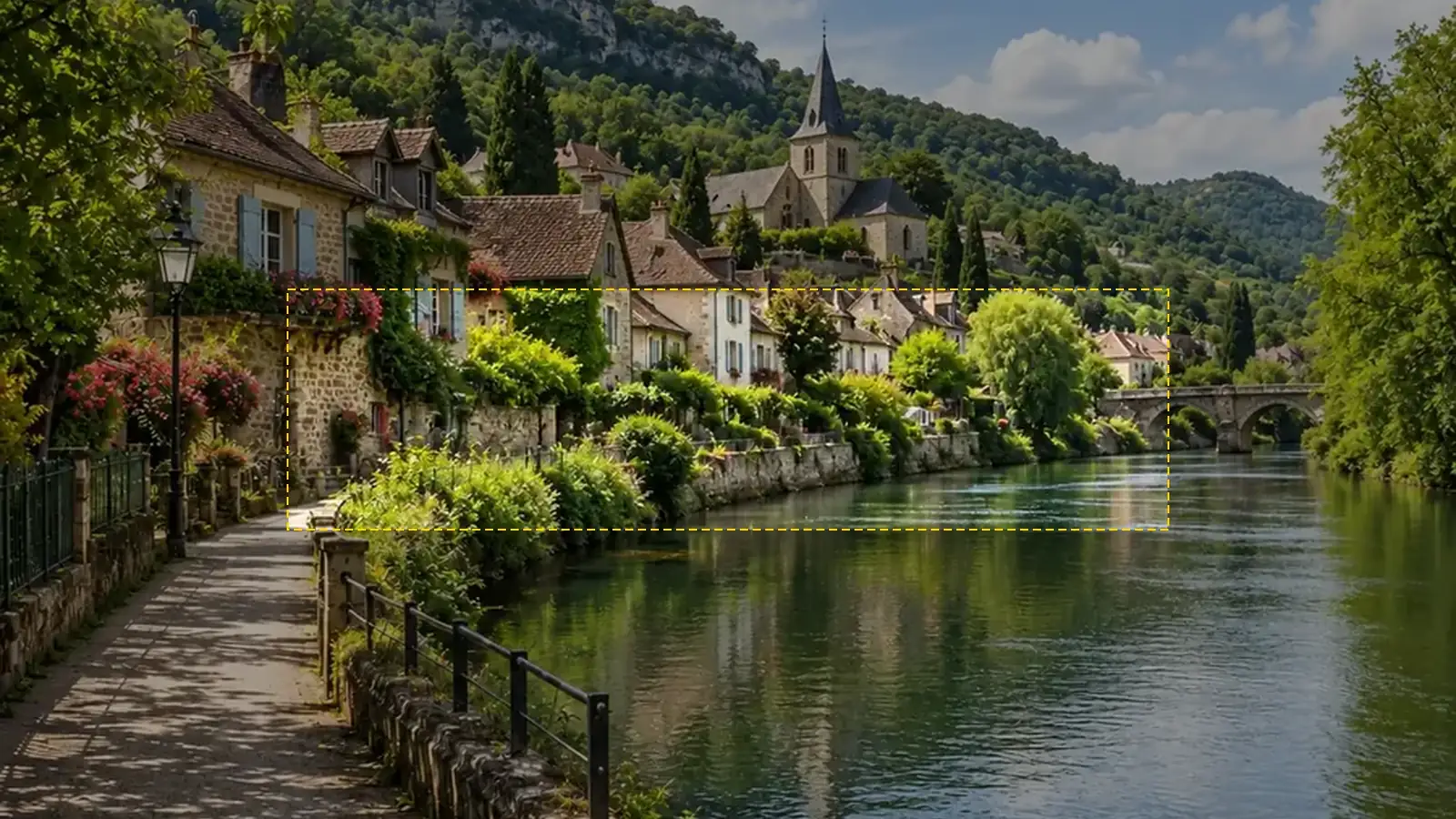
Reference example. It is not a result generated from your upload.
The recommended YouTube banner size is 2560 × 1440 pixels, a 16:9 image that fills a TV screen. The minimum upload is 2048 × 1152 px and the file must be 6 MB or smaller. The same banner is cropped differently on every device: desktops show roughly a 2560 × 423 strip, tablets 1855 × 423, phones 1546 × 423, and TVs the whole image. That is why the centered 1546 × 423 px safe area (1235 × 338 px at the minimum size) is the only part guaranteed to appear everywhere.
This YouTube banner resizer turns any photo into an exact-size banner and draws the safe area on the live preview, so you can see whether your channel name or logo will be cut off before you upload. It also makes the 800 × 800 YouTube profile picture size. Everything runs in your browser, so it is free, needs no sign-up, and your image is never uploaded.
Get the YT banner size right before you open YouTube Studio.
Add a JPG, PNG, or WebP up to 20 MB, such as a landscape, a product shot, or banner art exported at the wrong size. It stays on your device.
Pick Banner 2560×1440 to resize image to YouTube banner size. The dashed box marks what every device shows; drag the photo, zoom in, move the crop anchor, or switch to Fit whole image until the important part sits inside it.
Save a JPG (best for staying under 6 MB) or PNG, then upload it under Customization › Profile in YouTube Studio. The guide is only drawn on the preview, never on your file.
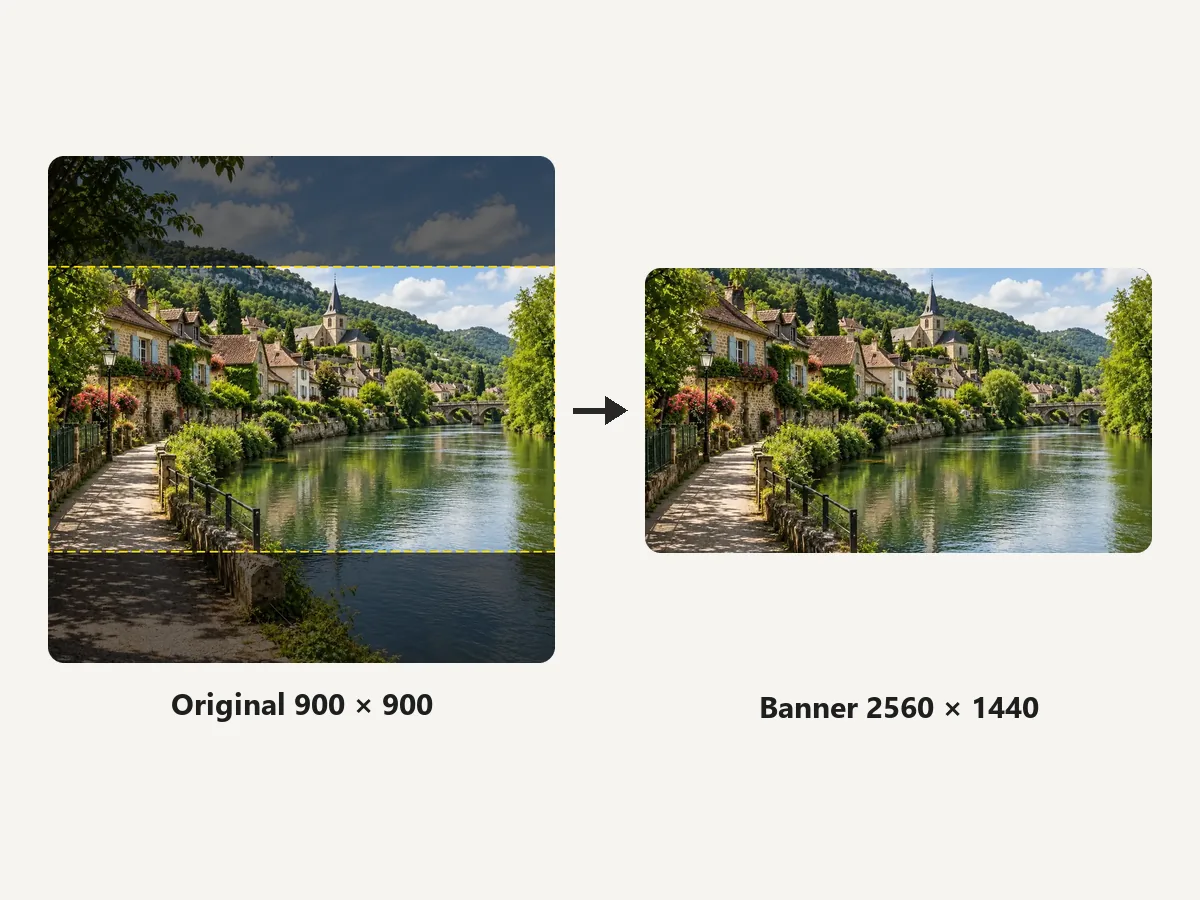
Square, vertical, or panoramic, any picture becomes an exact 2560 × 1440 canvas. The YouTube banner sizer scales the photo to fill 16:9 and trims only the overflow, so you can convert an image to YouTube banner dimensions in one step.
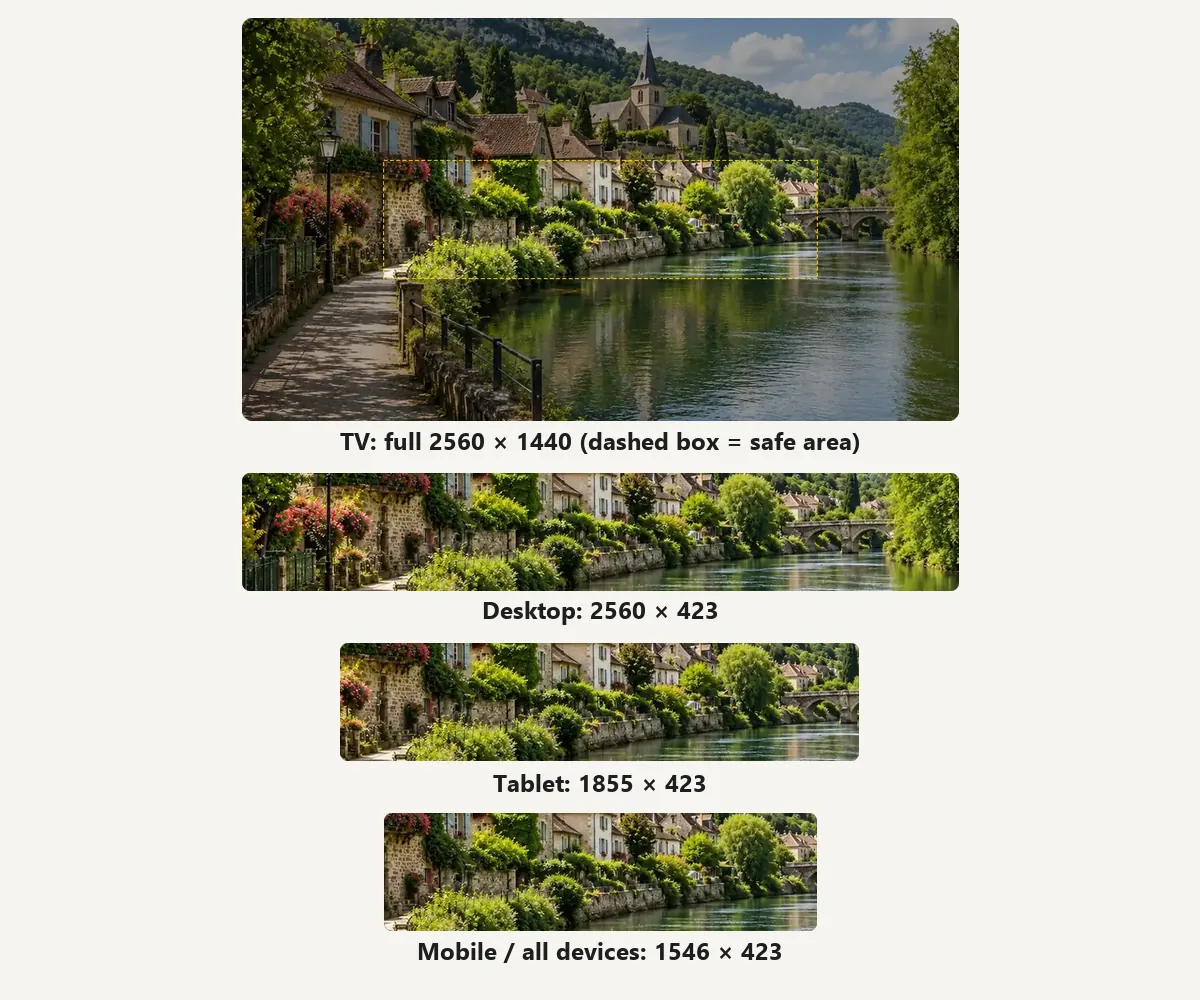
TVs show the full banner, desktops a 2560 × 423 strip, tablets 1855 × 423, and phones 1546 × 423. Switch the guide between these areas to check each view; the overlay works like a YouTube banner grid for placing text and logos.
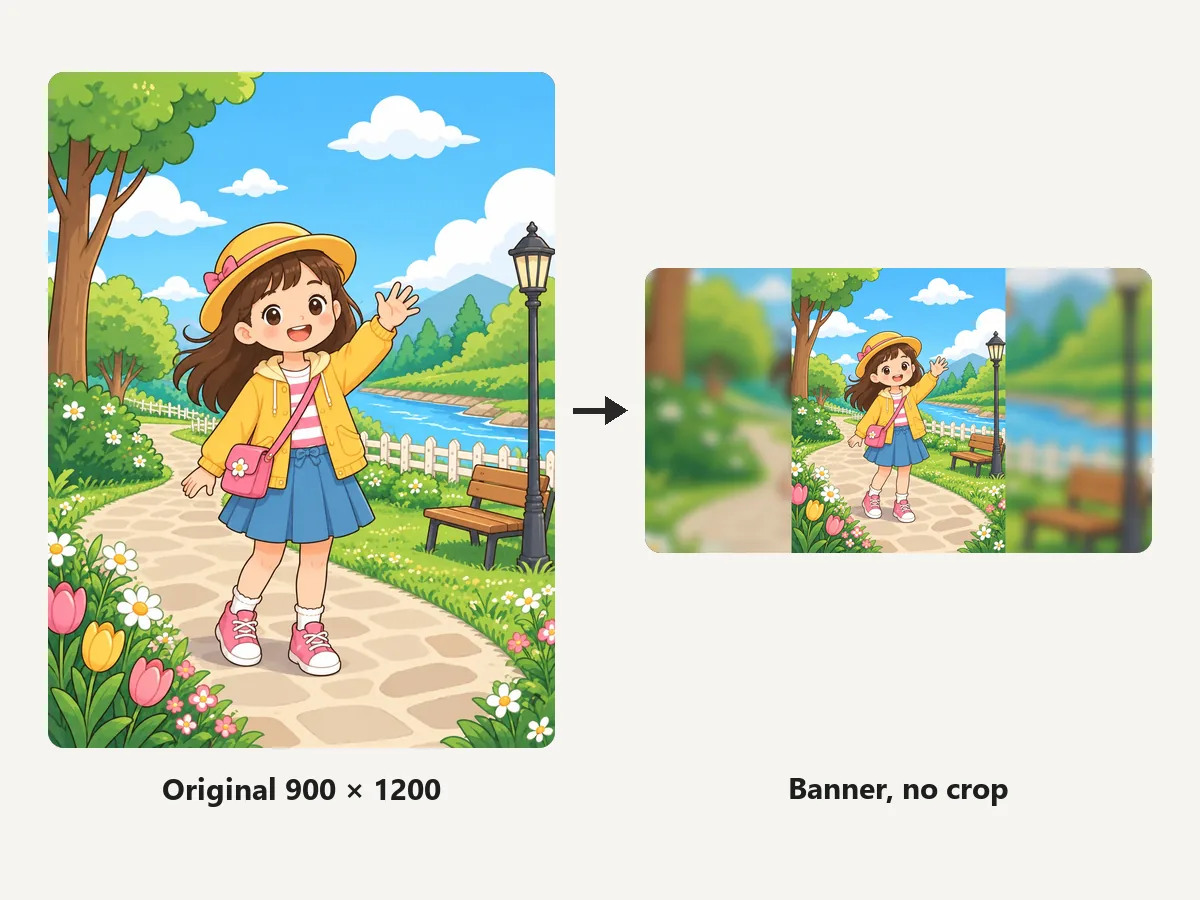
Have a tall poster or illustration? Fit whole image keeps all of it inside the banner and fills the sides with a blurred copy, black, or white, so nothing important gets trimmed by the YouTube banner cropper.
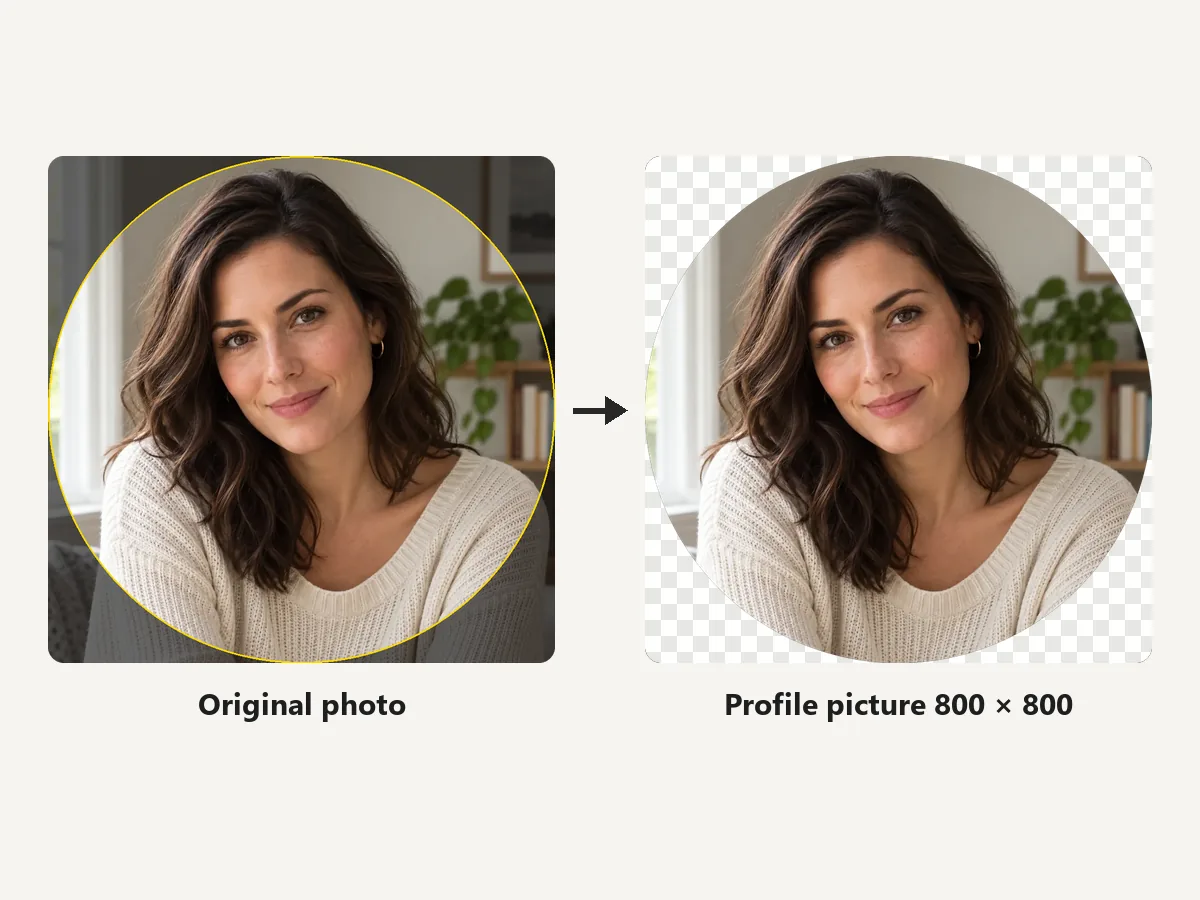
The same upload can become your channel icon. Pick Profile picture 800×800 to crop a square and preview it as the circle viewers will see, then download it as PNG (transparent corners) or JPG.
Official YouTube banner dimensions and profile picture rules from YouTube Help.
The recommended YouTube banner size in pixels, especially for TV, at a 16:9 aspect ratio. Keep the file 6 MB or smaller.
The smallest YouTube banner image size you can upload. At this size the safe area for text and logos is 1235 × 338 px.
The centered strip of a 2560 × 1440 banner that shows on every device. Put your channel name, logo, and schedule here.
Displayed as a 98 × 98 circle. JPG, GIF, BMP, or PNG (no animated GIFs), up to 15 MB.
Small habits that keep your channel art readable on phones and TVs.
Anything outside the 1546 × 423 safe area may disappear on phones. Center the name and tagline and leave the edges for background.
The top and bottom of the banner only appear on TVs. Fill them with color, texture, or scenery instead of key details.
YouTube advises against shadows, borders, and frames in the file, because the crop changes from device to device.
A 2560 × 1440 PNG of a photo can pass the 6 MB limit. JPG keeps it small; PNG suits flat logos and text.
How creators use a YouTube banner resizer.
Illustrative examples adapted from reference material, not verified reviews of EzImgMaker.
My channel name kept getting chopped on phones. With the safe-area box on the preview I finally got the banner YouTube size and layout right on the first upload.
Every YouTuber banner size guide lists five numbers. Here I just pick the preset, drag nothing, and download a 2560 × 1440 JPG.
I used a drone panorama for my banner. Fit whole image kept the whole skyline and the blurred edges look intentional.
Made the banner and the 800 × 800 profile picture from the same photo in two minutes, and nothing left my laptop.
Banner dimensions, safe area, profile picture size, and resizing.
YouTube recommends 2560 × 1440 pixels at a 16:9 aspect ratio, especially for TV. The minimum is 2048 × 1152 pixels, and the file must be 6 MB or smaller.
You upload one 2560 × 1440 banner and YouTube crops it per device: TVs show the full image, desktops about 2560 × 423, tablets about 1855 × 423, and phones about 1546 × 423. Use the guide in the preview to check each view.
It is the centered 1546 x 423 px area of a 2560 × 1440 banner (1235 × 338 px at the 2048 × 1152 minimum). Content inside it shows on every device, so keep text, logos, and faces there.
Upload a square image; 800 × 800 pixels is the common recommendation, and YouTube displays it as a 98 × 98 circle. It can be JPG, GIF, BMP, or PNG (not animated) up to 15 MB. The YouTube pfp size, the YT pfp size, and the YouTube profile pic size all refer to this same square.
Your channel logo is the profile picture, so use an 800 × 800 square. If you mean the video watermark, YouTube asks for a square image of at least 150 × 150 pixels under 1 MB.
Yes. Cover photo, channel art, and banner are names for the same image, so the YouTube cover size is 2560 × 1440 pixels with the 1546 × 423 safe area.
Phones and desktops only show a thin centered strip of the 16:9 image. If your text sits near the edges or the image is not 16:9, it gets cut. Resize to 2560 × 1440 here and keep key elements inside the safe area.
JPG is safest for photos because it stays well under 6 MB. PNG keeps flat graphics and small text sharp, but a 2560 × 1440 PNG of a photo can be larger than the limit.
The resizer can enlarge any image to 2560 × 1440, but enlarging cannot add detail. Start from a photo at least 2048 px wide, or run a small one through an AI upscaler first.
It is free with no sign-up. The image is processed in your own browser and never leaves your device. Only use images you have the right to edit and publish.
Upload a photo, keep the important part inside the safe area, and download a 2560 × 1440 banner.
YouTube is a trademark of Google LLC. EzImgMaker is an independent tool and is not affiliated with or endorsed by YouTube. Sizes follow YouTube Help at the time of writing and may change.