
What Is 4K Resolution? Pixels, Size & Aspect Ratio
What is 4K resolution? 4K UHD is 3840 x 2160 pixels (8.3 MP); cinema DCI 4K is 4096 x 2160. See 4K resolution size by aspect ratio, file size, PPI and prints.
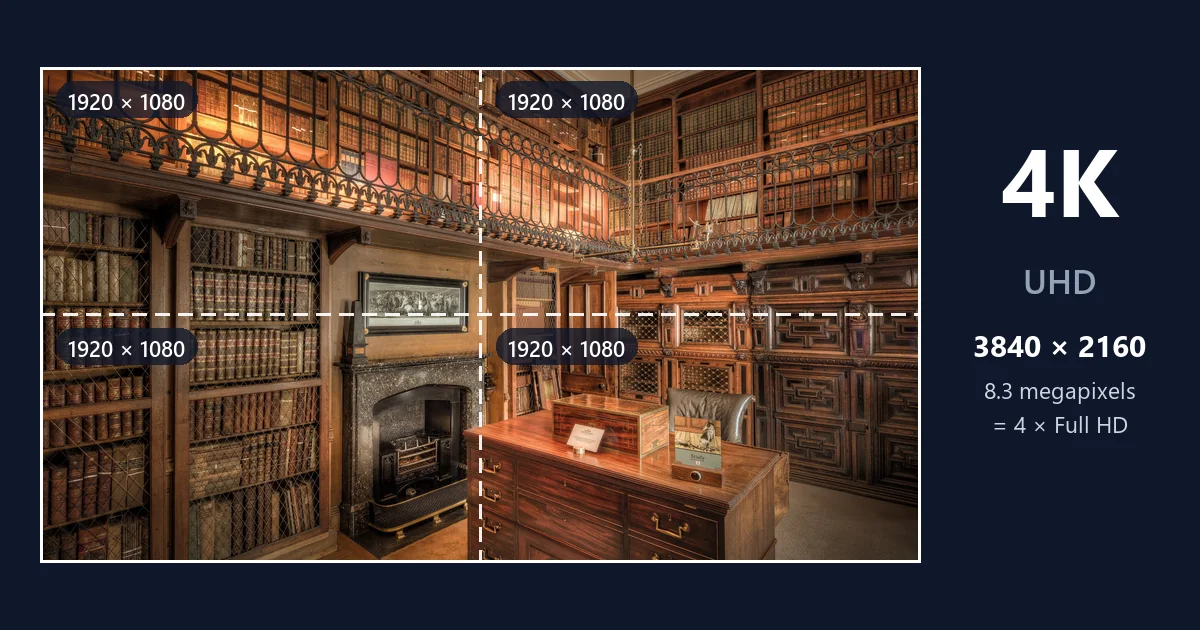
Short answer: 4K resolution is 3840 × 2160 pixels on TVs, monitors, phones, and streaming services: 8,294,400 pixels, or about 8.3 megapixels, in a 16:9 shape. It is also called 4K UHD, Ultra HD, or 2160p, and it has four times the pixels of 1080p Full HD. In cinema, "4K" means DCI 4K, which is slightly wider at 4096 × 2160 (8.8 MP). So if you just need the 4K res size: 3840 × 2160 for screens and video, 4096 × 2160 for movie-theater projection.
This guide collects every 4K number you are likely to need in one place: the exact pixel counts, how 4K compares with other resolutions, 4K image sizes for every aspect ratio (including 4:5 and 4096x4096), file sizes, pixel density on monitors and TVs, and how big you can print a 4K picture. Tap the chart to compare 4K with its neighbors at true scale.
What Does 4K Mean?
The "K" stands for thousand: 4K describes a picture that is roughly 4,000 pixels wide. The name came from digital cinema, where the 4K standard is 4096 pixels across. When TVs moved past 1080p, manufacturers adopted the 4K label for their 3840-pixel-wide panels too, because it was shorter and catchier than "2160p". So 4K is what the industry calls two closely related resolutions:
- 4K UHD (consumer 4K): 3840 × 2160. The resolution 4K TVs, monitors, laptops, phones, cameras, game consoles, and streaming services use.
- DCI 4K (cinema 4K): 4096 × 2160. Used by digital cinema projectors and many professional cinema cameras.
Notice the naming switch: older resolutions such as 720p and 1080p are named after their height (rows of pixels), while 4K is named after its width. By the old convention, 4K UHD would be called 2160p, and many video players do label it that way.
4K Resolution Size in Pixels
4K resolution is 3840 × 2160 on every consumer screen, but cinema adds a few variants. Here are the 4K resolution dimensions side by side:
| Format | Pixel dimensions | Total pixels | Megapixels | Aspect ratio | Where it is used |
|---|---|---|---|---|---|
| 4K UHD (Ultra HD, 2160p) | 3840 × 2160 | 8,294,400 | 8.3 MP | 16:9 (1.78:1) | TVs, monitors, phones, streaming, 4K Blu-ray |
| DCI 4K (full container) | 4096 × 2160 | 8,847,360 | 8.8 MP | about 1.9:1 | Cinema cameras and projection |
| DCI 4K flat | 3996 × 2160 | 8,631,360 | 8.6 MP | 1.85:1 | Cinema releases in flat widescreen |
| DCI 4K scope | 4096 × 1716 | 7,028,736 | 7.0 MP | 2.39:1 | Cinema releases in anamorphic widescreen |
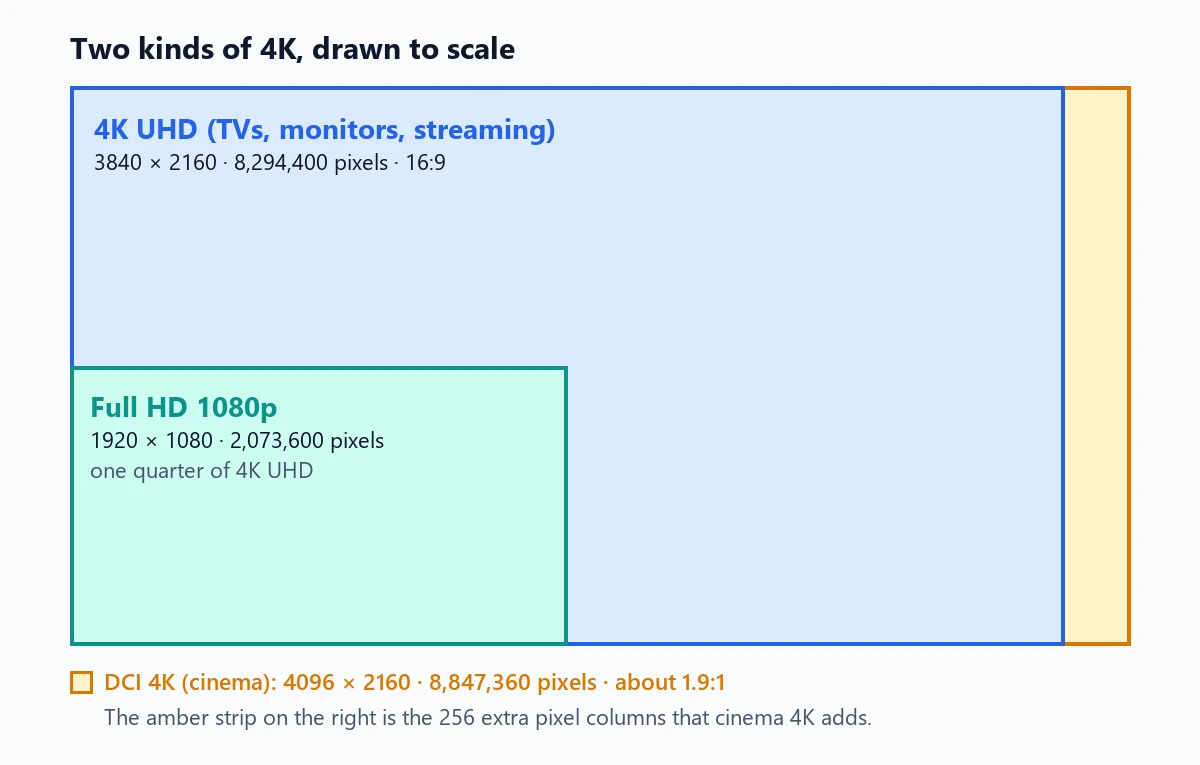
How Many Pixels in 4K?
A 4K UHD frame has 8,294,400 pixels: 3840 columns × 2160 rows. Written as a 4K size in pixels for a design brief or export setting, that is "3840 × 2160 px" (or 3840x2160). DCI 4K has 8,847,360 pixels, about 6.7% more. If you are asking how much resolution is 4K compared with what you have now, the quick rule is: four times 1080p, nine times 720p, and a quarter of 8K.
4K Screen Resolution Pixels at Different Scaling Settings
On a computer, the 4K screen resolution pixels stay at 3840 × 2160, but operating systems scale text and icons so they are not tiny. The scale setting decides how much workspace you get:
| Display scaling | Looks like a screen of | Typical use |
|---|---|---|
| 100% | 3840 × 2160 | 40-inch and larger 4K monitors |
| 125% | 3072 × 1728 | 32-inch 4K monitors, sharp eyes |
| 150% | 2560 × 1440 | 27 and 32-inch 4K monitors (common default) |
| 200% | 1920 × 1080 | 24-inch 4K monitors and 4K laptops: Full HD workspace, extra-sharp text |
4K Resolution Compared to 1080p (and Other Resolutions)
| Resolution | Pixel dimensions | Total pixels | Megapixels | Share of 4K UHD |
|---|---|---|---|---|
| 480p (SD widescreen) | 854 × 480 | 409,920 | 0.4 MP | 5% |
| 720p (HD) | 1280 × 720 | 921,600 | 0.9 MP | 11% (1/9) |
| 1080p (Full HD) | 1920 × 1080 | 2,073,600 | 2.1 MP | 25% (1/4) |
| 1440p (QHD) | 2560 × 1440 | 3,686,400 | 3.7 MP | 44% |
| 4K UHD (2160p) | 3840 × 2160 | 8,294,400 | 8.3 MP | 100% |
| 5K | 5120 × 2880 | 14,745,600 | 14.7 MP | 178% |
| 8K UHD (4320p) | 7680 × 4320 | 33,177,600 | 33.2 MP | 400% |
Is 1920 x 1080 resolution 4K? No. 1920 × 1080 is 1080p (Full HD), exactly one quarter of a 4K UHD frame: put four 1080p images in a 2 × 2 grid and you get 3840 × 2160. That is why a 1080p video looks soft on a 4K screen; the screen has to stretch each source pixel over four of its own. To see how the two compare on real screens and at real viewing distances, read 1080p vs 4K. For the older HD labels (HD Ready, Full HD, UHD), see HD vs 4K.
What do those extra pixels buy you? Mostly the ability to zoom in. The slider shows the same small area of a 4K photo of a library: once from the Full HD version of the frame and once from the native 4K frame. In Full HD, the caption under the framed engraving is a smudge; in 4K you can read it.


4K Image Sizes by Aspect Ratio
"4K" strictly describes the 16:9 screen resolution, but people also use it for images whose long side is about 4,000 pixels, or whose short side matches the 2160 rows of a 4K screen. Here are the common 4K-class image sizes:
| Aspect ratio | 4K-class size | Megapixels | Size that keeps 2160 rows | Typical use |
|---|---|---|---|---|
| 16:9 landscape | 3840 × 2160 | 8.3 MP | 3840 × 2160 | Desktop and TV wallpapers, video frames, YouTube 4K |
| 9:16 vertical | 2160 × 3840 | 8.3 MP | 1215 × 2160 | Phone wallpapers, Reels and Shorts in 4K |
| 1:1 square | 3840 × 3840 (or 4096 × 4096) | 14.7 MP (16.8 MP) | 2160 × 2160 | Album art, profile images, product shots, textures |
| 4:5 portrait | 3072 × 3840 | 11.8 MP | 1728 × 2160 | Instagram-style portrait posts, prints |
| 3:2 | 3840 × 2560 | 9.8 MP | 3240 × 2160 | Camera photos, 4 × 6 and 8 × 12 prints |
| 4:3 | 3840 × 2880 | 11.1 MP | 2880 × 2160 | Phone photos, tablets |
| 21:9 ultrawide | 5120 × 2160 (5K2K monitors) | 11.1 MP | 5040 × 2160 | Ultrawide wallpapers and cinema-style frames |
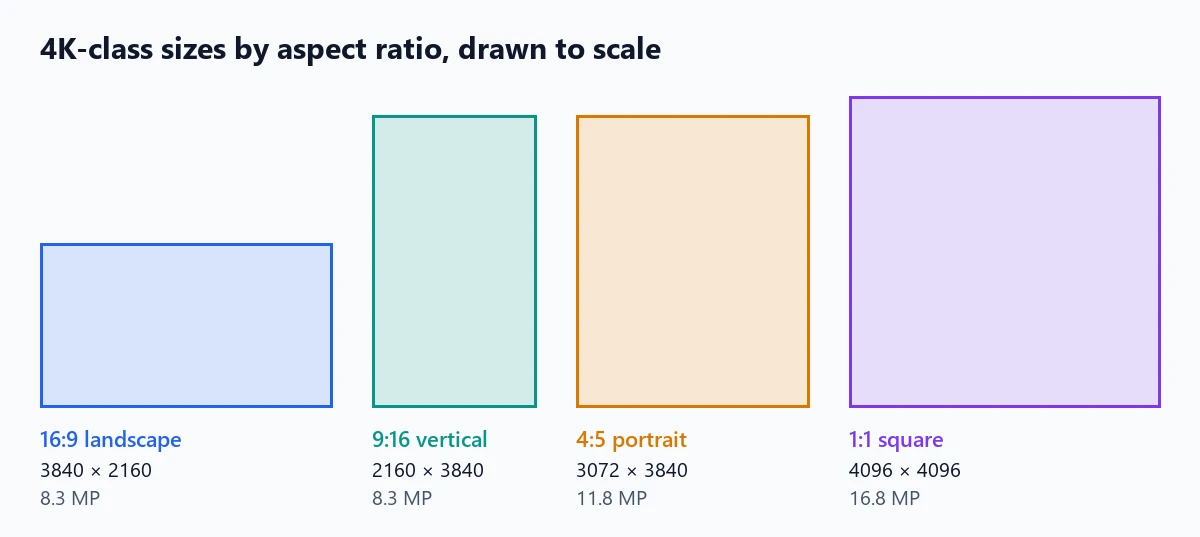
The 4:5 4K ratio
The 4:5 4K ratio comes up for portrait posts and prints. At a 3840-pixel long side, a 4:5 image is 3072 × 3840; cropped from a 16:9 4K video frame, it is 1728 × 2160. Social apps usually display 4:5 posts at around 1080 × 1350, so a 4K-class file mainly gives you headroom for cropping and printing.
What is 4096x4096?
4096x4096 is a square size used for "4K textures" in 3D modeling and games, high-resolution square artwork, and some AI image outputs. It is a power of two (2^12 on each side), which graphics hardware handles efficiently, and it holds 16,777,216 pixels (16.8 MP), roughly twice a 4K UHD screen. Uncompressed, a 4096 × 4096 RGB image is about 50 MB (67 MB with an alpha channel), which is why game engines store such textures in compressed GPU formats.
4K wallpapers
- Desktop or TV: 3840 × 2160.
- Phone (vertical 4K): 2160 × 3840 covers almost any phone screen with room to spare; modern phones are around 1080 to 1440 pixels wide.
- Ultrawide monitor: 3440 × 1440 or 5120 × 2160, depending on the screen; a 3840 × 2160 image would need cropping to fit 21:9.
4K File Size: How Big Is a 4K Image?
The pixel count fixes the uncompressed size; the file format decides how much of it you store. We saved the same 3840 × 2160 photo (the library frame above) in common formats:
| Format | 4K frame (3840 × 2160) | Same photo at 1080p |
|---|---|---|
| Uncompressed 8-bit RGB | 24.9 MB | 6.2 MB |
| PNG (lossless) | 17.9 MB | 4.3 MB |
| JPEG, quality 90 | 3.5 MB | 0.9 MB |
| WebP, quality 80 | 2.4 MB | 0.5 MB |
Photos with smooth areas (sky, studio backdrops) compress much smaller than detailed scenes like this one, so treat these as an upper-middle example. For video, 4K takes more data per minute: streaming services commonly recommend about 15 to 25 Mbps for 4K, and phones recording 4K at 30 frames per second in HEVC typically use around 170 MB per minute.
4K Display Resolution: Pixel Density on Monitors and TVs
Every 4K screen has the same 3840 × 2160 pixels, so the bigger the screen, the larger each pixel. Pixel density, measured in pixels per inch (PPI), tells you how sharp a 4K display resolution will look at a given size:
| Screen size | Resolution of 4K monitor or TV panels | Pixel density | Each pixel is about |
|---|---|---|---|
| 15.6-inch laptop | 3840 × 2160 | 282 PPI | 0.09 mm |
| 24-inch monitor | 3840 × 2160 | 184 PPI | 0.14 mm |
| 27-inch monitor | 3840 × 2160 | 163 PPI | 0.16 mm |
| 32-inch monitor | 3840 × 2160 | 138 PPI | 0.18 mm |
| 43-inch TV or monitor | 3840 × 2160 | 102 PPI | 0.25 mm |
| 55-inch TV | 3840 × 2160 | 80 PPI | 0.32 mm |
| 65-inch TV | 3840 × 2160 | 68 PPI | 0.37 mm |
| 75-inch TV | 3840 × 2160 | 59 PPI | 0.43 mm |
As general guidance, a person with 20/20 vision stops seeing individual 4K pixels at roughly 0.8 times the screen diagonal: about 1.8 feet from a 27-inch monitor or 3.6 feet from a 55-inch TV. Sit farther back and the picture looks perfectly smooth, which is also why the jump from 4K to 8K is hard to see in most living rooms.
How Big Can You Print a 4K Image?
Print size depends on how many pixels you spread over each inch of paper. Divide 3840 and 2160 by the PPI you want:
| Print quality | PPI | 4K UHD (3840 × 2160) prints at | For comparison, 1080p prints at |
|---|---|---|---|
| Sharp photo print, viewed up close | 300 | 12.8 × 7.2 in (32.5 × 18.3 cm) | 6.4 × 3.6 in |
| Good photo print | 240 | 16 × 9 in (40.6 × 22.9 cm) | 8 × 4.5 in |
| Wall print, viewed from arm's length | 200 | 19.2 × 10.8 in (48.8 × 27.4 cm) | 9.6 × 5.4 in |
| Poster, viewed from a few feet | 150 | 25.6 × 14.4 in (65.0 × 36.6 cm) | 12.8 × 7.2 in |
| Large poster, viewed from across a room | 100 | 38.4 × 21.6 in (97.5 × 54.9 cm) | 19.2 × 10.8 in |
Common photo papers are not 16:9, so you will crop. Cropped to 3:2, a 4K frame is 3240 × 2160: enough for an 8 × 12 inch print at 270 PPI or a 4 × 6 at well over 300 PPI. The photo print size guide shows the pixels every paper size needs and lets you crop to it. Changing the DPI number in a file only changes the print size it reports, not the detail. The increase DPI of image tool sets the DPI value a print shop reads and shows the resulting print size; if that size is too small at 300 DPI, add real pixels with the photo enlarger first.
How to Make an Image 4K Resolution
If your picture is smaller than 4K and you need it for a 4K wallpaper, a TV slideshow, a large print, or a client who asked for "4K", here is the reliable way to get there:
- Check the current size. Open the image properties: anything under 3840 pixels on the long side (for a landscape 16:9 image) is below 4K.
- Upscale with AI rather than a plain resize. A plain resize only stretches pixels and looks soft. The 4K image upscaler enlarges the picture until its long side reaches at least 3840 pixels and rebuilds sharp edges and texture without changing faces, text, or colors. For photos that are also blurry, increase image resolution has a restore mode that cleans up detail as it enlarges.
- Crop to the target shape. Crop to 16:9 for screens, 9:16 for phones, or the paper ratio for prints, after upscaling so you keep as many pixels as possible.
- Export with care. Save photos as high-quality JPEG or WebP, and graphics or screenshots with text as PNG.
For videos, the video upscaler doubles a 1080p clip to 3840 × 2160.
Frequently Asked Questions
What is 4K resolution in pixels?
4K resolution on TVs, monitors, phones and streaming is 3840 x 2160 pixels, which is 8,294,400 pixels in total, in a 16:9 shape. It is also called 4K UHD, Ultra HD or 2160p. Digital cinema uses DCI 4K, which is 4096 x 2160 pixels (8,847,360 pixels).
Is 1920x1080 resolution 4K?
No. 1920 x 1080 is 1080p, also called Full HD. 4K UHD is 3840 x 2160, twice as wide and twice as tall, so it has four times as many pixels. A 1920 x 1080 image or video shown on a 4K screen is scaled up to fill it.
How many megapixels is 4K?
4K UHD is about 8.3 megapixels (3840 x 2160 = 8,294,400 pixels). Cinema DCI 4K is about 8.8 megapixels. Any camera or phone with 8.3 MP or more in a 16:9 crop can capture a full 4K frame; a typical 12 MP phone photo (4032 x 3024) still has 4032 x 2268 pixels after cropping to 16:9.
Is 4K the same as 2160p and UHD?
For consumer screens, yes. 2160p names the resolution by its 2160 rows of pixels, UHD (Ultra HD) is the TV industry name, and 4K is the marketing name based on the roughly 4,000 pixel width. All three mean 3840 x 2160. Only cinema 4K (4096 x 2160) differs.
Is 4096x4096 4K?
4096x4096 is a square "4K texture" or 4K-class image: 4096 pixels on each side, about 16.8 megapixels. It is common for 3D textures, game assets and square artwork. It is not a screen resolution; 4K screens are 3840 x 2160.
What size is a 4:5 4K image?
A 4:5 portrait image with a 4K-class long side is 3072 x 3840 pixels (about 11.8 MP). If you keep the 2160-pixel height of a 4K frame instead, a 4:5 crop is 1728 x 2160. Many social apps downscale 4:5 posts to around 1080 x 1350 for display.
How big is a 4K image file?
An uncompressed 8-bit RGB 4K frame is about 24.9 MB. Compressed, it is much smaller: a detailed 3840 x 2160 photo saved as a high-quality JPEG is typically around 1 to 4 MB, a WebP somewhat smaller, and a PNG often 10 to 20 MB. The exact size depends on how much fine detail the picture has.
How large can I print a 4K image?
At 300 pixels per inch, the standard for sharp photo prints, a 3840 x 2160 image prints at 12.8 x 7.2 inches (32.5 x 18.3 cm). At 150 PPI, fine for posters viewed from a few feet away, it reaches 25.6 x 14.4 inches. For bigger prints, upscale the image first.
Is 2560x1440 2K or 4K?
Neither, strictly. 2560 x 1440 is 1440p or QHD (Quad HD), with about 3.7 megapixels. Monitor makers often sell it as "2K", but real cinema 2K is 2048 x 1080. 4K UHD has 2.25 times as many pixels as 1440p.
Final Takeaway
4K resolution is 3840 × 2160 pixels (8.3 MP, 16:9) on consumer screens and 4096 × 2160 in cinema. It holds four 1080p frames, prints sharply up to about 12.8 × 7.2 inches at 300 PPI, and takes roughly 1 to 4 MB as a high-quality JPEG. Square and portrait images can be "4K-class" at sizes such as 4096x4096 or 3072 × 3840. When a picture falls short, upscale it rather than stretching it. To decide whether you need 4K at all, compare 1080p vs 4K on real screens, or decode the TV labels in HD vs 4K.
The comparison slider is a demonstration made from a CC0 featured picture on Wikimedia Commons ("Abbotsford House Study Room"): the 4K version is a 3840 × 2160 crop of Wikimedia's 3840-pixel rendition of the photo, and the Full HD version is the same frame reduced to 1920 × 1080 and scaled back up with standard bicubic interpolation. No AI or sharpening was applied. File sizes were measured on that frame. Viewing distances follow the common 20/20 vision rule and are general guidance.