
1080p vs 4K: Is 4K Better Than 1080p?
4K resolution vs 1080p: 4K has four times the pixels, but is it better for you? Compare sharpness, viewing distance, screen size, file size, gaming and video.
Short answer: 4K (3840 × 2160) has four times the pixels of 1080p (1920 × 1080), so yes, 4K is better than 1080p whenever you can actually see the extra detail: on large screens, at close viewing distances, on 27-inch and larger monitors, and when you crop or edit footage. From across a living room, on a small TV, or on a phone, the 1080p and 4K difference shrinks to almost nothing, and 1080p wins on file size, bandwidth, and gaming frame rates.
Whether you call it 1080 vs 4K or Full HD vs UHD, this guide compares the two the way you will actually use them: the real pixel numbers, a side-by-side close-up, the viewing distance where 4K starts to matter, and a verdict for TVs, monitors, streaming, gaming, and recording video. Tap the boxes below to see how the two resolutions stack up at true scale.
4K Resolution vs 1080p: The Numbers
Here is 4K versus 1080p in numbers. Both use the same 16:9 widescreen shape; the difference is how finely each one divides the picture.
| 1080p (Full HD) | 4K (Ultra HD) | |
|---|---|---|
| Pixel dimensions | 1920 × 1080 | 3840 × 2160 |
| Total pixels | 2,073,600 | 8,294,400 |
| Megapixels | 2.1 MP | 8.3 MP |
| Rows of pixels ("p" number) | 1080 | 2160 |
| Other names | FHD, Full HD | UHD, Ultra HD, 2160p, 4K UHD |
| Aspect ratio | 16:9 | 16:9 |
| Pixel density on a 27-inch monitor | 82 PPI | 163 PPI |
| Pixel density on a 55-inch TV | 40 PPI | 80 PPI |
| Typical streaming bitrate | about 5 Mbps | about 15 to 25 Mbps |
| One frame as a high-quality JPEG | about 0.3 to 0.9 MB | about 1 to 3.5 MB |
Is 4K just 4 x 1080? Not quite, and this trips up a lot of people. 4K is two times 1080p in each direction: 2 × 1920 = 3840 columns and 2 × 1080 = 2160 rows. Counting rows only, 4K versus 1080 is 2160 against 1080, exactly double. Multiply the two directions together and you get 4 × the total pixels, which is where the "four times 1080p" rule comes from. So the resolution 4K vs 1080p gap is 4× in pixel count but 2× in linear sharpness.
What's the Difference Between 1080p and 4K?
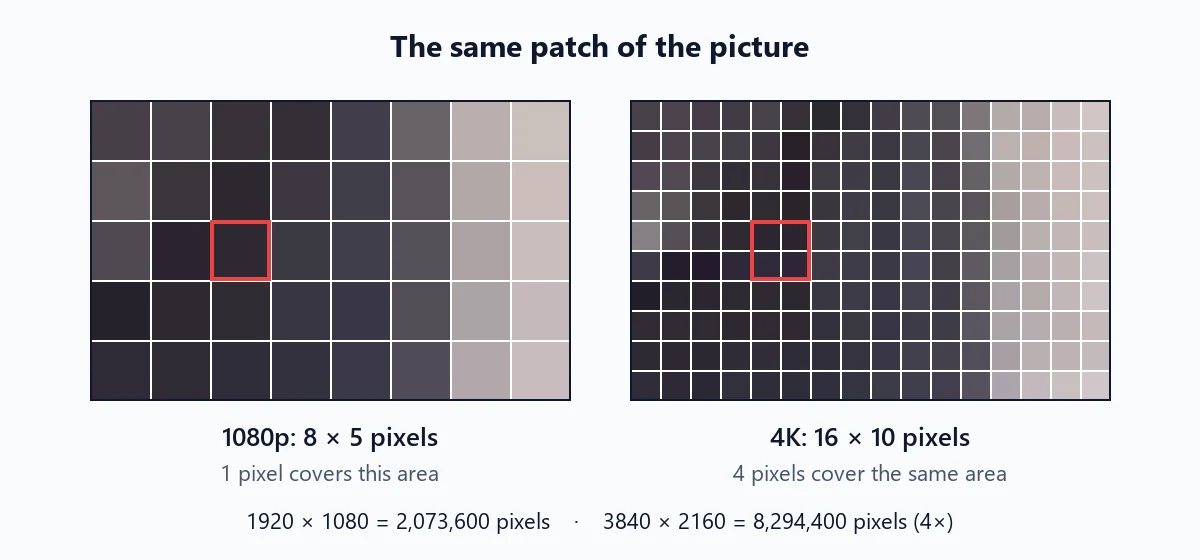
The short version: on the same size screen, every 1080p pixel is replaced by a 2 × 2 block of four smaller 4K pixels. That changes five things you can notice.
- Fine detail. Hair, feathers, fabric weave, foliage, and small text get twice as many pixels across, so they resolve instead of blending into a soft texture.
- Edges. Diagonal lines and curves have smaller "steps", so they look smoother without needing as much anti-aliasing.
- Room to crop. A 4K frame can be cropped to a quarter of its area and still deliver a full 1080p image. That is why many creators film in 4K even when they publish in 1080p.
- Data. Four times the pixels means larger files and more bandwidth, even though modern codecs compress 4K more efficiently per pixel.
- Processing power. Games, editors, and players have to push four times as many pixels every frame.
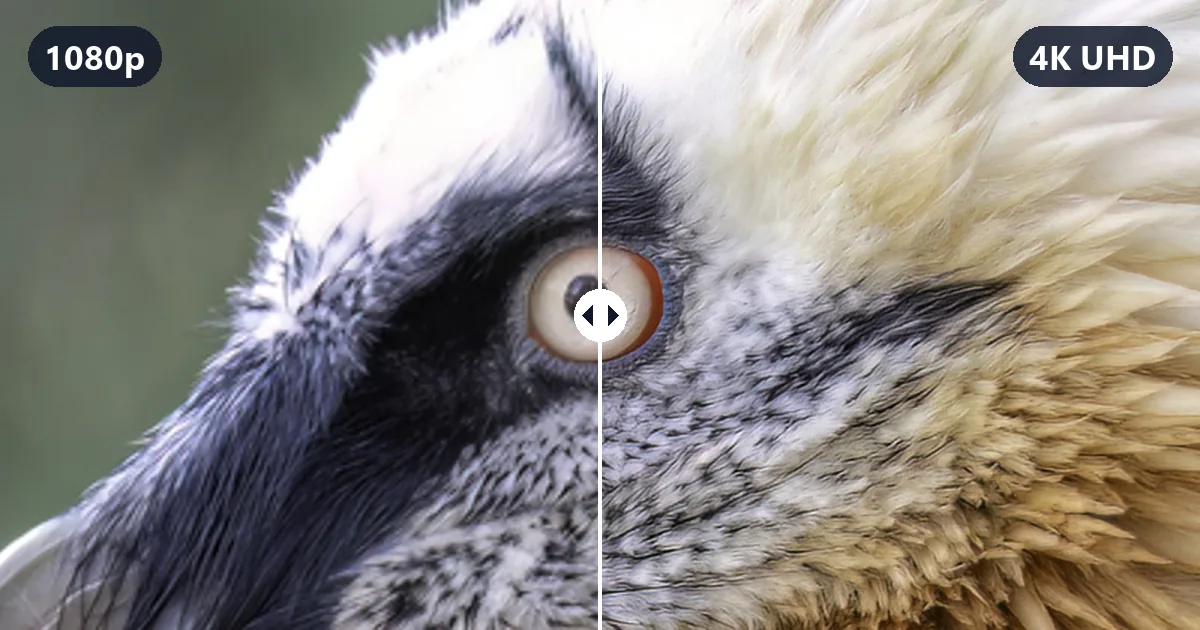
Here is a 4K and 1080p comparison of the same frame. Both images show the exact same 600 × 400 pixel area of a 3840 × 2160 frame, enlarged 2× so the difference is visible on any screen. Drag the divider.


Notice where the 1080p side loses out: the bristles near the eye, the separate feathers on the forehead, and the texture in the dark mask. Large shapes, colors, and the overall look stay the same. That is the honest picture of 1080p resolution vs 4K resolution: 4K adds fine detail, not a different image.
How Much Better Is 4K Than 1080p?
On a spec sheet: four times the pixels and twice the pixel density. On your screen: anywhere from "night and day" to "no visible difference", depending on three things.
- Screen size. 4K compared to 1080p has twice the pixel density at the same size, and bigger screens make each pixel bigger. A 1080p pixel on a 65-inch TV is about 0.75 mm wide; on a 27-inch monitor it is about 0.31 mm.
- Viewing distance. Your eyes can only separate details down to a certain angle. Sit farther back and small pixels merge, whatever the resolution.
- The source. A 4K screen showing a 1080p broadcast, an old DVD, or a low-bitrate stream is not showing 4K detail. The TV has to invent the missing pixels by scaling.
When all three line up (a big screen, a close seat, and real 4K content), the difference is obvious. When one of them is missing, it fades fast.
Can You Tell the Difference Between 1080p and 4K?
A common rule of thumb is that a person with 20/20 vision can separate details about 1/60 of a degree apart. Using that rule, here is the distance where 1080p pixels become too small to see, and therefore the distance where 4K starts to pay off. Treat it as general guidance: sharper eyes, high-contrast text, and HDR highlights can push the visible difference a little farther.
| Screen size (16:9) | 1080p pixel density | 4K pixel density | 4K looks sharper than 1080p closer than | 4K pixels themselves visible closer than |
|---|---|---|---|---|
| 24-inch monitor | 92 PPI | 184 PPI | 3.1 ft (0.95 m) | 1.6 ft (0.48 m) |
| 27-inch monitor | 82 PPI | 163 PPI | 3.5 ft (1.07 m) | 1.8 ft (0.54 m) |
| 32-inch monitor or TV | 69 PPI | 138 PPI | 4.2 ft (1.27 m) | 2.1 ft (0.63 m) |
| 43-inch TV | 51 PPI | 102 PPI | 5.6 ft (1.70 m) | 2.8 ft (0.85 m) |
| 55-inch TV | 40 PPI | 80 PPI | 7.2 ft (2.18 m) | 3.6 ft (1.09 m) |
| 65-inch TV | 34 PPI | 68 PPI | 8.5 ft (2.58 m) | 4.2 ft (1.29 m) |
| 75-inch TV | 29 PPI | 59 PPI | 9.8 ft (2.97 m) | 4.9 ft (1.49 m) |
| 85-inch TV | 26 PPI | 52 PPI | 11.1 ft (3.37 m) | 5.5 ft (1.68 m) |
Two quick readings of the table: at a desk, almost everyone sits inside the "4K looks sharper" distance, so monitors show the difference of 4K and 1080p clearly. In a living room with a 55-inch TV and a sofa 9 to 10 feet away, you are past the 1080p limit, so most of 4K's extra detail is lost. Move up to a 75-inch screen at the same distance and 4K starts to matter again.
I Can't Tell the Difference Between 1080p and 4K: Why?
If you bought a 4K screen and it looks no sharper, run through this list:
- You sit too far away for the screen size (check the table above).
- The content is not 4K. Cable and broadcast channels, many older shows, and lots of online videos are 720p or 1080p.
- The stream is limited. Many streaming services only send 4K on certain plans, apps, or devices, and drop to lower resolutions when the connection slows.
- The player is set lower. Video apps often default to "Auto" or a data-saver setting. Pick 2160p or 4K manually to check.
- The connection chain is not 4K-ready. An older HDMI port, cable, receiver, or streaming stick may cap the signal at 1080p or at 30 frames per second.
- The picture mode is soft. Motion smoothing and heavy noise reduction can hide fine detail; try a Movie or Filmmaker mode.
Is There a Big Difference Between 1080p and 4K on a Monitor?
Usually yes, because you sit so close. The difference is most obvious in text, which is made of thin strokes and sharp edges. The pair below simulates the same small patch of a 27-inch screen: at 1080p, each pixel is twice as wide, so letters show visible stair-steps; at 4K with 200% scaling, the same text is drawn with four times as many pixels.
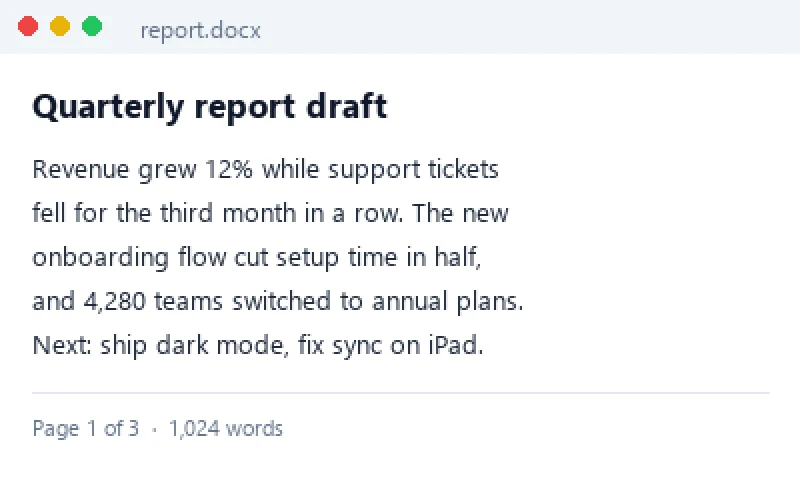
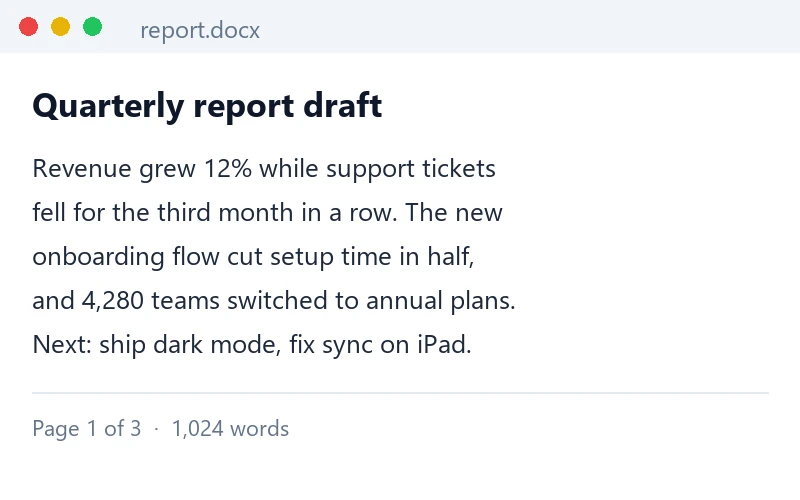
Simulation: the same text rendered at 1080p and at 4K pixel density for the same physical patch of screen, shown at matching size.
In a 4K comparison to 1080p on a monitor, you also get more usable workspace if you lower the scaling, at the cost of smaller text. A middle option is 1440p (2560 × 1440), covered in the next section but one.
1080p and HDR: Why Some 4K Upgrades Look Better for Other Reasons
People often compare an old 1080p TV with a new 4K TV and credit all of the improvement to resolution. Part of it usually comes from HDR (high dynamic range): brighter highlights, deeper shadows, and a wider range of colors. HDR is separate from resolution. Most 4K TVs support it and many older 1080p TVs do not, but HDR video can exist at 1080p too, and some online videos are offered in 1080p HDR.
So when you weigh 1080p and HDR against 4K, remember:
- A good 1080p HDR picture can look more striking than a 4K SDR picture with poor contrast.
- A new 4K TV usually also brings a better panel, better processing, and wider color, which helps 1080p content too.
- For the biggest visible upgrade, you want both: 4K resolution and HDR content shown on a screen that is bright enough to do it justice.
1080p vs 2K vs 4K (and Where 1440p Fits)
"2K" causes confusion because it means two different things:
| Name | Pixels | Megapixels | Where you see it |
|---|---|---|---|
| 1080p (Full HD) | 1920 × 1080 | 2.1 MP | TVs, laptops, budget monitors, streaming, most online video |
| DCI 2K | 2048 × 1080 | 2.2 MP | Digital cinema projection and film workflows |
| 1440p (QHD, often sold as "2K") | 2560 × 1440 | 3.7 MP | 27-inch gaming and office monitors, some phones |
| 4K UHD | 3840 × 2160 | 8.3 MP | TVs, larger monitors, cameras, phones, streaming |
| DCI 4K | 4096 × 2160 | 8.8 MP | Cinema cameras and projection |
In monitor shopping, "1080p vs 2K vs 4K" almost always means 1080p vs 1440p vs 4K. 1440p has about 1.8 times the pixels of 1080p and about 44% of 4K, which makes it a popular middle ground: visibly sharper than 1080p at 27 inches, yet much easier to run at high frame rates than 4K. Cinema 2K, on the other hand, is barely different from 1080p. For the full story on the cinema formats, see what 4K resolution is.
Is 4K or 1080p Better? Use Case by Use Case
1080p versus 4K is not one decision but several. Here is how it plays out where it matters.
TVs and movies: is 4K resolution better than 1080p?
For new TVs, the question has mostly been settled: almost every TV above 43 inches is 4K, and the price difference at those sizes is small. 4K matters most on 55-inch and larger screens viewed from closer than the table above suggests, with 4K Blu-ray discs or high-quality 4K streams. If you mostly watch cable, sports broadcasts, or older shows, you will be watching scaled-up 1080p or 720p most of the time, and the TV's processing will matter more than its pixel count. For the TV naming jungle (HD Ready, Full HD, UHD), see HD vs 4K.
Streaming: is 1080p or 4K better on a slow connection?
Resolution needs bitrate. A 4K stream squeezed through a slow connection shows blocky shadows and smeared motion, and a solid 1080p stream will often look cleaner. As a rule of thumb, stick with 1080p below about 15 Mbps of stable speed, and choose 4K above about 25 Mbps.
| Stream | Typical recommended speed | Data used per hour |
|---|---|---|
| 720p HD | about 3 Mbps | about 1.4 GB |
| 1080p Full HD | about 5 Mbps | about 2.3 GB |
| 4K UHD | about 15 to 25 Mbps | about 7 to 11 GB |
Data per hour is simple math: Mbps × 3600 seconds ÷ 8 bits per byte. Actual numbers vary by service, codec, and content; fast action and grain use more.
Gaming: which is better 1080p or 4K?
4K looks stunning in slower, scenic single-player games on a big TV or a 27 to 32-inch monitor. The catch is performance: at the same settings, the graphics card has to draw four times the pixels of 1080p, which can cut frame rates sharply. Competitive players usually choose 1080p or 1440p at 144 Hz or more, because smooth motion and low input lag matter more than fine detail. Built-in upscalers in modern games, which render at a lower internal resolution and output to 4K, narrow the gap and are often the best compromise. Consoles that support 4K also often render below native 4K and upscale.
Recording video: which is better 4K or 1080p?
If your phone or camera and your storage can handle it, record in 4K when the footage matters:
- You can crop and reframe in editing: a 1920 × 1080 window fits inside a 3840 × 2160 frame four times over, so you can zoom 2× and still export clean 1080p.
- Downscaling 4K to 1080p produces a cleaner, more detailed 1080p video than recording in 1080p directly.
- The footage stays future-proof for 4K screens.
Stick with 1080p for long recordings, live streams, quick social clips, and devices that overheat or run out of space. The difference 1080p and 4K make to storage is large: a typical recent phone recording in the efficient HEVC format uses roughly 60 MB per minute at 1080p and 30 fps, versus roughly 170 MB per minute at 4K and 30 fps (and around 400 MB per minute at 4K and 60 fps).
Monitors: what's better 4K or 1080p at a desk?
| Monitor size | 1080p | 1440p | 4K |
|---|---|---|---|
| 24-inch | Good (92 PPI), easy to run | Sharper (122 PPI) | Very sharp (184 PPI), needs 150 to 200% scaling |
| 27-inch | Soft for text (82 PPI) | Popular sweet spot (109 PPI) | Crisp (163 PPI), great for photo and text work |
| 32-inch | Too soft for most (69 PPI) | Acceptable (92 PPI) | Best choice (138 PPI) |
Photos and editing
A 4K monitor shows an 8.3 MP slice of your photo at once, so you can judge focus and fine retouching without zooming in as often. For images you publish, the resolution you need depends on where they go: 1080p-class images (around 1920 px wide) are plenty for most web pages and social posts, while 4K images suit wallpapers, large displays, and some prints. If a photo is too small, the 4K image upscaler can enlarge it to 4K size.
4K vs 1080p Comparison: The Verdict
Still wondering what is better 1080p or 4K for your own setup? Find your situation in the table.
| Your situation | Better choice | Why |
|---|---|---|
| 55-inch or larger TV, seated within about 7 to 8 feet | 4K | Extra detail is clearly visible |
| 43-inch or smaller TV across a room | Either (buy on picture quality) | 1080p pixels are already too small to see |
| 27-inch or larger monitor for text, photos, or video editing | 4K | You sit close enough to see every pixel |
| Competitive gaming, mid-range graphics card | 1080p or 1440p | High frame rates matter more |
| Single-player or console gaming on a big TV | 4K (with upscaling) | Scenery benefits from detail |
| Streaming on less than about 15 Mbps | 1080p | A clean 1080p beats a starved 4K stream |
| Recording important video | 4K | Room to crop, cleaner downscaled 1080p, future-proof |
| Long recordings, live streams, limited storage | 1080p | About a third of the file size |
| Phone screen | Either | Pixels are too small to tell apart |
Turning 1080p Into 4K: What Upscaling Can and Can't Do
Any 4K TV or monitor scales a 1080p picture up automatically, but standard scaling only spreads the existing pixels over a bigger grid, which is exactly why the left side of the slider above looks soft. AI upscaling works differently: a trained model predicts the missing detail and redraws edges and textures at the new size. The result looks much closer to native 4K, though it cannot recover detail that was never captured, so very small or blurry sources still have limits.
- Photos and images: the 4K image upscaler enlarges a picture to 4K size without changing its content, and the image upscaler handles 2× and 4× enlargements for any size. To fix soft or blurry photos as well as enlarge them, try increase image resolution.
- Videos: the video upscaler doubles the width and height of a clip, so 1080p becomes 3840 × 2160 4K; the HD video converter brings old SD clips up to 1080p-class HD.
Frequently Asked Questions
Is 4K better than 1080p?
On paper, always: 4K (3840 x 2160) has four times the pixels of 1080p (1920 x 1080), so it can show finer detail and sharper text. In practice the gain is only visible when the screen is big enough or close enough, the content is real 4K, and the stream or file has enough bitrate. On a 55-inch TV, for example, 4K looks clearly sharper from about 7 feet or closer, while from 10 feet most people see little difference.
Is 1080p better than 4K for anything?
Yes. 1080p needs roughly a third of the data and storage of 4K, or less, is far easier for a graphics card to run at high frame rates, and is the safer choice on slow internet, for live streaming, and for long recordings. A high-bitrate 1080p source can also look better than a heavily compressed 4K stream.
What is the difference between 1080p and 4K?
1080p is 1920 x 1080 pixels (about 2.1 megapixels) and 4K UHD is 3840 x 2160 pixels (about 8.3 megapixels). 4K has twice as many pixels across and twice as many down, which is four times as many in total, so each pixel is half as wide on the same size screen.
Is 4K 1080p or 2160p?
4K is 2160p. The "p" number counts the rows of pixels: 1080p has 1080 rows and 4K UHD has 2160. TV makers call 3840 x 2160 "4K" because it is close to 4,000 pixels wide; cinema 4K is slightly wider at 4096 x 2160.
What is better 4K or 1080p for gaming?
It depends on the game and the hardware. 4K looks best in slower, scenic games on a large TV or a 27 to 32-inch monitor, but it asks the graphics card to draw four times the pixels. For fast competitive games, most players prefer 1080p or 1440p at a high refresh rate, because smooth frame rates matter more than extra detail.
Does 4K actually look better than 1080p on a phone?
Rarely. A 6-inch phone screen is so small that even a 1080p-class panel packs more pixels per inch than your eye can separate at normal distance. 4K videos can still look a little cleaner on a phone because they are usually streamed at a higher bitrate, but the extra pixels themselves are hard to see.
Is 4K UHD better than 1080p on a small TV?
On a 32 to 43-inch TV watched from the sofa, the difference is small: on a 43-inch screen you would need to sit within about 5.6 feet to see 4K detail that 1080p cannot show. Most small TVs sold today are 4K anyway, so pick one for its picture quality, smart features and price rather than for the pixel count alone.
What's better 1080p or 4K for a 24-inch monitor?
1080p is fine on a 24-inch monitor for gaming and general use (about 92 pixels per inch). 4K at 24 inches is very sharp for text and photo work, but you will need display scaling of around 150 to 200%, and games need a strong graphics card to run at 4K. Many people find 1440p at 27 inches the better middle ground.
Can I convert a 1080p video or photo to 4K?
You can upscale it, but it will not become identical to native 4K. A basic resize only stretches the existing pixels. An AI upscaler, such as the EzImgMaker 4K image upscaler or video upscaler, rebuilds sharper edges and texture at the larger size, which looks much closer to 4K. Fine detail that was never captured cannot be recovered exactly.
Does 4K use more data than 1080p?
Yes. Streaming services commonly recommend about 15 to 25 Mbps for 4K and about 5 Mbps for 1080p. At those rates an hour of 4K uses roughly 7 to 11 GB, compared with about 2.3 GB for an hour of 1080p.
Final Takeaway
4K has four times the pixels of 1080p and twice the sharpness in each direction, and that advantage is real. Whether you see it comes down to screen size, viewing distance, and source quality. Choose 4K for big TVs watched up close, for monitors, and for recording video you care about; stay with 1080p (or 1440p) for fast gaming, limited bandwidth, and long recordings. Still deciding between labels on a TV box? Read HD vs 4K. Want every 4K number in one place, from 4096 × 2160 to print sizes? See what is 4K resolution.
Comparison images are demonstrations. The slider and pixel grid use a CC0 photo from Wikimedia Commons ("Gypaetus barbatus in Alpenzoo Innsbruck"): the 4K version is a 16:9 crop of the photo resized to 3840 × 2160, and the 1080p version is the same frame reduced to 1920 × 1080 and scaled back up with standard bicubic interpolation. No AI or sharpening was applied. JPEG frame sizes were measured on two sample photos at quality 90 and vary with the amount of detail. The monitor text pair is a rendering, not a photo of real screens. Viewing distances are calculated from the common 20/20 vision rule and are general guidance.