
HD vs 4K: What's the Difference?
HD vs 4K explained: HD is 1280 x 720, Full HD is 1920 x 1080 and 4K UHD is 3840 x 2160. See full HD vs high definition, which is better, and what to buy.
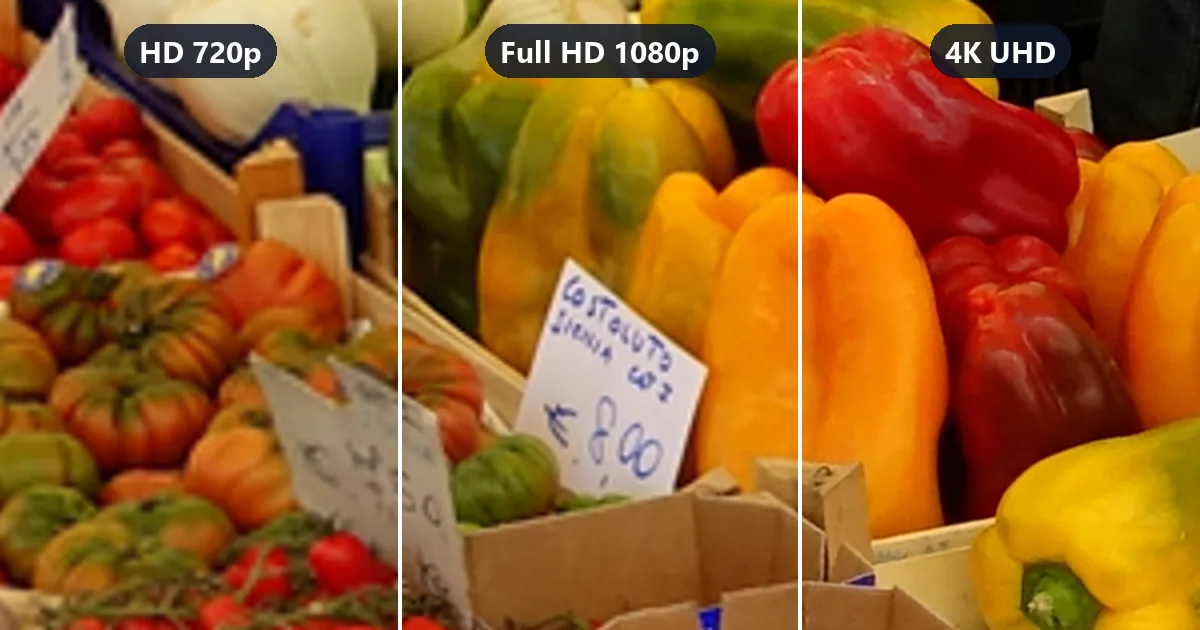
Short answer: HD and 4K are both resolutions, and the difference is the number of pixels. HD usually means 720p (1280 × 720), Full HD means 1080p (1920 × 1080), and 4K UHD means 3840 × 2160. 4K has nine times the pixels of HD and four times the pixels of Full HD, so it shows much finer detail on big screens and monitors. On small TVs viewed from across the room, Full HD already looks about as sharp as your eyes can tell.
The labels are where most of the confusion starts. "HD", "HD Ready", "Full HD", "UHD", and "4K" all appear on boxes, streaming menus, and camera settings, and they do not follow one naming rule. This guide untangles them, compares HD and 4K side by side, and tells you which one makes sense for a TV, a monitor, a laptop, or a video project. Tap a box below to compare HD vs 4K resolution at true scale.
What Is the Difference Between 4K & HD?
High definition is not one resolution but a family. Here is 4K versus HD in numbers, with Full HD in the middle:
| HD (720p) | Full HD (1080p) | 4K UHD (2160p) | |
|---|---|---|---|
| Pixel dimensions | 1280 × 720 | 1920 × 1080 | 3840 × 2160 |
| Total pixels | 921,600 | 2,073,600 | 8,294,400 |
| Megapixels | 0.9 MP | 2.1 MP | 8.3 MP |
| Compared with HD | 1× | 2.25× | 9× |
| Compared with Full HD | 0.44× | 1× | 4× |
| Other names | HD Ready, 720p | FHD, 1080p (1080i on broadcast) | UHD, Ultra HD, 2160p |
| Where you still see it | Small TVs, older broadcasts, low-data streaming | Most TVs under 43 inches, laptops, online video, Blu-ray | Almost all larger TVs, monitors, phones and cameras, premium streaming |
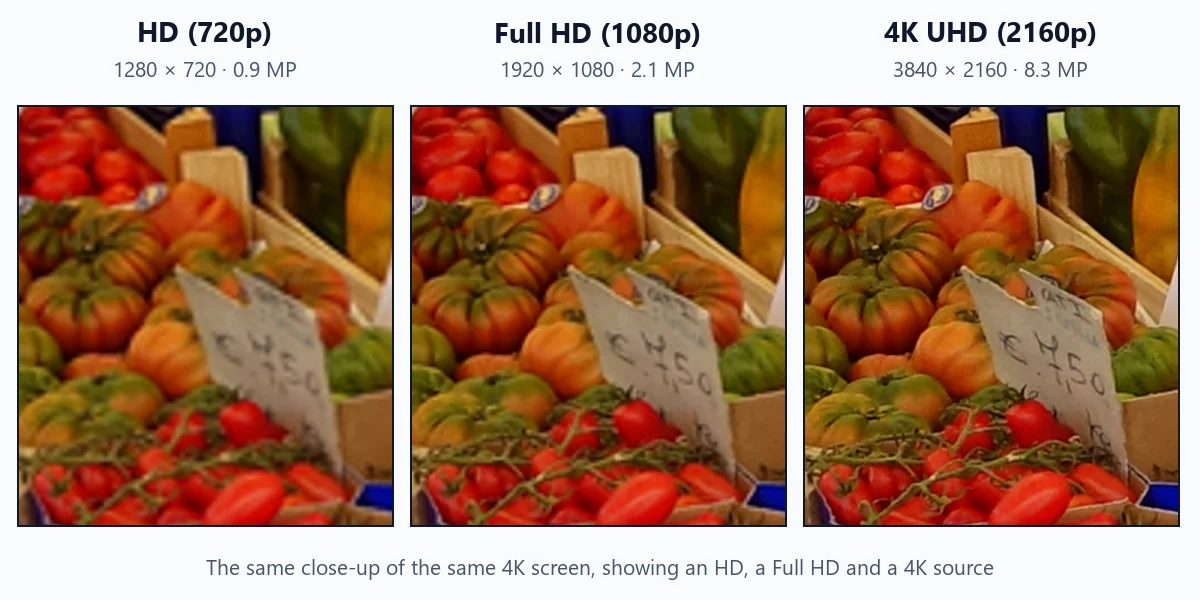
In short, 4K resolution vs HD is a 9× jump in pixels, and 4K vs HD in its Full HD form is a 4× jump. All three use the same 16:9 widescreen shape, so a 4K screen can show HD and Full HD content edge to edge by scaling it up. The difference in 4K and HD detail is easiest to see in fine textures and small text. Here is what the difference between 4K and 1080p (and 720p) looks like when the same scene is shown on one 4K screen:
Full HD vs High Definition: What the Labels Mean
When you compare full HD vs high definition, you are really comparing two tiers of the same family: plain HD is 720p and Full HD is 1080p, with 2.25 times as many pixels. The table decodes the labels you will run into, including the ones that look alike:
| Label on the box or menu | What it usually means | Pixels |
|---|---|---|
| SD (standard definition) | DVD and old TV quality, not HD | 720 × 480 (NTSC) or 720 × 576 (PAL), shown 4:3 or 16:9 |
| HD Ready, HD, 720p | Entry-level high definition | 1280 × 720 (some budget TVs: 1366 × 768) |
| Full HD, FHD, 1080p | Full high definition | 1920 × 1080 |
| 1080i | Broadcast Full HD sent as alternating half-frames | 1920 × 1080 (interlaced) |
| QHD, Quad HD, 1440p (often sold as "2K") | Four times 720p HD | 2560 × 1440 |
| 4K, UHD, Ultra HD, 2160p | Four times Full HD | 3840 × 2160 |
| 8K, 8K UHD | Four times 4K | 7680 × 4320 |
So what is the difference between HD and 4K labels in practice? Three tips for reading them:
- A product that says only "HD" is usually 720p-class. When a store shelf compares HD vs. 4K models, the "HD" one is rarely Full HD; look for 1920 × 1080 in the spec sheet.
- HD vs full HD on streaming plans: some services call 720p "HD" and 1080p "Full HD"; others call 1080p "HD". The plan details list the actual maximum resolution.
- 1080p vs HD on cameras and phones: a recording setting labeled "HD" is often 720p, while "FHD" or "1080p" is Full HD. Full HD vs 1080p is not a choice at all: they are two names for the same resolution.
Why HD Counts Rows and 4K Counts Columns
The naming switched halfway through. HD-era names count the rows of pixels: 720p has 720 rows, 1080p has 1080. "4K" counts the columns, roughly 4,000 (3840 on TVs, 4096 in cinema). Named the HD way, 4K would be 2160p, and you will see that label in video players. The step from HD to 4K therefore looks bigger than "720 to 4,000" suggests in one sense and smaller in another: rows go from 720 to 2160 (3×), columns from 1280 to 3840 (3×), and pixels by 3 × 3 = 9×. For the full set of 4K numbers, including cinema 4K, see what is 4K resolution.
The Difference Between HD, Full HD, 4K and 8K at a Glance
Each step in the modern ladder multiplies the pixel count by four (2 × the width and 2 × the height):
- HD (720p) → Quad HD (1440p): 4× the pixels. The name literally means "four HD screens".
- Full HD (1080p) → 4K UHD (2160p): 4× the pixels. A 4K screen holds four Full HD pictures in a 2 × 2 grid.
- 4K → 8K (4320p): 4× again, 33.2 million pixels, with very little native 8K content to watch.
From HD to 4K the total jump is 9× (2.25× from HD to Full HD, then 4× from Full HD to 4K), which is why moving from an old 720p TV to a 4K TV is so noticeable on a large screen.
1080p HD vs 4K: The Comparison Most People Mean
When someone asks about HD vs 4K today, they usually mean a 1080p HD screen or video against 4K, because 720p has mostly disappeared from new TVs and monitors bigger than 32 inches. In short:
- 4K has 4× the pixels of 1080p and twice the pixel density on the same screen.
- You see it on large TVs viewed closer than about 1.6 times the screen diagonal, on monitors at a desk, and when you crop or edit footage.
- Full HD wins on data, storage, and gaming performance.
What's the Difference Between 4K and 1080p in Daily Use?
Sharper text on monitors, finer textures in nature and sports footage on big TVs, and more room to crop photos and videos. What stays the same: colors, contrast, and motion, which depend on the panel and HDR rather than on pixel count. For a deeper look, including a drag-to-compare close-up, the viewing-distance table, and gaming and streaming verdicts, read 1080p vs 4K.
Is HD or 4K Better? It Depends on the Screen
Pixels only help when your eyes can resolve them. A common rule based on 20/20 vision gives a handy shortcut for 16:9 screens:
- HD (720p) stops showing visible pixels beyond about 2.3 × the screen diagonal.
- Full HD (1080p) stops showing visible pixels beyond about 1.6 × the diagonal.
- 4K stops showing visible pixels beyond about 0.8 × the diagonal.
If you sit farther than a resolution's distance, a higher resolution adds little you can see. Treat these as general guidance; eyesight, content, and HDR all shift the numbers a bit.
TVs: is HD or 4K better for your room?
| TV size | HD (720p) looks fully sharp beyond | Full HD looks fully sharp beyond | 4K shows all its detail at about | Sensible choice today |
|---|---|---|---|---|
| 32-inch | 6.2 ft (1.9 m) | 4.2 ft (1.3 m) | 2.1 ft (0.6 m) | HD or Full HD for a bedroom or kitchen; 4K only as a desk monitor |
| 43-inch | 8.4 ft (2.6 m) | 5.6 ft (1.7 m) | 2.8 ft (0.9 m) | Full HD or 4K; most new models are 4K anyway |
| 55-inch | 10.7 ft (3.3 m) | 7.2 ft (2.2 m) | 3.6 ft (1.1 m) | 4K |
| 65-inch | 12.7 ft (3.9 m) | 8.5 ft (2.6 m) | 4.2 ft (1.3 m) | 4K |
| 75-inch | 14.6 ft (4.5 m) | 9.8 ft (3.0 m) | 4.9 ft (1.5 m) | 4K |
Read it like this: sit between the Full HD and the 4K distance and 4K looks visibly sharper than Full HD; sit beyond the Full HD distance and the two look nearly the same. So is 4K or HD better? For a bedroom 32-inch TV across the room, HD or Full HD is enough. For any living-room TV of 50 inches or more, 4K is the right choice, and it is what you will find in stores. Picture quality also depends on contrast, brightness, HDR support, and processing, which often matter more than the jump from Full HD to 4K at the same size.
Monitors: what's better 4K or HD?
At a desk you sit 2 to 3 feet away, which is close enough to see pixels on most screens. A 24-inch Full HD monitor (92 pixels per inch) is fine for gaming and office work; at 27 inches, Full HD looks soft for text, and 1440p or 4K is a clear step up; at 32 inches, 4K is the natural pick. 720p HD has no place on a desk monitor today.
Laptops and phones: what's better HD or 4K?
The 4K and HD difference is smallest on small screens, because they pack pixels tightly. A 15.6-inch Full HD laptop already has about 141 pixels per inch, and a 6-inch phone with a 1080p-class screen has well over 350. 4K on these screens is sharper on paper, but the visible gain is small, and it costs battery life. Choose Full HD for laptops unless you edit photos or read a lot of small text, and do not worry about 4K playback on a phone.
Projectors
Projectors throw a very large image, often 100 inches or more, so resolution matters more than on a TV of the same price. Many affordable "4K" projectors use pixel-shifting to show 4K detail from a lower-resolution chip; compare native resolutions in the spec sheet.
HD vs 4K Sources: What Are You Actually Watching?
A 4K screen only shows 4K detail when the source is 4K. Here is what common sources deliver:
| Source | Resolution | HD or 4K? |
|---|---|---|
| DVD | 480 or 576 lines | Standard definition, not HD |
| Broadcast and cable TV (many channels) | 720p or 1080i | HD |
| Blu-ray | 1080p | Full HD |
| 4K Blu-ray (Ultra HD Blu-ray) | 2160p, often with HDR | 4K |
| Streaming apps | 480p up to 2160p, depending on plan, device and connection | HD to 4K |
| Video calls | Typically 720p or 1080p | HD |
| Recent phones and cameras | Up to 4K (some 8K) | 4K |
So the 4K vs. HD question also depends on what you watch. If most of it is broadcast TV or older shows, a 4K TV is mostly scaling HD up. That still looks good on a quality set, but the full 4K benefit appears with 4K streams, 4K discs, games, and your own 4K videos and photos.
HD vs 4K for Video Creators
- Record in 4K when you can. You can crop, reframe, or stabilize and still export a clean Full HD video, and the footage stays useful for 4K screens later.
- Export in the resolution your audience needs. Full HD remains a common viewing resolution for online video, especially on phones and laptops. Some platforms give higher-resolution uploads more bitrate, so a 4K upload can look cleaner even for viewers who watch at 1080p.
- Stay in HD or Full HD for long recordings and live streams. 4K files are roughly three times bigger, and live 4K needs a fast, stable upload.
Turning HD footage into 4K
Old 720p or SD clips will always look soft on a 4K screen if you only resize them. AI upscaling predicts the missing detail and redraws edges and textures at the larger size, so the result holds up much better on big screens. The HD video converter takes SD clips (360p, 480p, 540p) up to 1080p-class HD, and the video upscaler doubles a 1080p clip to 3840 × 2160. For stills, such as video frames, thumbnails, or photos for a 4K slideshow, use the 4K image upscaler.
Quick Answers: Which Is Better, HD or 4K?
Which is better HD or 4K depends less on the label than on the screen size, the distance, and what you play on it. Find your case below.
| You are choosing... | Pick | Because |
|---|---|---|
| A 50-inch or larger TV | 4K | Visible extra detail at normal distances, and nearly all models are 4K |
| A 32-inch TV for a bedroom or kitchen | HD or Full HD | 4K detail is too fine to see from across the room |
| A 27-inch or 32-inch monitor | 4K (or 1440p at 27 inches) | You sit close enough to see the difference |
| A laptop | Full HD | Sharp enough on small screens, better battery life |
| A streaming plan on slow internet | HD or Full HD | A steady HD stream beats a struggling 4K one |
| A camera setting for family videos | 4K, if storage allows | Room to crop and future-proof footage |
| A setting for long recordings or live streams | Full HD | About a third of the data |
Frequently Asked Questions
What's the difference between 4K and HD?
Pixel count. HD (720p) is 1280 x 720, about 0.9 million pixels. 4K UHD is 3840 x 2160, about 8.3 million pixels, which is nine times as many. Compared with Full HD (1080p, 1920 x 1080), 4K has four times the pixels. More pixels let a screen show finer detail and sharper text, especially on large screens viewed up close.
Is Full HD the same as high definition?
Full HD is the top tier of high definition. "HD" on its own usually means 720p (1280 x 720), while "Full HD" means 1080p (1920 x 1080), which has 2.25 times as many pixels. Both count as high definition, so a product labeled only "HD" may be 720p; check the pixel numbers in the specifications.
Is 4K or HD better for a 32-inch TV?
At normal sofa distances, a 32-inch screen is small enough that 720p HD or 1080p Full HD already looks sharp; you would need to sit within about 4 feet to see what Full HD cannot show and within about 2 feet to see all of 4K. A 32-inch 4K screen is still worth it as a desk monitor, where you sit close.
What is better 4K or HD for streaming on slow internet?
HD. Streaming services commonly recommend about 3 Mbps for 720p, 5 Mbps for 1080p and 15 to 25 Mbps for 4K. If your connection cannot hold the 4K rate, the app drops quality or shows compression artifacts, and a steady Full HD stream will look cleaner.
What is better HD or 4K for a laptop?
For most laptops, Full HD is the better balance: on a 13 to 16-inch screen it already gives about 140 to 165 pixels per inch, and it uses less battery. A 4K laptop panel is sharper for photo editing and reading, but you will run it with 200% scaling and get shorter battery life.
Is 1080p considered HD or Full HD?
1080p is Full HD (FHD). It is high definition, but the more precise label is Full HD; plain "HD" or "HD Ready" usually refers to 720p. 1080i is a broadcast format with the same 1920 x 1080 pixels sent as alternating half-frames.
Is 4K the same as UHD?
For TVs, monitors and streaming, yes: 4K UHD (Ultra HD) is 3840 x 2160, also called 2160p. In cinema, "4K" refers to DCI 4K, which is slightly wider at 4096 x 2160. Consumer screens use 3840 x 2160.
Can a 4K TV play HD content?
Yes. A 4K TV scales HD and Full HD sources up to fill its 3840 x 2160 panel. Good TVs scale well, but the picture still has only the detail of the original source, so HD broadcasts look softer than native 4K content on the same screen.
Can I convert HD video to 4K?
You can upscale it. A standard resize only stretches pixels, but an AI video upscaler rebuilds edges and texture at the new size: 2x turns a 1080p clip into 3840 x 2160, and 4x takes small SD clips much higher. The result looks closer to 4K, although detail that was never filmed cannot be recovered exactly.
Final Takeaway
The difference between HD and 4K comes down to pixel count: 921,600 pixels for HD, about 2.1 million for Full HD, and about 8.3 million for 4K UHD. Full HD vs high definition is the smaller step (2.25×); Full HD to 4K is the bigger one (4×). Buy 4K for living-room TVs and desk monitors, stay with Full HD where screens are small or bandwidth is tight, and read the pixel numbers rather than the label. Next, see exactly how 1080p vs 4K compares up close, or look up every 4K number in what is 4K resolution.
The close-up comparison is a demonstration made from a CC0 photo on Wikimedia Commons ("Market scene - Campo de' Fiori - Rome, Italy"): the 4K version is a 16:9 crop resized to 3840 × 2160, and the HD and Full HD versions are the same frame reduced to 1280 × 720 and 1920 × 1080, then scaled back up with standard bicubic interpolation. No AI or sharpening was applied. Viewing distances are calculated from the common 20/20 vision rule and are general guidance.