Two Lines on a Color Block
GOLDEN HOUR in Impact over a sunset selfie, on a navy background.
Upload a photo, type a word, and watch the picture fill every letter. Choose from eight fonts, a transparent, colored, or faded-photo background, add an outline, drag the photo into place, and download a high-resolution PNG. Free, and nothing is uploaded.
Font
Layout
Drag the preview (or use arrow keys on it) to move the picture inside the letters. Zoom in first if the photo already fits exactly.
Runs in your browser. Your photo is never uploaded.
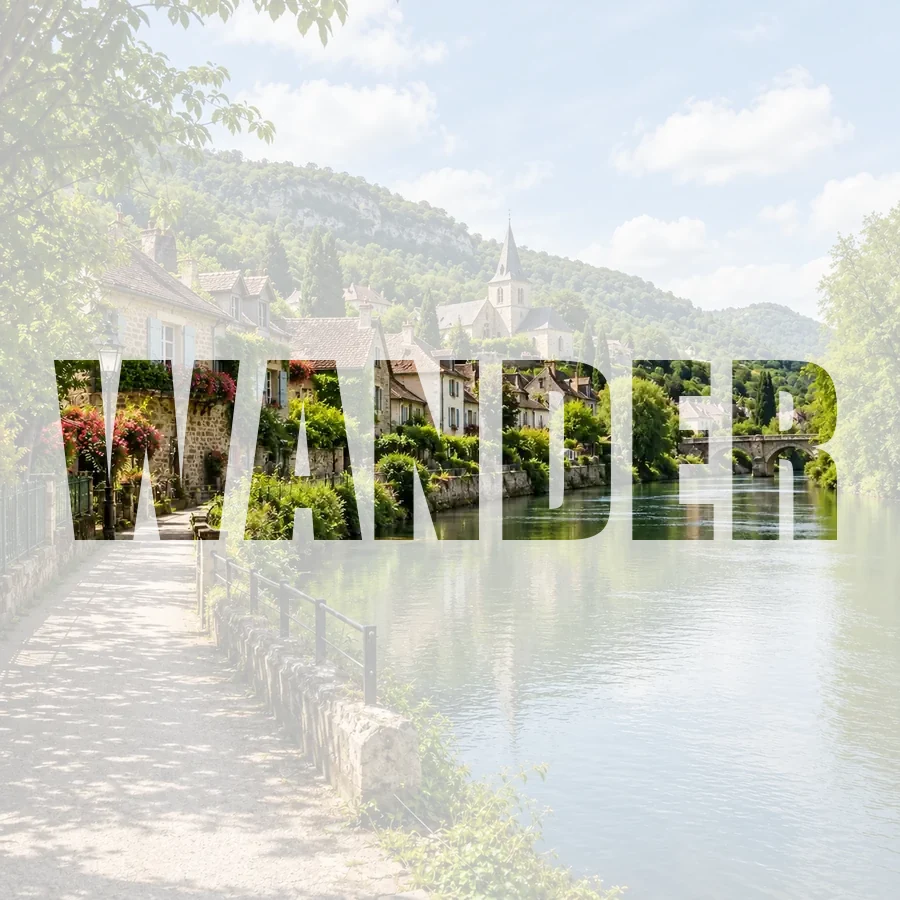

Reference example. It is not a result generated from your upload.
A picture inside text is a word whose letters work like windows: instead of a flat color, each letter shows part of a photo. Designers call it a text mask or clipping mask. It turns a travel shot into a bold WANDER headline, a city street into CITY, or a family snapshot into a name you can print.
This image inside text generator does it without Photoshop or an app. Type up to four lines, pick a system font, decide whether the image within text sits on a transparent, solid, or faded-photo background, and download a crisp PNG. Your photo is processed in your browser and never uploaded.
Every example below was made with this tool’s own fonts and settings.
GOLDEN HOUR in Impact over a sunset selfie, on a navy background.

CITY in Heavy Sans, cut from a street photo, on a bright yellow card.

HOME in Serif with a thin navy outline, saved as a transparent PNG.
How to put picture in text without Photoshop: upload, type, download.
Choose a JPG, PNG, or WebP up to 20 MB. Landscapes, cityscapes, textures, and colorful portraits look best inside letters.
Write a word or name (up to four lines), pick one of eight fonts, choose the canvas and background, add an outline, and drag the preview to move the photo inside the letters.
Save a high-resolution PNG, with a transparent background if you chose None, ready for a post, poster, or thumbnail.
Pick Photo size and Faded photo to keep your whole picture as the background, softened, while the letters show it in full color. The text centers itself and grows to fill the frame, so a single word becomes a poster in one step.

Thick fonts show the most of your photo: Impact, Heavy Sans, Condensed, and Rounded are made for it, while Serif, Typewriter, Script, and Modern add character. Set the background to any color, adjust letter spacing, and add a thin or bold outline in any color.
Choose Fit text and no background to get just the photo in letters, with nothing around them. Drop the PNG onto a thumbnail, slide, invitation, or website header, and it sits on any color like a sticker.
Drag the preview or use the arrow keys to slide the picture inside the letters, and zoom up to 300% to fill them with a face or a detail. It is free, needs no sign-up, and runs on your device, so your photo is never uploaded.
Picture-filled lettering works anywhere a word needs to grab attention.
Video thumbnails, podcast covers, and blog headers with one bold photo-filled word.
Put the photo in text that names the place, the date, or the occasion.
A name or a year filled with a family photo makes a personal card or wall print.
Product shots inside a slogan, or class photos inside a school name, for slides and posters.
Small choices that make the picture inside the letters easy to read.
Heavy fonts and short words leave the most room for the photo. One to eight letters works best.
Landscapes, cities, flowers, and textures read well; plain white backgrounds disappear inside letters.
Use a dark background or an outline when the photo is light, and a light background when it is dark.
For a portrait, zoom and drag so the face sits inside a wide letter like O, D, or M.
A few ways people put a picture inside text.
Illustrative examples adapted from reference material, not verified reviews of EzImgMaker.
Every travel video gets a thumbnail with the city name filled with a shot from the trip. Transparent PNG, drop it on, done.
I made our class reunion banner with the year filled with an old group photo. The Photo size mode with a faded background looked great printed.
We used it to put product photos in text for a sale slide. Impact plus a black outline is very readable from the back of the room.
My daughter’s name filled with her favorite beach photo, framed above her bed. Dragging the picture to get the waves in the right letters was easy.
Common questions about putting an image inside text.
Upload a photo, type your text, and the picture fills the letters automatically. Choose a font and background, drag the preview to position the photo, and click Download PNG.
Use this browser tool instead of a clipping mask. It does the masking for you, so there are no layers to manage: type the word, pick the font, and download the photo inside text as a PNG.
No. It runs in any modern browser on Windows, Mac, iPhone, or Android. Nothing to install, no account, and the result is saved straight to your device.
Yes. Set Background to None and the PNG keeps a transparent background, so only the photo-filled letters (and the outline, if you add one) are visible.
Thick fonts such as Impact, Heavy Sans, or Condensed show the most of the picture. Fonts come from your device, so a font that is not installed falls back to a similar one in both the preview and the download.
Yes. Press Enter to start a new line, up to four lines. Lines are centered and share the same photo, which flows across all of them.
With Photo size, the PNG matches your photo’s pixel size. With Fit text, the longest side matches your photo, between 1,200 and 4,096 pixels. The exact size is shown under the download button.
It is free and needs no sign-up. The picture never leaves your device because everything is drawn in your browser. Please only use photos you own or have permission to use.
No. This tool puts a photo in letters as a design. To read text out of an image, use an image-to-text (OCR) tool instead.
Upload a picture, type a word, and download your photo-filled lettering as a PNG.