Podcast host: original English
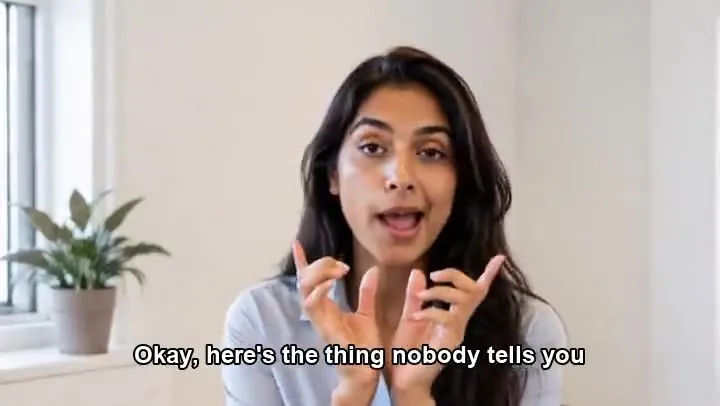
The source clip, with the host speaking English. Listen to it before you compare.
Upload a video of one speaker, add the new audio, and the AI redraws the mouth so it fits the new words. Dub a clip into another language, replace a line you misspoke, or put a fresh script on footage you already have.
MP3, WAV, M4A or OGG · Up to 10 MB · 1–60 seconds. Expressive requires less than 60 seconds.
Reference example. It is not a result generated from your upload.
Lip sync AI changes the mouth in an existing video so it matches a different audio track. Lip synchronisation used to mean re-recording dialogue until it fit the picture, or animating mouths frame by frame. Here you give the AI a video and the speech you want, and it rebuilds the lip and jaw movement around the new words while the rest of the shot stays as it was.
It works as video to video lipsync AI for one speaker at a time. Typical jobs are dubbing a tutorial or vlog into another language, fixing a sentence someone stumbled over, and giving an animated character new dialogue. You bring the new audio: upload it, record it, or type the script and pick a voice. Nothing is translated automatically.
Play each original first, then its dubbed version. Same scene, new voice, and a mouth that follows the new line.
The source clip, with the host speaking English. Listen to it before you compare.
A Spanish voice on the same footage, with the lip movement rebuilt to match it. Sound on.
Here the host speaks Spanish. Note the pace of the sentence before you play the dub.
The same host now speaks English, and the mouth shapes change with the new words.
A travel-style clip in Hindi, spoken straight to the camera in a colorful courtyard.
English audio on the same scene. A front-on speaker like this is the easiest case for Lite mode.
An outdoor clip in Tagalog, filmed beside a jeepney with the city behind her.
Dubbed into English for a wider audience, the same way you could translate your own vlog.
Four steps in the panel at the top of the page.
Add an MP4 or MOV of one person speaking: up to 50 MB, 60 seconds long and at least 360p. The clearer the face, the better the sync.
Choose Upload audio for an MP3, WAV, M4A or OGG file up to 10 MB, Record to use your microphone, or Type text to enter a script and pick a voice. Speech can be 1 to 60 seconds long.
Lite is for a single speaker facing the camera and processes faster. Basic is for busier footage: it splits the video into scenes and finds the speaker in each one.
Confirm you own the video or have the speaker’s permission, press Generate Video, and play the AI lip sync video with sound. The finished clip is as long as your audio.
Record or upload the translated line, and the lipsync AI reshapes the mouth for the new language, as in this Japanese version of an English clip. Bring your own translation: the lip-syncer matches speech, it does not translate it.
Misspoke a number or a product name? Record the corrected sentence in the same voice and sync it onto the take you already have. A presenter facing the camera, like this one, is the ideal source.
Lite suits one speaker looking into the lens, like a host or a presenter, and finishes faster. Basic is built for footage with cuts and movement, such as a cooking clip in a working kitchen: it segments the scenes and identifies the speaker before syncing.
The finished lipsync video runs as long as the speech. If the video is longer, the end is trimmed; if it is shorter, it loops. Cut the clip to roughly the length of the new line, as in this Spanish take, and you get a clean result with no repeats.
Anyone who has the footage already and needs it to say something else.
Publish the same lesson or vlog in Spanish, Japanese or English without filming it again.
Update a price, a date or a feature name in an existing explainer by syncing one new sentence.
Patch a fumbled intro or re-record an ad read on the video version of an episode.
Give a 3D character fresh dialogue, like the wizard in the examples, without keyframing the mouth by hand.
A lip syncer can only match what it can see and hear clearly. These habits make the biggest difference.
Hands, mics and hair in front of the mouth confuse the sync. Pick a take where the lips stay visible the whole time.
A speaker who mostly faces the camera syncs best. Sharp turns and profile shots are where glitches show up.
The model listens for speech. Remove background music, or record in a quiet room, so it hears every syllable.
A dub close in length to the original sentence keeps the pacing natural and avoids trimmed or looping footage.
At least 360p is required, and HD gives the AI more detail around the mouth. Upscale a soft clip before you upload it.
Use your own voice, a voice actor who agreed, or a stock voice. Never put words in a real person’s mouth without consent.
Only have a still? This is image to video lip sync AI: one portrait plus your audio becomes a talking clip.
Make a Photo TalkNeed a speaker from scratch? Write the dialogue in quotes and generate an original character who says it, with sound.
Write a SceneLift a low-resolution clip above the 360p minimum before syncing, or sharpen the dubbed result afterward.
Upscale a ClipClear burned-in captions in the old language before you publish the dubbed version.
Remove CaptionsSoftware that matches the mouth in a video to a voice track. Here it takes your footage and the new speech, then redraws the lip and jaw movement so the speaker appears to say the new words.
Lip synchronisation (lip synchronization in US spelling) is the timing of mouth movement to sound. In film it means dialogue that lines up with the actor’s lips; with AI it means generating that match automatically from any voice track.
Upload the video, add the speech as a file, a recording or typed text, choose Lite or Basic, confirm you have permission, and generate. You get an MP4 at 25 fps that lasts as long as the audio.
It is a common way people search for lip sync clips: a person or a character mouthing along to a voice or a song. You can make one from your own footage here. For music, use the vocal on its own, since a full mix with drums and instruments gives the model less to follow.
Use Lite for one person facing the camera, such as a vlog, a podcast or a presentation; it is the faster option. Use Basic for footage with cuts or a moving camera; it splits the scenes and identifies the speaker. Both modes are built for one speaker, so avoid clips where two people talk.
Video: MP4 or MOV, up to 50 MB and 60 seconds, at least 360p. Audio: MP3, WAV, M4A or OGG, up to 10 MB, between 1 and 60 seconds long.
The output follows the audio. Extra video is cut off at the end, and a video that is too short loops to cover the speech. For the most natural look, trim the video to about the length of the new line first.
Yes, as long as you supply the translated speech. Record it yourself, work with a voice actor, or type the translated script and choose a stock voice. The AI lip sync generator then fits the mouth to it; it does not translate on its own.
Yes. New accounts get bonus credits on sign-up. The cost depends on the length of the speech and is shown on the Generate button before you start.
Only footage of yourself or of people who agreed, and audio you have the right to use. Do not lip sync public figures, celebrities or politicians, do not make anyone appear to say something they did not say, and do not use the results to deceive. Label dubbed clips as AI-edited when you share them.
Upload a clip, add the new line, and get a lip-synced version back. One speaker, up to 60 seconds, with consent from everyone on screen.
Lip-synced videos are AI-edited and no longer show what was originally said. Upload only footage and audio you own or have permission to use, never put words in a public figure’s mouth, and do not use the results to impersonate, mislead or harass anyone.