
Landscapes and Wallpapers
Skies, grass, and water are the easiest corners to rebuild. Remove the Gemini watermark from a wide scene and it is ready to use as a wallpaper or a slide background.
Made a picture with Gemini or Nano Banana and want the sparkle mark gone? Upload it, let the AI remove the Gemini watermark, and keep the whole frame with no cropping or clone stamp.
Fine-tune
Your photo stays in this browser during this UI preview.


Reference example. It is not a result generated from your upload.
Images you create in the Gemini app, with Nano Banana, or in Google AI Studio often carry a small four-point sparkle in the bottom-right corner. That visible Gemini watermark is easy to spot, and it can get in the way when you want to drop your own artwork into a slide, a mockup, or a post. A Gemini watermark remover detects that mark and rebuilds the pixels behind it, so the picture keeps its original size instead of being cropped.
EzImgMaker works as a Gemini logo remover online: upload the image, confirm what to remove, and the AI fills the corner with matching sky, texture, or background. It is meant for pictures you generated yourself. It removes the visible logo only and does not touch the invisible SynthID signal, so the image is still identifiable as AI-generated.
Drag each slider to compare the original Gemini image with the cleaned version. The logo disappears and the rest of the frame stays untouched.
Skies, grass, and water are the easiest corners to rebuild. Remove the Gemini watermark from a wide scene and it is ready to use as a wallpaper or a slide background.


The sparkle often lands on clothing or a dark interior. The AI matches the fabric and shadows, so a portrait set looks like it was never stamped.


Flat colors and outlines have to line up exactly. Use it as a Gemini icon remover on stickers, children’s book art, and cartoon scenes.
Nano Banana images use the same sparkle logo. Remove it from fantasy landscapes and concept art while keeping every tree, ridge, and cloud.
Here is how to remove Google Gemini watermark logos without layers, masks, or a clone brush.
Add a JPG, PNG, or WebP up to 20 MB that you made with Gemini, Nano Banana, or Google AI Studio. The original download works better than a screenshot.
Keep "Gemini sparkle logo" and "Auto-detect" for the usual corner mark, or switch to a text watermark or another spot. Add a note if anything else should go.
Click Remove Watermark, compare the result with your original, and save the clean image at its full size.

Cropping is the quick way to delete Gemini watermark marks, but it changes your aspect ratio and cuts off the edge of the scene. This Gemini watermark cleaner fills the logo area with matching detail, so a 16:9 image stays 16:9 and nothing important is lost.

Neon reflections, rain-soaked streets, foliage, and fabric are where simple blur tools leave a smudge. The AI reads the surrounding texture and continues it, which is what separates the best Gemini watermark remover from a generic patch tool.

Whether the picture came from the Gemini app, Nano Banana, or Google AI Studio, it is the same sparkle. Use it as a Google Gemini watermark remover for illustrations, product shots, and photoreal scenes alike, and as a Gemini AI logo remover for the small icon on exported images.
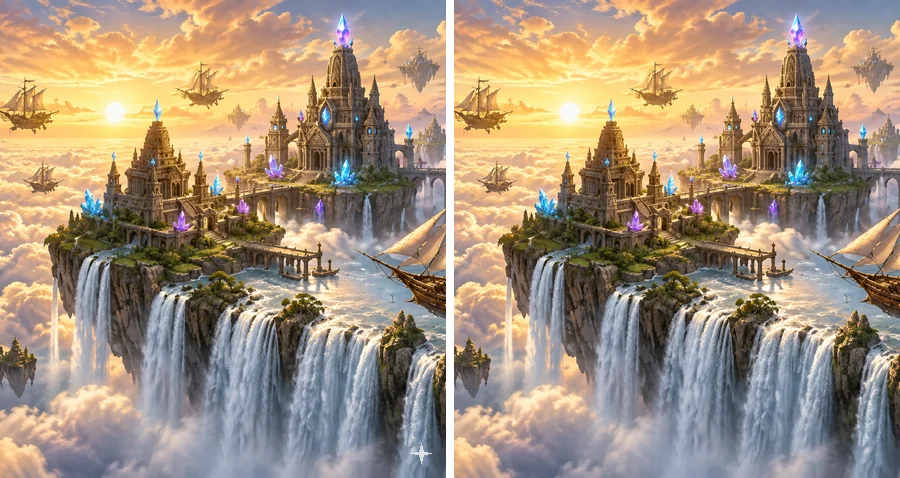
Switch the mark type to remove a text watermark, a caption, or another logo or icon from your own AI art. Describe anything extra in the instructions box and the Gemini mark remover handles it in the same pass.
People cleaning up images they generated themselves before putting them to work.

A stray logo in the corner of a hero slide looks unfinished. Clean the concept art you generated so the audience focuses on the idea.
Crop-free cleanup keeps the framing you designed for a post, story, or video thumbnail. Remember to label AI images where the platform asks you to.
Product mockups, packaging ideas, and reference boards look more consistent when every tile is free of the same corner stamp.
Turn your favorite Nano Banana landscape into a wallpaper or a print without a sparkle sitting in the corner.
If you are wondering how to remove Gemini watermark from images with the fewest artifacts, start with these habits.
The file saved from Gemini has the most detail around the logo. Screenshots and re-compressed copies leave faint traces.
Upload the image before resizing or cropping it, so the AI has the surrounding pixels it needs to rebuild the corner.
If a caption or second logo should also go, name it and its position in the instructions box.
Use the tool on images you generated or have permission to edit, never on someone else’s watermarked work.
Typical ways people clean up their own AI images.
Illustrative examples adapted from reference material, not verified reviews of EzImgMaker.
I build pitch decks with concept art I generate in Gemini. Removing the corner sparkle used to mean cropping every slide image; now the full frame stays intact.
The logo sat on a dark coat in one of my portrait sets. The cleaned corner matched the fabric, and I could not find where it had been.
My moodboards mix dozens of Nano Banana images. Cleaning them gives the board a consistent look when I present it to clients.
I turned a generated mountain scene into a desktop wallpaper. The sky in the corner came back smooth, with no blur patch.
Answers about removing the visible Gemini logo from images you created.
It is a tool that finds the visible Gemini watermark, the small sparkle logo Google adds to images from the Gemini app, Nano Banana, and Google AI Studio, and replaces it with matching background detail. Unlike cropping, it keeps the original dimensions of your picture.
Upload the image, leave the mark type on "Gemini sparkle logo" and the position on "Auto-detect", then click Remove Watermark. Compare the result with your original and download it. That is how to get rid of Gemini watermark marks without opening a photo editor.
Use an inpainting tool like this one instead of a crop. The AI rebuilds the pixels under the logo from the surrounding area, so the edges of the scene and the aspect ratio stay the same. Starting from the original, uncompressed download gives the cleanest corner.
Nano Banana images carry the same sparkle logo, so the process is identical: upload, keep the default settings, and remove. If the image also has a caption or another mark, switch the mark type or describe it in the instructions box.
Whether a download carries the visible sparkle depends on the Gemini product and plan you use, and Google can change that at any time. If your image has the mark, a separate Gemini remover like this one cleans it up; check Google’s current terms for the plan you use.
No. The tool only removes the visible logo. Google also embeds an invisible SynthID signal in Gemini images, and we do not attempt to remove or hide it. Your image can still be recognized as AI-generated, and you should keep labeling it as AI content where required.
No. Use this Gemini watermark remover only on images you generated yourself or have the right to edit. Do not remove watermarks, signatures, or logos from photographers’ work, stock images, or other creators’ art; that can infringe their copyright.
The rest of the image is left as it was, and only the logo area is rebuilt. Very busy patterns, text, or faces right under the logo are the hardest to reconstruct, so compare the result with your original before using it.
You can upload JPG, PNG, or WebP images up to 20 MB. Square, portrait, and widescreen Gemini images all work.
Yes. The page works in mobile browsers, so you can clean an image saved from the Gemini app on your iPhone or Android phone without installing anything.
Wondering how to remove the Gemini watermark? Upload an image you created with Gemini or Nano Banana and get the full frame back without the sparkle logo.
Gemini, Nano Banana, and Google AI Studio are trademarks of Google LLC. EzImgMaker is an independent tool and is not affiliated with or endorsed by Google. Remove marks only from images you created or have permission to edit.