
100+ ChatGPT Photo Editing Prompts (Copy & Paste, With Examples)
Copy 100+ ChatGPT photo prompts for photo editing: portraits that keep your face, backgrounds, light, vintage, outfits and trends, with before/after examples.
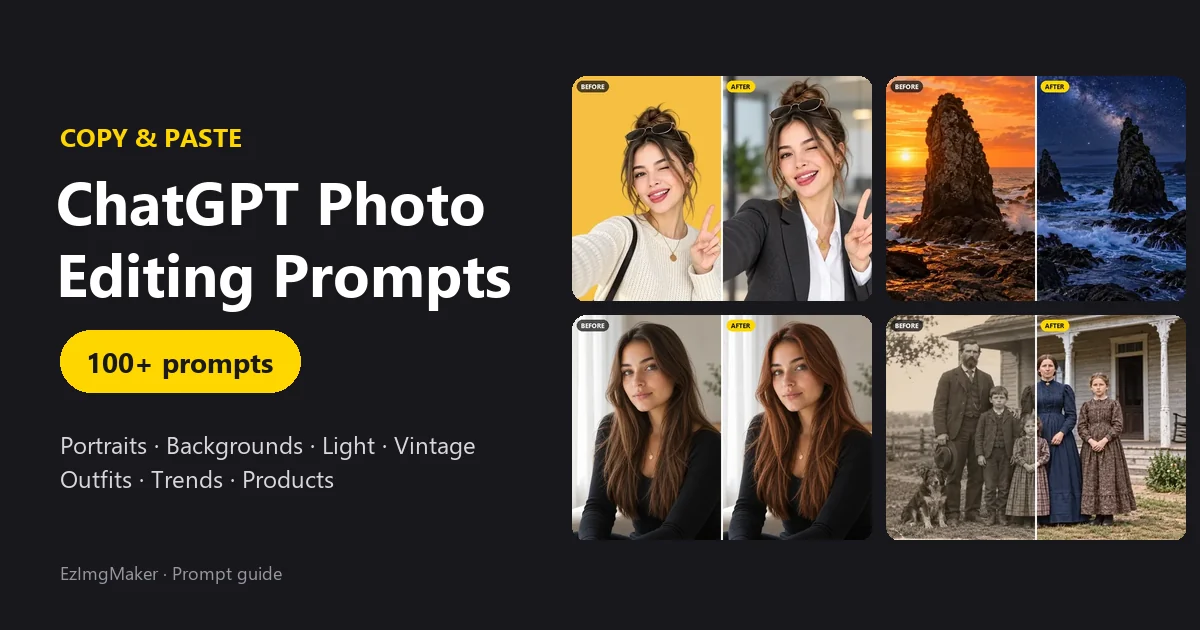
Short answer: a good ChatGPT photo editing prompt names one change, adds the details, says what must stay the same, and describes the finish. Copy any of the 100+ chat gpt photo prompts below, upload your photo to ChatGPT or to our ChatGPT-style photo editor, paste the prompt, and adjust the details to fit your picture.
These chat gpt photo editing prompts are grouped by what you want to fix or create: portraits that keep your face, backgrounds, light and color, vintage and aesthetic looks, outfits and hair, the edits trending right now, candid moments, cars and products. Each card shows the full ChatGPT photo editing prompts text, a real before and after, a Copy button and a link to a tool where you can try it. They work as AI prompts for photo editing in most image editors, not just ChatGPT.
Chat GPT Prompt for Photo Editing: The 4-Part Formula
Writing a prompt for ChatGPT for photo editing is less about clever words than structure. Most failed edits come from two problems: the prompt is vague (“make it better”), or it does not say what to keep, so the face or the composition changes. Every image editing prompt in this guide follows the same four parts, so you can swap a detail without breaking the rest. The same structure works for any chat gpt prompt for image editing, and for any AI photo editing prompt in other tools.
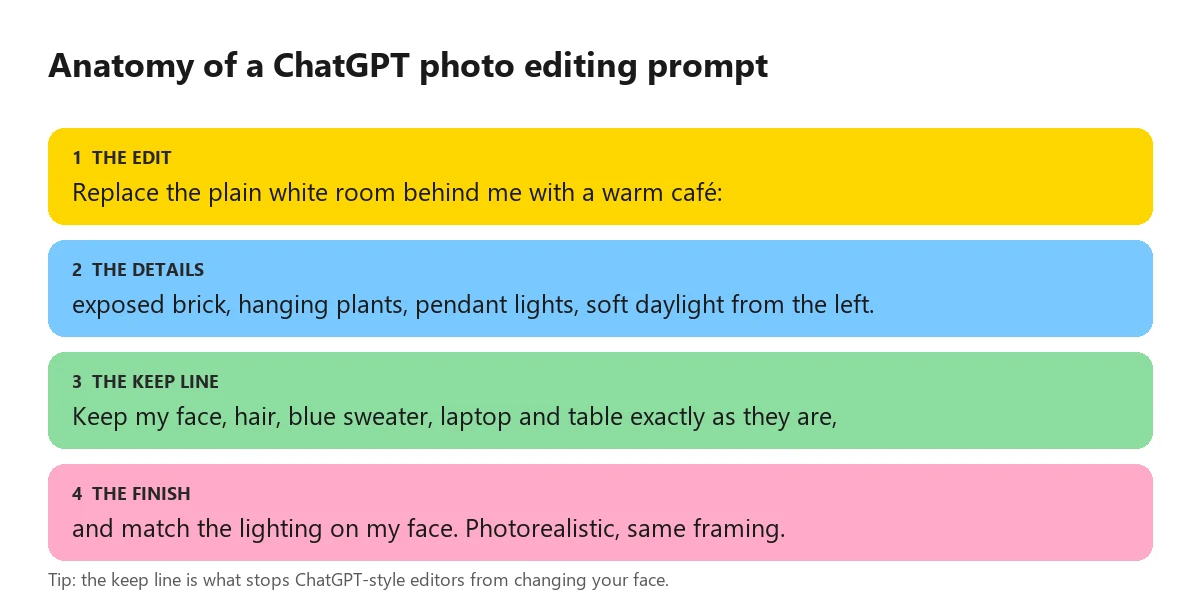
- The edit: one clear change. “Replace the background,” “whiten my teeth,” “turn this into a watercolor.”
- The details: colors, materials, light direction, mood. Specific details beat adjectives like “beautiful.”
- The keep line: what must not change. “Keep my face, hair, expression and pose exactly the same.” This is the line that makes a chatgpt prompt for photo editing without changing face work.
- The finish: photorealistic or stylized, same framing, aspect ratio, or where the result will be used.
Even a one-line chat gpt picture prompt gets better with a keep line. Compare “make the sky blue” with “make the sky a clear blue with a few soft clouds; keep the buildings and people exactly the same.” The second is a ChatGPT picture prompt that changes one thing and protects everything else.
How to edit photos with ChatGPT prompts
- Upload a sharp photo. Faces should be clear and not too small; avoid heavy filters on the original.
- Paste one prompt and adjust the details (colors, outfit, place) so they fit your picture. Keep the keep line.
- Generate, then refine in small steps. If something is off, ask for one fix at a time: “Same image, but make the light warmer.”
- Download the version you like. For prints, upscale it afterwards with the image enhancer.
The same prompts work in ChatGPT and in the ChatGPT photo editor, the AI photo editor (where you can pick the model and aspect ratio) and AI photo retouch for skin, teeth and cleanup.
See a ChatGPT Photo Edit Prompt in Action
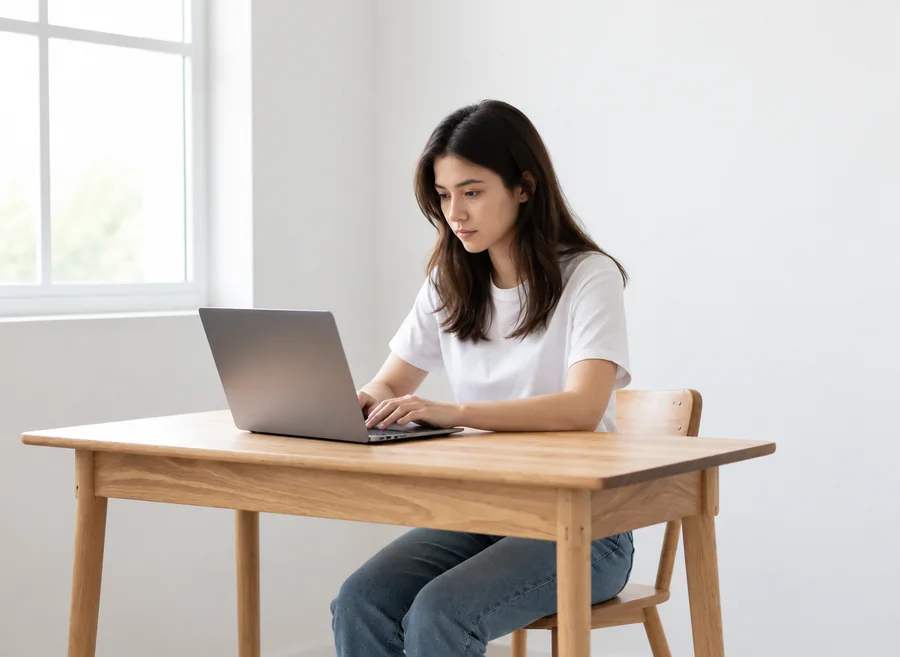
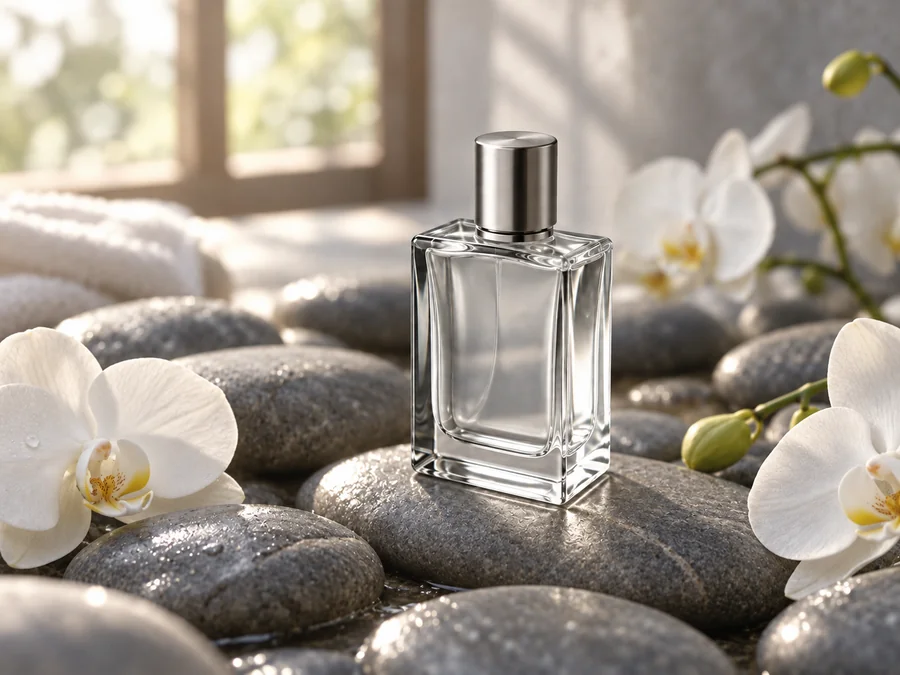
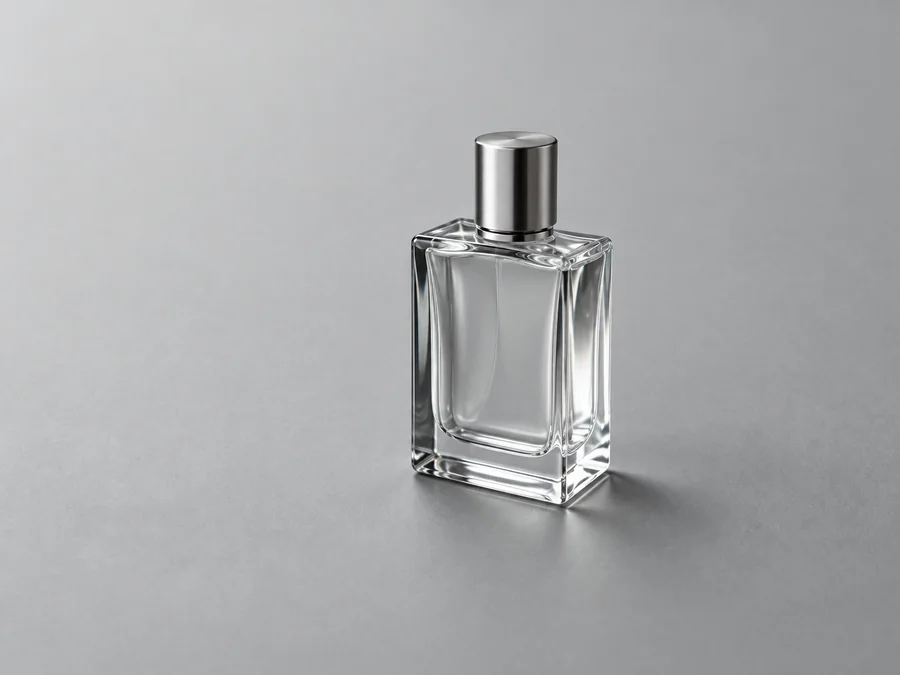
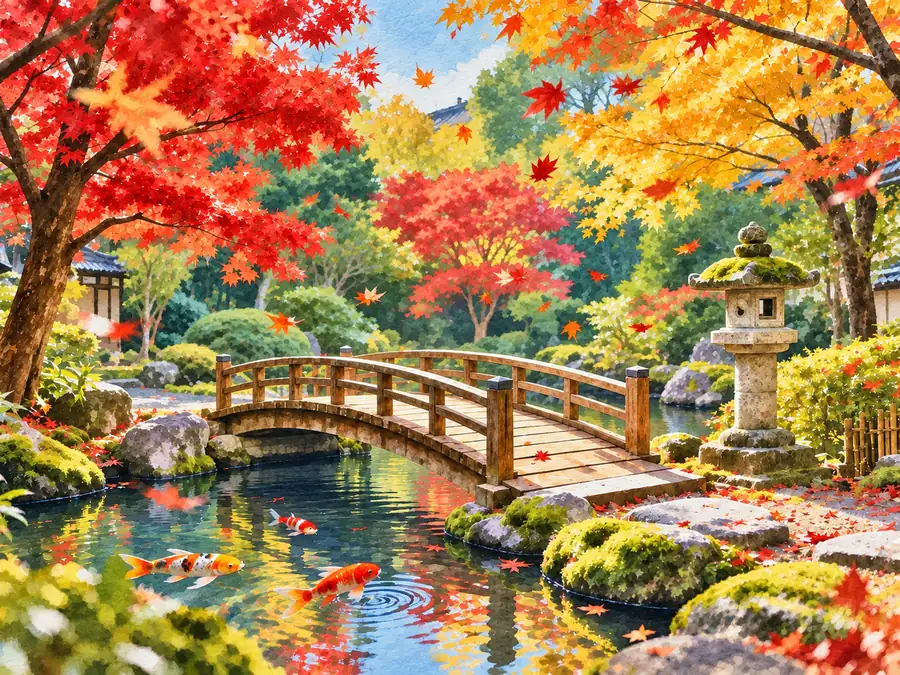
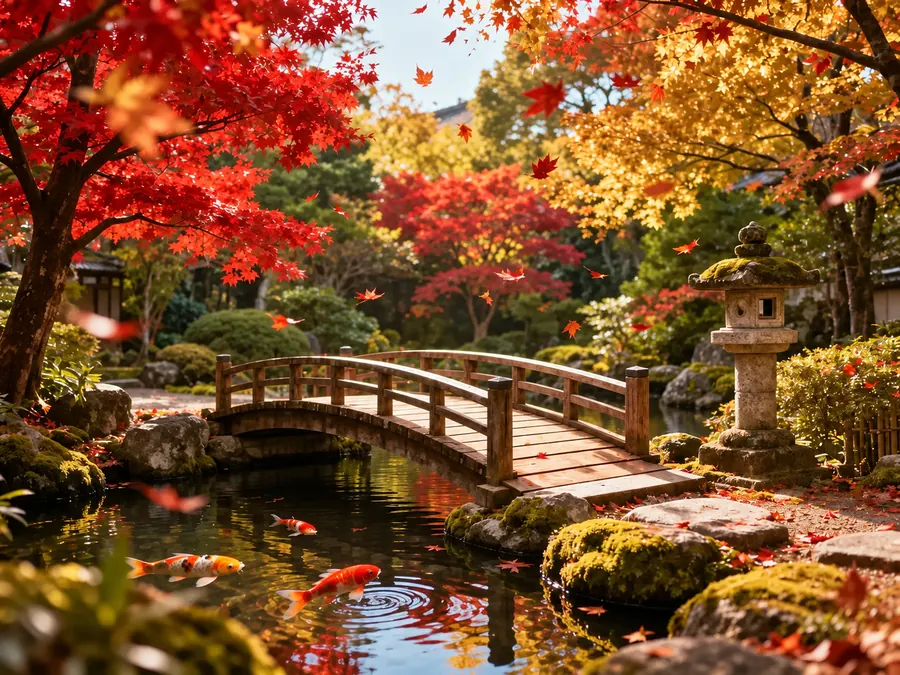
Drag each slider to compare the original photo with the result of the prompt above it. The first is a background swap, the second a product scene, and the third one of our favorite creative ChatGPT prompts for photos: a change of medium.
Prompt: “Replace the bright white room with a cozy café: exposed red brick, plants hanging from the ceiling, a window to the street and warm daylight. Keep me, my white T-shirt, the laptop and the wooden table exactly as they are.”

Prompt: “Place this perfume bottle on smooth gray spa stones with white orchids around it, soft daylight from a window behind and a calm, clean spa mood. Keep the bottle’s shape, cap, glass and label area exactly the same.”
Prompt: “Turn this photo into a hand-painted anime-style illustration with soft brush textures, warm autumn reds and golds, and clear outlines. Keep the bridge, pond, lanterns and composition exactly as they are.”
ChatGPT Prompt for Photo Editing Without Changing Face
These chatgpt portrait prompts change the outfit, light or small details while your face stays yours. Each one ends with a keep line. The first one is also our favorite chatgpt prompt for professional photo editing: a headshot made from an everyday selfie.
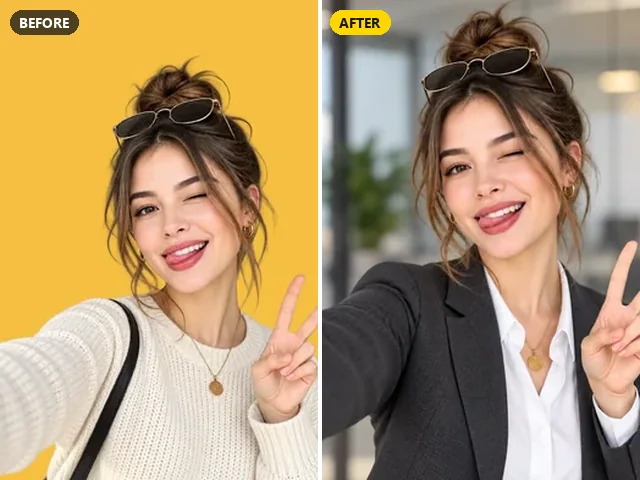
Professional Headshot From a Selfie
Turn this selfie into a polished professional photo: replace my sweater with a tailored black blazer over a crisp white shirt and change the yellow wall to a softly blurred modern office with large windows, natural window light. Keep my face, expression, hairstyle, pose and hand gesture exactly the same.
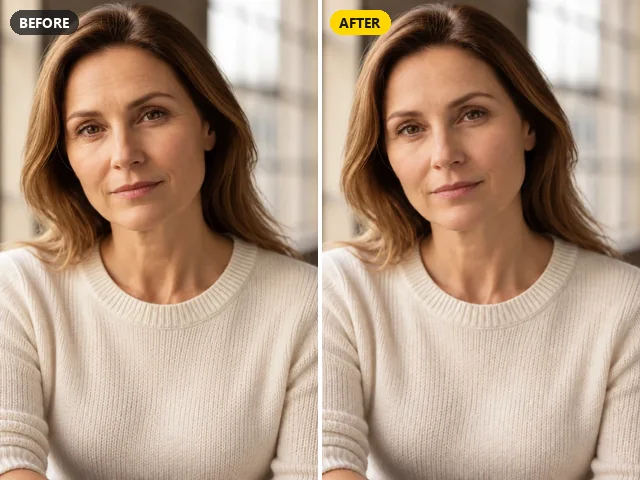
Natural Skin Retouch, No Plastic Look
Retouch this portrait naturally: soften the fine lines around my eyes and forehead, reduce under-eye shadows and even out my skin tone, but keep real skin texture and pores. No makeup, no slimming, no plastic look. Do not change my face shape, eyes, hair or expression.
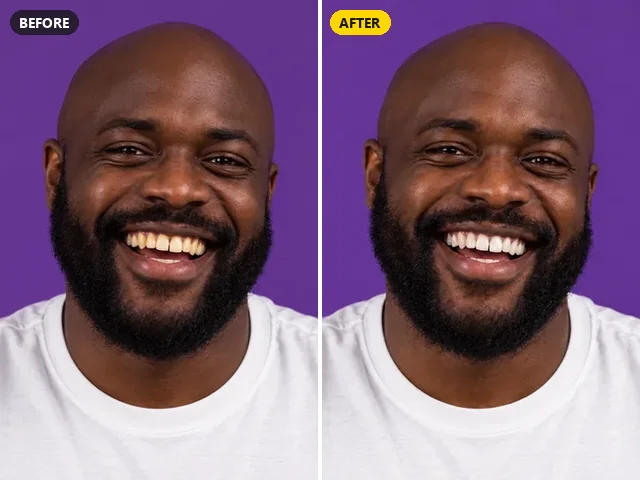
Brighter, Whiter Smile
Whiten my teeth to a natural, healthy shade, not bright white. Keep the shape and size of my teeth, my smile, lips, beard and skin exactly the same, and leave the purple background untouched.
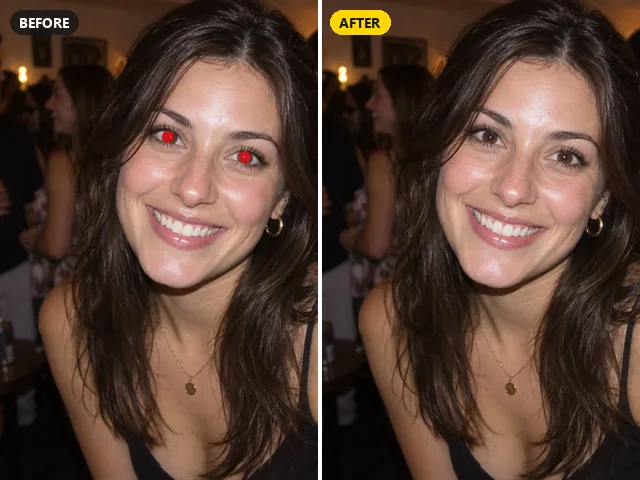
Fix Red Eyes From the Flash
Remove the red-eye caused by the camera flash and restore my natural dark brown eyes with soft catchlights. Change nothing else: same face, smile, hair, lighting and party background.
Background Editing Prompts
Background swaps are the most common photo editing prompts for ChatGPT, and the easiest to get right because the subject stays put. Describe the new place in detail and ask the AI to match the light on the subject.
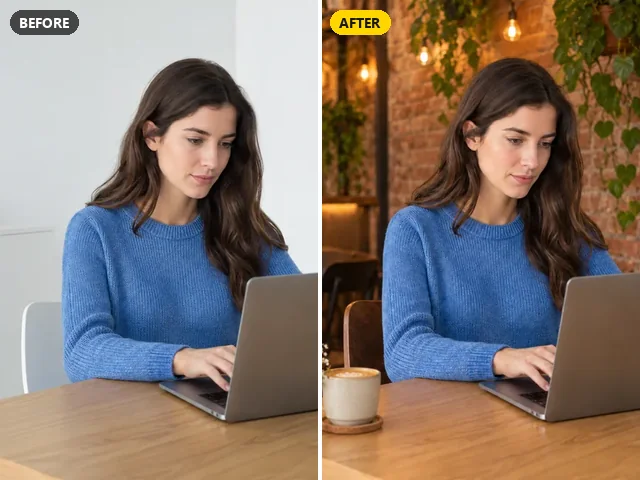
Plain Room to Cozy Café
Replace the plain white room behind me with a warm café: exposed brick wall, hanging plants, pendant lights and a chalkboard menu, soft daylight from the left. Keep me, my blue sweater, the laptop and the table exactly as they are, and match the lighting on my face.
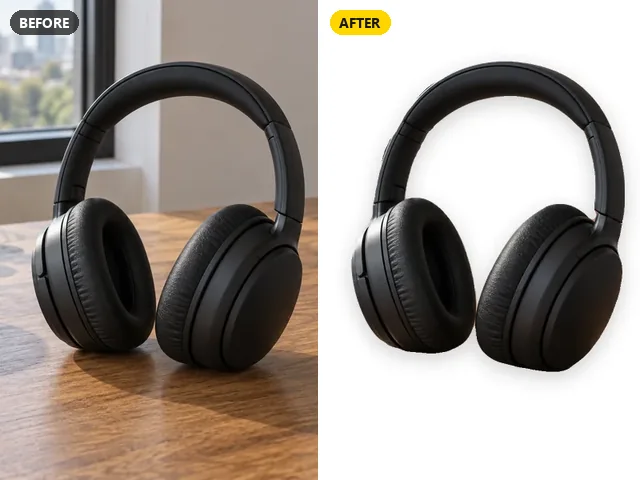
Clean White Background for a Product
Remove everything except the headphones and place them on a pure white background, centered, with a soft natural shadow underneath. Keep the shape, color, texture and angle of the headphones unchanged. Square, ready for an online shop.
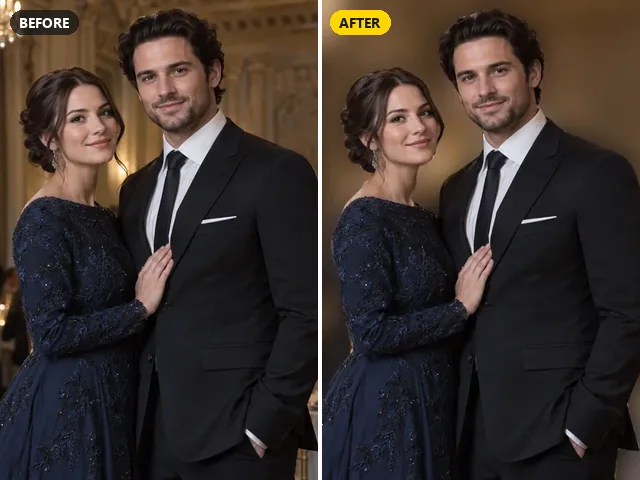
Blur a Busy Background
Blur the busy ballroom behind us into a smooth, creamy bokeh, like a portrait lens at f/1.8. Keep both of us sharp, with our faces, hair, clothes and pose exactly the same.
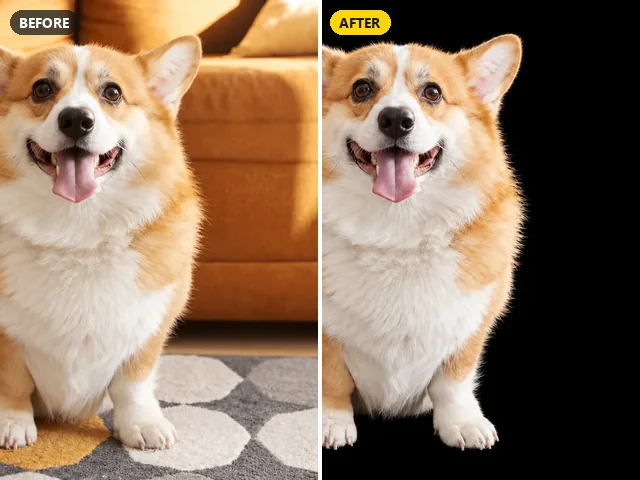
Studio Black Background
Cut out my corgi and put it on a solid black background, like a studio pet portrait, with clean edges around the fur. Keep the dog’s face, fur color, expression and pose exactly the same.
Need a transparent PNG instead? The background remover cuts out people and products in one click, with no prompt needed.
ChatGPT Photo Enhancement Prompts for Light and Color
Light is what makes a photo look expensive. A good chatgpt photo enhancement prompt says where the light comes from and what color it is, then protects the subject.
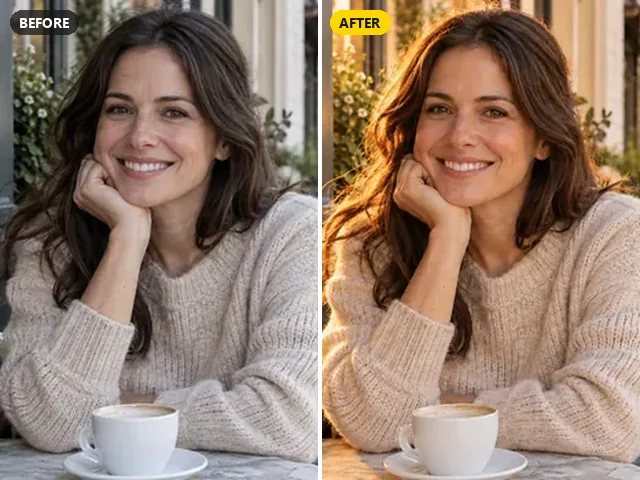
Golden Hour Relight
Relight this café photo as if it were taken at golden hour: warm, low sunlight from the right, a soft glow on my hair and sweater, gentle lens flare and longer shadows on the sidewalk. Keep my face, smile, pose and outfit exactly the same.
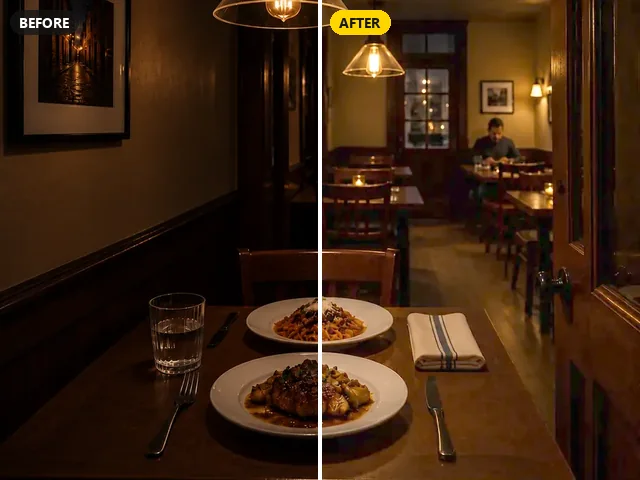
Brighten a Dark Restaurant Photo
Brighten this dark restaurant photo so the food and table are clearly visible: lift the shadows, keep the warm lamp light, reduce noise and keep natural colors, no HDR look. Do not change the dishes, the table layout or the decor.
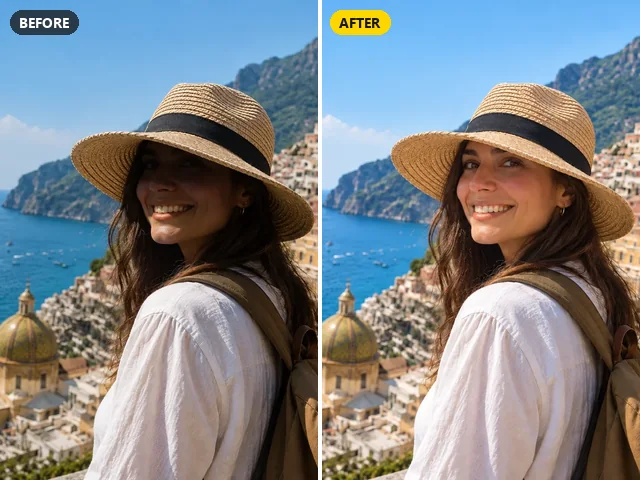
Remove a Harsh Hat Shadow
Remove the harsh shadow my straw hat casts across my face, so my eyes and skin are evenly lit like the rest of the photo. Keep the hat, my face, smile, backpack and the coastal town behind me exactly the same.
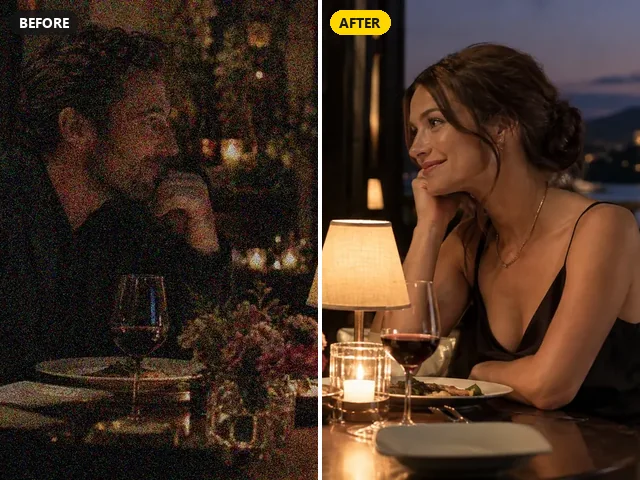
Rescue a Low-Light Dinner Photo
Enhance this low-light dinner photo: reduce the grain, sharpen both faces, recover detail in the shadows and keep the warm candlelight mood. Keep our faces, expressions and everything on the table exactly as they are.
Chat GPT Vintage Photo Prompts and Aesthetic Edits
Looking for chatgpt prompts for aesthetic pictures, or ChatGPT prompts for pictures of yourself aesthetic and polished at the same time? These four cover the looks people ask for most: a classic black-and-white portrait, a restored and colorized family photo, a neon night mood and a day-to-night scene. Each chat gpt vintage photo prompt keeps the people and the composition the same.
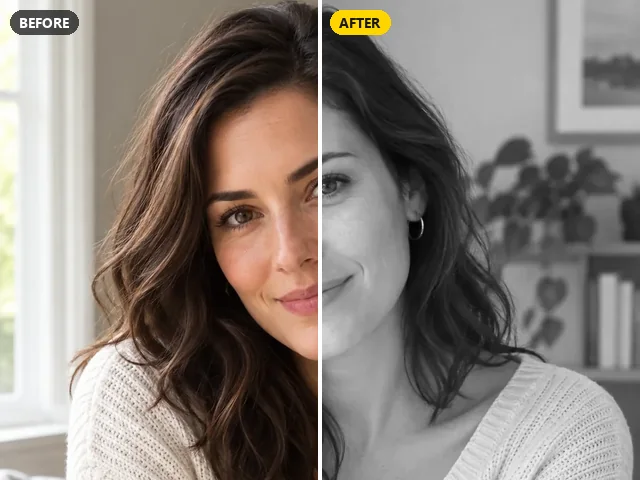
Timeless Black and White Portrait
Convert this portrait to a timeless black-and-white photo with rich contrast, deep blacks, soft gray skin tones and a subtle film grain, like a classic studio print. Keep my face, hair and expression exactly the same.
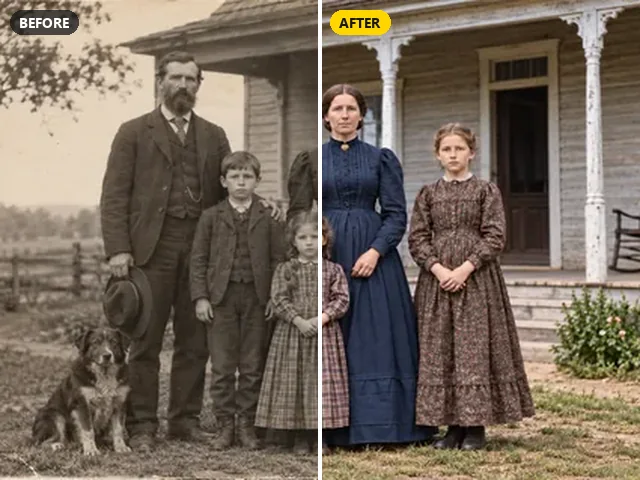
Restore and Colorize an Old Photo
Restore this old family photo: repair scratches, creases and fading, sharpen the faces, then colorize it with natural, period-appropriate colors: blue sky, green grass, muted wool clothing. Keep every person, face and pose exactly as in the original.
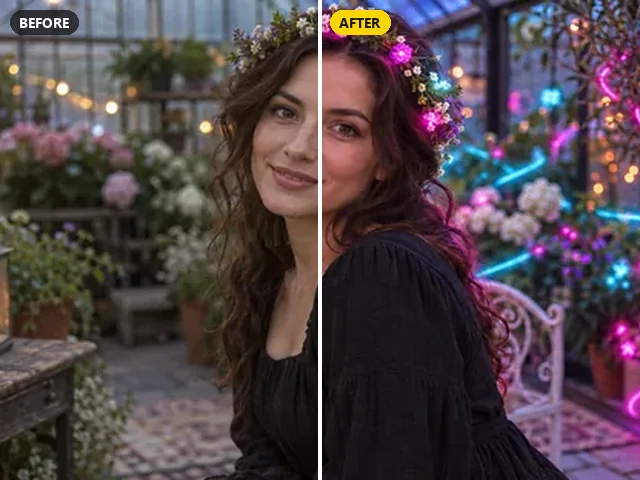
Neon Night Aesthetic
Give this garden portrait a neon night aesthetic: glowing pink and electric-blue neon light ribbons swirling through the plants, deeper shadows and a moody color grade. Keep my face, flower crown, black dress and pose exactly the same.
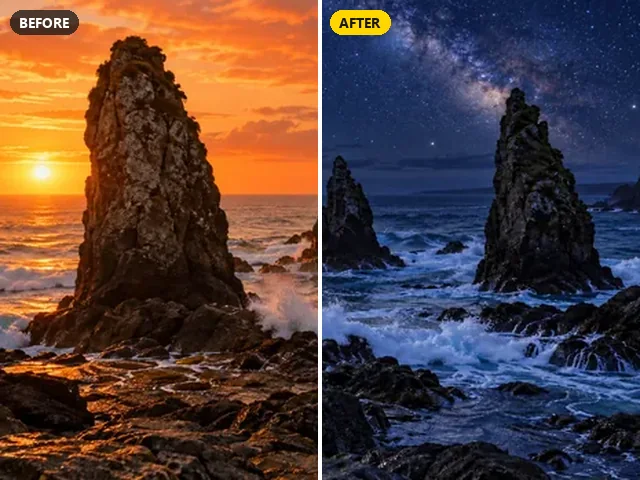
Sunset to Starry Night
Turn this sunset seascape into a clear night: a deep blue sky full of stars and a faint Milky Way, moonlight on the waves and rocks, a tiny lighthouse glow on the far cliff. Keep the sea stacks, coastline and composition exactly the same.
For a one-click version of these, see the black and white photo converter and colorize image.
Outfit and Hair Prompts
Try a new hair color or a new jacket before you buy it. Name the exact color or garment, and list what should stay, including accessories.
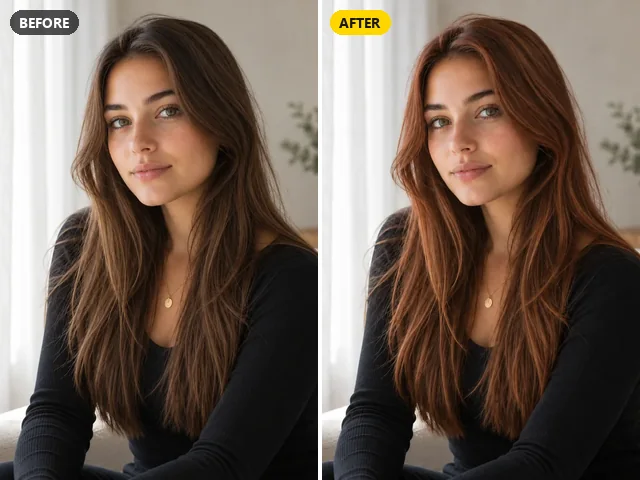
Copper Hair Color
Change my hair color to a rich copper auburn with natural depth and shine, keeping the strands realistic. Keep my face, makeup, haircut, hair length and the background exactly the same.
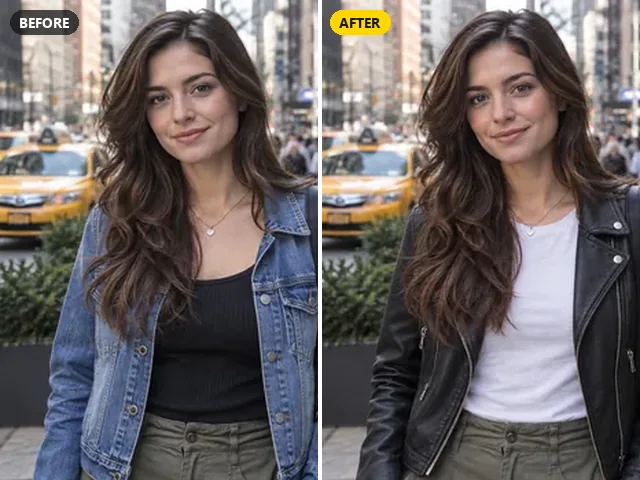
Denim Jacket to Leather Jacket
Swap my denim jacket and black top for a black leather biker jacket over a plain white T-shirt. Keep my face, hair, jeans, pose and the city street behind me exactly the same.
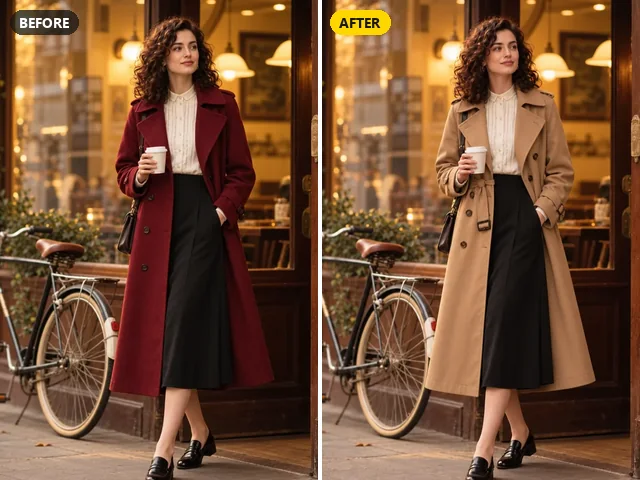
Red Coat to Camel Trench
Replace my burgundy coat with a classic camel trench coat, open at the front and the same length. Keep my face, hair, black skirt, shoes, the coffee cup and the café front exactly the same.
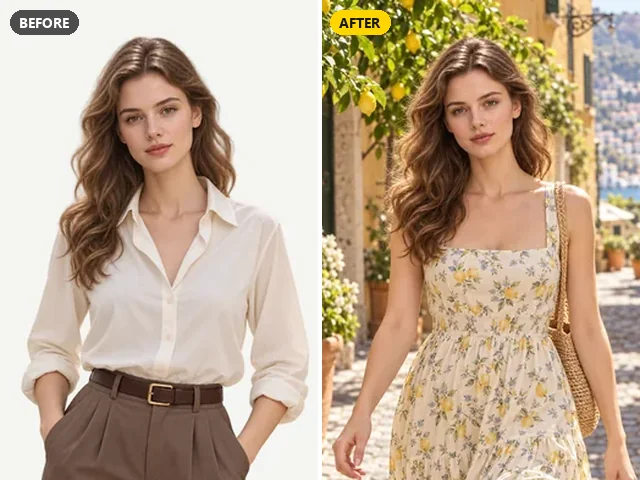
Studio Shot to Riviera Street Look
Put me on a sunny Mediterranean street with lemon trees, potted flowers and a glimpse of the sea, and change my outfit to a cream floral sundress with a straw bag. Keep my face, hair and expression exactly the same, with warm afternoon light.
More outfit ideas: the AI clothes changer swaps garments from presets, and the hair color changer previews dozens of shades.
ChatGPT Photo Editing Prompts Trending Right Now
Every month brings a new viral edit, and every chatgpt photo prompt trend follows the same pattern as each chat gpt prompt for photo editing trending on social feeds: a recognizable format (a toy box, a figurine, a sticker) plus your face. These four are the popular ChatGPT photo prompts people keep sharing, and the figurine and sticker are the cute ChatGPT photo prompts people ask for most. Every chatgpt cute photo prompt here keeps your face recognizable. The action figure and minifigure prompts are short enough to paste into the custom box of the matching tools.
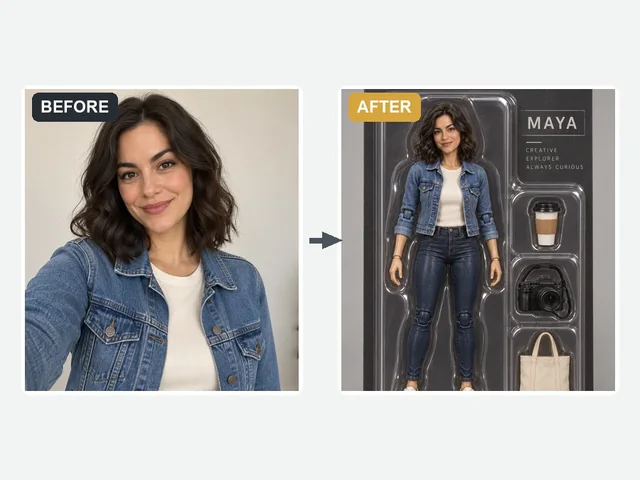
Boxed Action Figure of Yourself
Turn me into a realistic action figure in a clear blister pack: full body in my denim jacket, white top and jeans, tiny accessories in side slots (coffee cup, camera, tote bag), the name “MAYA” on the box, studio product lighting. Keep my face recognizable.
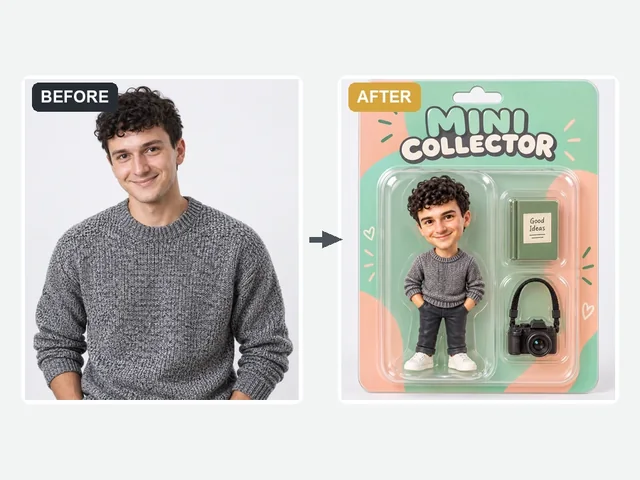
Mini Collector Figurine
Make a cute 3D collectible figurine of me with a slightly oversized head, gray sweater and dark jeans, in a pastel mint-and-peach blister pack labeled “MINI COLLECTOR,” with a tiny camera and notebook. Soft studio light. Keep my curly hair and smile.
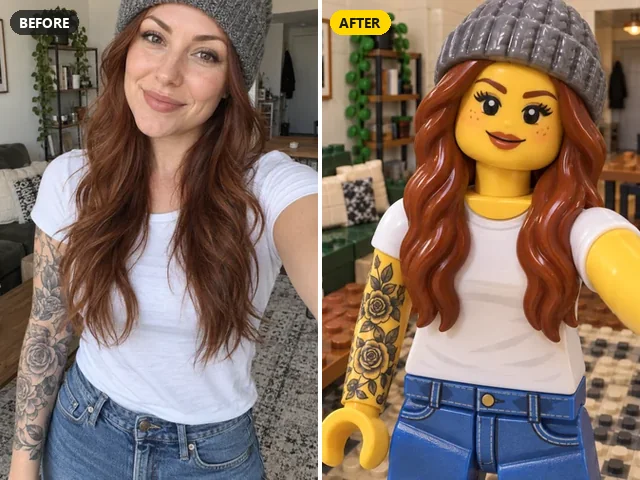
Toy Brick Minifigure Selfie
Turn my selfie into a toy brick minifigure of me: yellow plastic face with a friendly smile, molded long red hair under a gray knit beanie, white T-shirt, printed arm tattoos and blue jeans, in a living room built from toy bricks. Keep my pose.
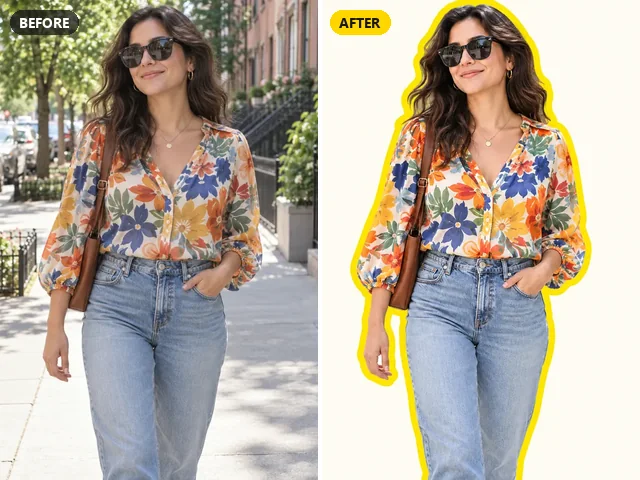
Die-Cut Sticker of Yourself
Cut me out of this street photo and turn me into a die-cut sticker: full body, a thick bright yellow outline around my silhouette, plain off-white background, clean edges. Keep my face, sunglasses, floral shirt and jeans exactly the same.
Chat GPT Candid Photo Creation Prompts
Posed photos can feel stiff. Candid photo prompts for ChatGPT ask the AI to change the moment (a laugh, a glance, a step) while keeping the people, which is perfect for couple and family pictures. Upload a clear photo of everyone and use one of these.
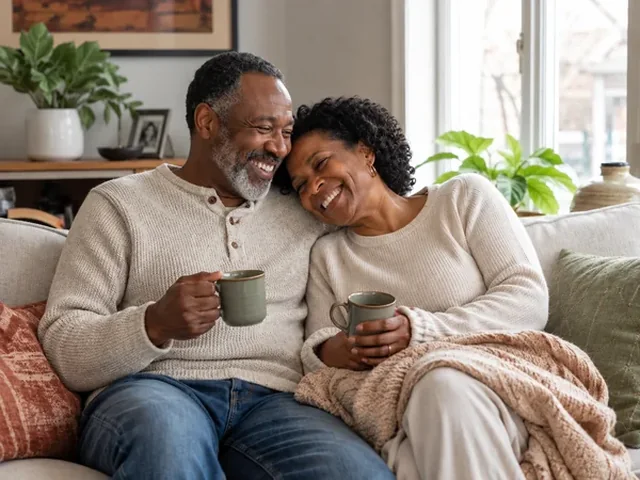
Candid Laugh on the Sofa
Turn our posed photo into a candid moment at home: we sit close on a cream sofa under a knit blanket, holding mugs, laughing with our heads leaning together, soft morning window light and plants in the background. Keep both of our faces, hair and clothes exactly the same.
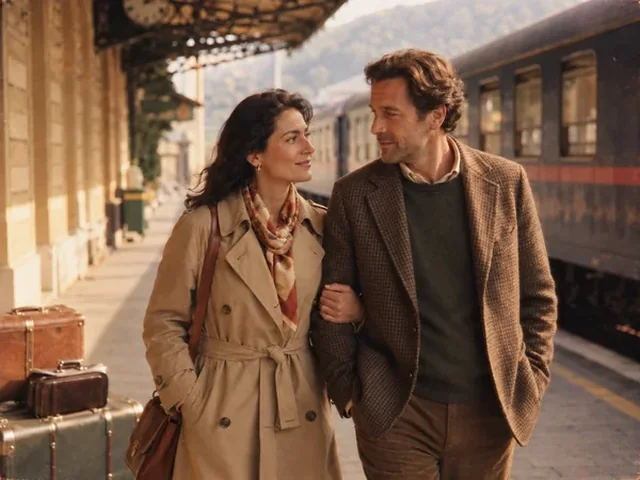
Candid Walk on a Train Platform
Make a candid travel photo of us walking arm in arm along a sunny old train platform, a vintage train beside us and a leather suitcase in the background, glancing at each other mid-step, warm film-like colors. Keep both of our faces exactly as in the photo.
ChatGPT Prompts for Car Photos and Products
For objects, the keep line protects shape, logos and reflections. These two chatgpt prompts for pictures of cars and products are a good base for listings, ads and social posts.
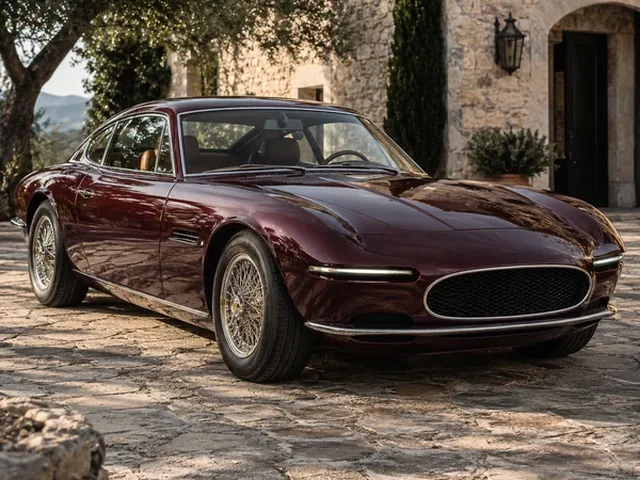
Repaint a Classic Car
Repaint this vintage coupe in a deep metallic burgundy with a glossy clear coat. Keep the chrome, wheels, tires, windows, reflections and the stone courtyard exactly the same.
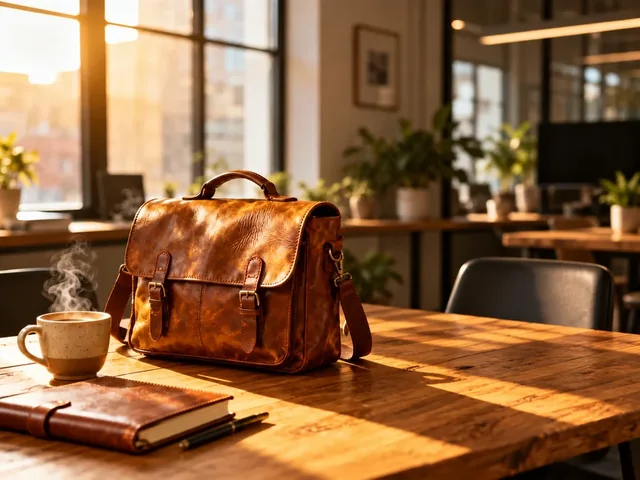
Leather Bag Lifestyle Scene
Place this leather messenger bag on a wooden desk by a sunny window with a cup of coffee, an open notebook and soft morning light, warm lifestyle product photo. Keep the bag’s shape, stitching, color and buckles exactly the same.
More ChatGPT Photo Prompt Ideas: 72 Quick Prompts
Here is the rest of the list: short ChatGPT photo edit prompts for everyday fixes and fun edits. Pick a tab, copy a line and add your own details. Each one already includes the part that keeps your photo recognizable, and every chatgpt edit photo prompt can be pasted straight into an editor as a ChatGPT photo editor prompt. Treat it as a chatgpt prompts list for photo editing you can come back to.
Quick fixes
Straighten the horizon and crop slightly so nothing important is cut off. Change nothing else.
Remove the person walking behind me and fill the area naturally. Keep everything else the same.
Remove the power lines from the sky without changing the buildings or trees.
Remove the glare on my glasses so my eyes are clearly visible. Keep my face and frames the same.
Make this blurry photo sharper and clearer while keeping it natural. Do not change any faces.
Reduce the noise and grain in this night photo and keep the colors natural.
Remove the date stamp in the corner and restore the area behind it.
Remove the stain on my shirt and keep the fabric texture and color the same.
Close the gap in the curtains and remove the clutter on the windowsill. Keep the room the same.
Open my closed eyes naturally, matching my eye shape and color. Keep the rest of my face the same.
Fix the color cast so skin tones look natural and whites look white.
Extend the photo to a 4:5 portrait by adding more sky and ground. Keep the original scene untouched.
Portraits & selfies
Turn this selfie into a LinkedIn headshot: navy blazer, light gray studio backdrop, soft front light. Keep my face and hair exactly the same.
Make this a moody cinematic portrait with a single soft light from the left and a dark background. Keep my face the same.
Give me a soft-glam look: subtle eyeliner, natural blush and nude lips. Keep my face shape and features unchanged.
Tame the flyaway hairs and smooth my hair slightly. Keep the hairstyle, length and color the same.
Remove the blemishes on my chin and forehead but keep my skin texture and freckles.
Reduce the shine on my forehead and nose. Keep everything else the same.
Change my plain T-shirt to a white linen shirt with rolled sleeves. Keep my face, pose and background.
Make my smile look a little more relaxed and natural, without changing my teeth or face shape.
Turn this into an editorial magazine portrait with a clean backdrop and soft beauty lighting. Keep my face identical.
Add soft, flattering window light from the right side of my face. Keep my expression and pose.
Make my eye color a soft hazel green with natural detail in the iris. Change nothing else.
Add light stubble to my face that matches my hair color. Keep my face and expression the same.
Backgrounds
Replace the background with a sandy beach at sunset and match the warm light on my face. Keep me unchanged.
Put me in a minimalist white studio with a soft floor shadow. Keep my outfit and pose the same.
Change the background to a snowy mountain view and add cool daylight. Keep my face the same.
Replace the messy room behind me with a tidy, modern home office. Keep me exactly as I am.
Put me in front of a pastel pink wall with soft natural light. Keep my outfit, pose and face.
Replace the gray sky with a clear blue sky with a few soft clouds. Keep the buildings unchanged.
Place us under cherry blossom trees in a park in spring. Keep both of our faces and clothes the same.
Change the background to a city rooftop at blue hour with soft city lights behind me.
Swap the background for a library with tall wooden bookshelves and warm lamps. Keep my face and clothes.
Put this product on a marble kitchen counter with soft morning light. Keep the product unchanged.
Light & color
Make the colors warm and golden like late afternoon sun. Keep the people and objects the same.
Give this photo a clean, bright, airy look with soft whites. Keep the composition.
Apply a teal-and-orange cinematic color grade with deeper shadows. Keep faces natural.
Turn this daytime street photo into a rainy night with reflections on the road. Keep the buildings the same.
Make the sky a dramatic sunset with orange and pink clouds. Keep the landscape unchanged.
Add soft fog in the background for depth and mood. Keep the subject sharp and unchanged.
Recover the blown-out sky and bring back detail in the clouds. Keep the rest of the exposure natural.
Make the greens of the trees richer and the sky bluer without looking oversaturated.
Add soft sun rays coming through the trees from the top right. Keep the scene the same.
Turn this into a moody, low-key photo with deep shadows and a single warm highlight.
Aesthetic & vintage
Make this look like a 90s disposable camera photo: flash, warm tint, light grain, date-free. Keep my face.
Give this photo a vintage 70s film look with faded colors and soft grain. Keep everyone recognizable.
Turn this into an instant-film style photo with a white border and soft, slightly faded colors.
Make it a dreamy pastel aesthetic with soft light and a pink and lilac color palette. Keep my face.
Give this a Y2K digital camera look: on-camera flash, cool tones and slight blur. Keep my features.
Turn this into a black-and-white street photo with high contrast and deep shadows.
Make this look like an old sepia photograph from the early 1900s with soft edges. Keep the faces.
Create a scrapbook collage of this photo with torn paper edges, tape and doodles around it. Keep my face.
Give this an old-money aesthetic: muted tones, soft natural light and an elegant, quiet mood.
Turn this into a cozy autumn aesthetic photo with warm browns, soft light and falling leaves.
Make this a moody film noir frame with dramatic shadows from window blinds. Keep my face the same.
Give this a soft cottagecore look: wildflowers, warm light and a gentle hazy glow. Keep me unchanged.
Creative & fun
Turn this photo into a soft watercolor painting with visible brush strokes and white paper edges.
Turn me into a 3D animated movie character while keeping my hair, face shape and outfit recognizable.
Make this a classic oil painting portrait with rich colors and visible brush texture. Keep my likeness.
Turn this into a clean pencil sketch with fine shading on white paper.
Turn my pet into a superhero with a small red cape, flying over the city. Keep my pet’s face and fur.
Make a comic book version of this photo with bold outlines, halftone dots and a speech bubble that says “Let’s go!”
Turn this photo into pixel art with a limited 16-color palette. Keep the composition.
Turn me into a funny caricature with a slightly bigger head and a big smile. Keep me recognizable.
Show me as a fantasy elf with pointed ears in an enchanted forest. Keep my face exactly the same.
Turn this group photo into a cute chibi sticker sheet, one sticker per person. Keep everyone recognizable.
Products & cars
Put this sneaker on a concrete block with dramatic side lighting and a soft shadow. Keep the shoe unchanged.
Place this bottle in shallow water with splashes and bright summer light. Keep the label area unchanged.
Make this car photo look like a magazine ad: golden hour on an empty coastal road. Keep the car the same.
Clean the dirt off this car and add a showroom shine. Keep the body shape and wheels unchanged.
Change the car color to matte black and keep the chrome and lights the same.
Put this candle on a cozy bedside table with warm evening light and a blurred bedroom behind.
Tips: What the Best ChatGPT Prompts for Image Editing Have in Common
The best ChatGPT prompts for photo editing share a few habits, and they apply to ChatGPT editing prompts and any AI image edit prompt alike:
- One change per prompt. A new background, new outfit and new art style in one go is where faces drift. Chain them instead.
- Say what to keep, every time. The keep line is the difference between an edit and a new picture.
- Describe light like a photographer. “Warm light from the left” beats “nice lighting.”
- Name colors and materials exactly. “Camel wool trench coat” is clearer than “nice coat.”
- Put text in quotes. If you want words in the image, quote them exactly and say where they go.
- Refine in small steps. “Same image, but warmer” is easier for the model than rewriting the whole prompt.
- Start from a good photo. Sharp, well-lit and not too small. AI can fix a lot, but not a face that is not there.
These rules turn any of the prompts for ChatGPT to edit photos into reliable, repeatable edits, and they are the same rules behind every popular prompt for ChatGPT photo editing trending this season. Use a prompt for chat gpt photo editing to change a photo you have; if you are after chatgpt photography prompts that create a brand-new photo from scratch, write a scene description instead and use the AI image generator.
ChatGPT or a Dedicated AI Photo Editor?
Both understand plain-language prompts. Instead of writing a prompt to ask ChatGPT Photoshop steps for a retouch, you describe the result and the image model does the edit. The difference is the workflow:
| ChatGPT | ChatGPT-style editor and AI photo editor | |
|---|---|---|
| How you edit | A conversation: upload, ask, ask again | One upload, one instruction box, before and after side by side |
| Best for | Brainstorming ideas, multi-step creative edits | Quick, repeatable edits that keep the rest of the photo |
| Model choice | The model ChatGPT uses | Pick a model in the AI photo editor: Nano Banana 2, Nano Banana Pro, Seedream 4.5, GPT Image 2 or Flux 2 |
| Shape of the result | Ask for it in the prompt | Choose an aspect ratio before you start |
| Ready-made ideas | Write your own | Prompt presets and examples on the page |
Many people use both: ChatGPT to find the idea, and an editor to apply it to many photos the same way. Text-heavy edits are the main exception, where it pays to pick a model known for clean lettering, such as GPT Image 2 or Nano Banana Pro.
Frequently Asked Questions
What is the best ChatGPT prompt for photo editing?
The best ChatGPT prompt for photo editing does four things in order: names the one edit you want, adds the details (colors, materials, light direction), states what must stay the same, and describes the finish (photorealistic, same framing). For example: "Replace the plain wall behind me with a warm café with exposed brick and plants, soft daylight from the left. Keep my face, hair and clothes exactly as they are and match the lighting on my face."
How do I edit a photo in ChatGPT without changing my face?
End every prompt with a keep line such as "Keep my face, hair, expression and pose exactly the same," change one thing at a time, and start from a sharp, well-lit photo where your face is large in the frame. If the face still drifts, ask for a smaller edit, repeat the keep line, or use an editor built for one-instruction edits so the rest of the photo is preserved.
Are these ChatGPT photo editing prompts free?
Yes, every prompt in this guide is free to copy and use. Running them costs whatever the tool you paste them into charges. On EzImgMaker you can try them in the ChatGPT-style photo editor, the AI photo editor or AI photo retouch with the free credits you get when you sign up, and each tool shows the cost before you start.
Do these prompts work outside ChatGPT?
Yes. They are written in plain language, so they work in most AI image editors that take an uploaded photo plus an instruction. Results vary between models: if one model ignores a detail, simplify the prompt or try another model. ChatGPT is a trademark of OpenAI; EzImgMaker is not affiliated with OpenAI.
Why does ChatGPT change my face when I edit a photo?
Image models regenerate the picture rather than painting over it, so small changes in eyes, jaw or skin can creep in, especially when a prompt asks for several big changes at once or the face is small and blurry. A clear keep line, one change per prompt and a sharp source photo reduce it. For skin, teeth or red-eye fixes, a retouch-focused tool is usually more faithful.
What ChatGPT photo prompts are trending right now?
Popular ChatGPT photo prompts right now include boxed action figures and collectible figurines of yourself, toy brick minifigures, die-cut stickers, professional headshots made from selfies, vintage film and black-and-white portraits, and neon night aesthetics. You will find a ready-made prompt for each in this guide.
How long should an image editing prompt be?
One to three sentences is enough for most edits, roughly 30 to 80 words. Longer prompts work, but every extra idea is another chance for the model to change something you wanted to keep. Put the edit first and the keep line last.
Can ChatGPT add text to a photo?
Yes, but spelling is not always perfect. Put the exact words in quotes, say where they go and how they should look, for example: Add the words “Happy Birthday, Mia” in white script across the top. For text-heavy designs, models known for clean lettering, such as GPT Image 2 or Nano Banana Pro in the AI photo editor, tend to do better.
Can I edit photos of other people with these prompts?
Only edit photos you have the right to use: your own, or photos of people who agreed. Do not use AI edits to create fake or misleading images of real people, to make someone look like they were somewhere they were not, or to sexualize anyone.
More Prompt Guides and Tools
- ChatGPT photo editor: edit a photo by typing what you want.
- AI photo editor: the same idea with a choice of models and aspect ratios.
- AI photo retouch: skin, teeth, blemishes and cleanup.
- AI Christmas photo prompts: 43 festive prompts for selfies, couples and families.
- AI video prompts: turn a still photo into a short video.
These chat gpt image editing prompts, like all the image edit prompts above, are free to copy. A good photo prompt for ChatGPT is still only half the job; the other half is starting from a sharp photo you have the right to edit.
ChatGPT is a trademark of OpenAI. EzImgMaker is an independent product and is not affiliated with OpenAI. Example images show the kind of result each prompt is written for; your result depends on your photo and the model you choose.